Jira vs Confluence: Differences, Prices and Links, Tested
On this page
A new engineer asks where the spec should go. One teammate says Jira, because that is where the work is. Another says Confluence, because that is where documents live. Six months later the team has specs pasted into Jira descriptions, to-do lists typed into Confluence pages, and nobody sure which copy is current.
We tested how the two products connect on our own Jira and Confluence Cloud site on 6 November 2026, and took both price lists from Atlassian’s pricing pages the same day.
Short answer: Jira tracks work items: an owner, a status, a priority, a due date, moving across a board. Confluence holds pages: specs, notes, decisions, how-tos. Both are Atlassian products, sold separately, each free for up to 10 users. Most teams use both: write in Confluence, track in Jira, and connect them with the Jira macro, the one link type that shows up on the Jira side.
What each one is for
| Question | Jira | Confluence |
|---|---|---|
| Unit of work | Work item (task, bug, story, epic) | Page, plus whiteboards and databases |
| Organised in | Spaces (formerly projects), boards, workflows | Spaces, page trees |
| Built for | Moving work from To Do to Done | Writing, sharing and finding knowledge |
| Typical content | Bugs, feature work, requests, sprint plans | Specs, meeting notes, runbooks, decision logs, release notes |
| Who changes it | The person doing the work, through transitions | Anyone who can edit the page |
| Search | JQL, e.g. assignee = currentUser() AND statusCategory != Done | Confluence search across pages and spaces |
Atlassian’s own description of Confluence is “a content creation and collaboration platform”, and it suggests Confluence for “meeting notes, project plans, requirement documents, release notes, roadmaps, and more”. Jira is where those plans become owned, dated pieces of work. If you are new to Jira’s pieces, our guides on work types and task management in Jira cover them.
Is Confluence part of Jira?
No. Both are Atlassian products, but you subscribe to each one separately, and each has its own Free plan. Adding Confluence to a Jira site is a separate trial started from the app switcher.
Atlassian also sells a bundle. The Teamwork Collection “includes Jira, Confluence, Loom, and Rovo”, and “you’ll pay a single price for the entire collection”. Its Premium edition is $29.00 per user per month on monthly billing. Jira Premium plus Confluence Premium bought separately come to $33.70 per user, before Loom.
Prices side by side
All prices are Atlassian’s list prices for monthly billing in US dollars, taken from the data its own price calculators use (plans dated 13 October 2026). The per-user price applies to users 1 to 100; above that it steps down.
| Plan, per user per month | Jira | Confluence | Both |
|---|---|---|---|
| Free (up to 10 users) | $0 | $0 | $0 |
| Standard | $9.70 | $7.15 | $16.85 |
| Premium | $19.60 | $14.10 | $33.70 |
| Team, Standard, per month | Jira | Confluence | Both |
|---|---|---|---|
| 10 users | $0 | $0 | $0 |
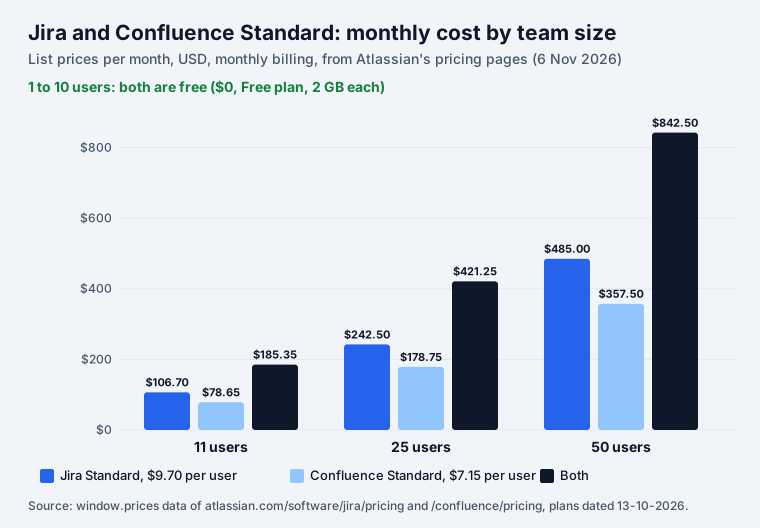
| 11 users | $106.70 | $78.65 | $185.35 |
| 25 users | $242.50 | $178.75 | $421.25 |
| 50 users | $485.00 | $357.50 | $842.50 |
The limits differ more than the prices suggest:
| Limit | Jira Free / Standard | Confluence Free / Standard |
|---|---|---|
| Users | 10 / up to 100,000 | 10 / up to 250,000 |
| Storage | 2 GB / 250 GB | 2 GB / 250 GB |
| Automation steps | 150 per subscription a month / 400 per user | 50 per subscription a month / 100 per user |
| Guests | not on Free / free, 5 per paid user | not listed on Free / free, 5 per paid user |
| Going over 10 users | 7-day Standard trial starts automatically | 7-day Standard trial starts automatically |
On both, Atlassian writes: “If you’re on the Free plan and exceed the user limit, we’ll automatically upgrade you to a 7-day free trial of the Standard plan.” What else changes at user 11, including Marketplace apps, is in our Jira free plan guide.
How they connect: what we tested
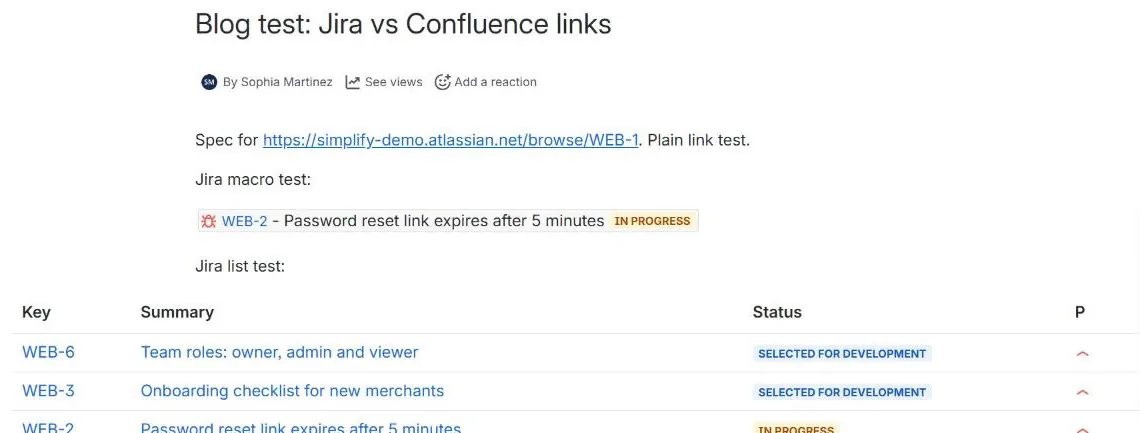
Atlassian promises that “Whenever a work item is mentioned in a Confluence page using the Jira work items macro, Jira will create a work item link to that page for you, automatically.” We made one Confluence page in our Engineering space with three ways of pointing at Jira:
- a plain link to work item WEB-1;
- the Jira macro showing one work item, WEB-2;
- the Jira macro as a table, with the JQL
project = WEB AND statusCategory != Done ORDER BY priority DESC.
Then we asked Jira for each work item’s links:
| On the Confluence page | What Jira added to the work item |
|---|---|
| Jira macro, one work item (WEB-2) | A “mentioned in” link to the page |
| Plain URL to a work item (WEB-1) | Nothing |
| Jira macro as a JQL table (WEB-6 etc.) | Nothing for the work items in the table |
On the new work item view, the page appears under Attachments, not in a section of its own:
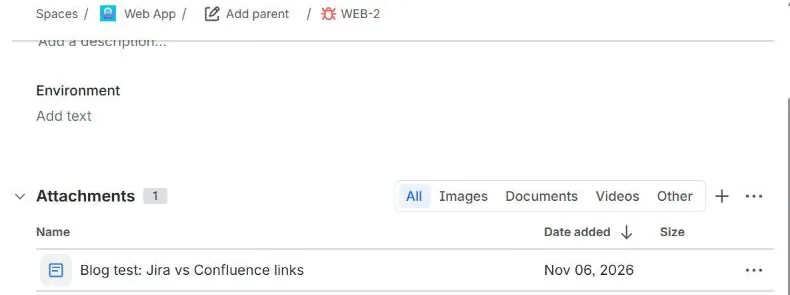
So if you want a spec to be findable from the ticket, put the ticket in the page with the macro, not as a bare link. In the editor this is easy: Atlassian says you can “paste individual work items or Jira query URLs into the editor and watch them immediately transform into the Jira work items macro.” Our plain link was saved through the API, where no conversion happens. A table of work items is fine for a status report, but it does not link back to each one.
The word “space” now means two things
Jira’s screens and Atlassian’s Jira docs now say space where they used to say project: our breadcrumb reads “Spaces / Web App”, and the docs open with “This page is for company-managed spaces”. Confluence has had spaces all along. When someone says “put it in the team space”, ask which product they mean.
JQL did not follow the rename. On our site, checked with Jira’s JQL validator:
project = WEBworks (8 work items);space = WEBfails withField 'space' does not exist or you do not have permission to view it.
Atlassian’s own swimlane examples use space = "coffee hub", which our site rejected. Keep writing
project in filters and saved searches.
Which one for what
| You need to… | Use |
|---|---|
| Fix a bug, ship a feature, answer a request | A Jira work item |
| Agree what to build before building it | A Confluence page, with the epic in a Jira macro |
| Keep meeting notes and decisions | Confluence; turn each action into a Jira work item with an owner |
| Report status to people outside the team | A Confluence page with a Jira macro table, always current |
| Repeat the same steps on every piece of work | A checklist on the Jira work item |
| Explain how a system works | A Confluence page with a diagram |
The rule of thumb: if it has an owner and a “done”, it belongs in Jira. If people will read it again next year, it belongs in Confluence.
Is Jira being phased out?
No. The question comes up because Atlassian is ending its self-managed edition. From Atlassian’s licensing page:
- “End of life for impacted Data Center products* will take place on March 28, 2029 at 23:59 PST”, when subscriptions expire, “making Data Center products and apps read-only.”
- “On March 30, 2026 at 23:59 PST, new customers will no longer be able to purchase new Data Center subscriptions”.
- Existing customers can buy subscriptions and expansions “until March 30, 2028”.
- “Unlike other Atlassian Data Center products, Bitbucket and Bamboo Data Center will not end of life.”
Jira Cloud and Confluence Cloud carry on. If you run Jira or Confluence Data Center, you have until 28 March 2029 to move.
Where our apps fit
Some of our apps exist for both products, because teams draw and write in both:
- Excalidraw whiteboards and Mermaid diagrams on a Confluence page and on a Jira work item: sketch the design in the spec, then keep the version the team built next to the ticket. Neither makes external calls.
- Speech to Text for Confluence and Jira: dictate a page or a comment in 60+ languages.
- Secret Sentinel scans Jira and Confluence for leaked credentials.
All of them are free for up to 10 users, like the products themselves.
How we tested
- Our Jira and Confluence Cloud site, 6 November 2026. Page 12419074 created in the ENG space through
POST /wiki/api/v2/pagesin storage format with the three links above; links read withGET /rest/api/3/issue/{key}/remotelinkright after. - JQL checked with
POST /rest/api/3/jql/parse?validation=strict. - Prices: the
window.pricesdata on Atlassian’s Jira and Confluence pricing pages (“Jira, Standard, Monthly (USD, Default, 13-10-2026)” and the Confluence equivalent), graduated tiers; totals are users times the 1 to 100 price. Plan limits from the same pages.
Sources
- Our Jira and Confluence Cloud site, 6 November 2026: page “Blog test: Jira vs Confluence links”, work items WEB-1, WEB-2, WEB-6.
- Atlassian: Jira pricing, Confluence pricing, Teamwork Collection pricing, Data Center End of Life.
- Atlassian Support: Use Jira Cloud with Confluence, Configure swimlanes.
Frequently asked questions
What is the difference between Jira and Confluence?
Jira tracks work items: each has an owner, a status in a workflow, a priority and often a due date, and teams move them across boards. Confluence holds pages: specs, meeting notes, how-tos and decisions, organised in spaces. Jira answers "who is doing what, and is it done?". Confluence answers "what did we decide, and how does it work?".
Is Confluence part of Jira?
No. Both are made by Atlassian, but they are separate products with separate plans and bills. Each has its own Free plan for up to 10 users. Atlassian also sells them together in the Teamwork Collection, which "includes Jira, Confluence, Loom, and Rovo" for one price.
How much do Jira and Confluence cost together?
Nothing up to 10 users on the Free plans. Above that, on monthly billing, Jira Standard is $9.70 and Confluence Standard $7.15 per user per month for the first 100 users, so 11 users pay $185.35 a month for both and 50 users $842.50 (Atlassian's pricing data, 6 November 2026). Premium is $19.60 and $14.10.
Does linking a Confluence page show up in Jira?
It depends on how you link. In our test a Jira macro showing one work item made Jira add a "mentioned in" link to that work item, shown under Attachments. A plain URL to a work item and a JQL table of work items added nothing to the work items they named.
Is Jira being phased out?
No. Jira Cloud carries on. What ends is Atlassian's self-managed Data Center edition: "End of life for impacted Data Center products* will take place on March 28, 2029", after which the products become read-only. New customers could no longer buy Data Center from March 30, 2026; existing ones can buy until March 30, 2028.
Can I use Confluence without Jira?
Yes. Confluence is sold and signed up for on its own, with its own Free plan (10 users, 2 GB). Many teams use only Confluence as a wiki. You add Jira when you need to track work through statuses, not just write about it.