JQL Sprint Queries: Current, Previous, Next and Dates
On this page
A team lead builds a dashboard filter for the current sprint: sprint = "Sprint 1". It works
for two weeks. Then the next team names its sprints Sprint 14, 15 and 16, and the same filter
returns 30 work items from four sprints. Nobody touched it.
Sprint JQL looks small: one field and three functions. We ran every sprint question we could find on a live Jira Cloud site on 14 November 2026 and wrote down the count each query returned and the trap behind it. Below are 15 recipes, the works and fails table, and what Jira cannot search at all.
Short answer: the current sprint is sprint in openSprints(), plus project = KEY to keep
one team. Planned sprints are futureSprints(), completed ones closedSprints(). There is no
function for the previous or the next sprint: use the sprint’s ID, sprint = 39. Search a
sprint by ID, not name, because a name with no exact match finds every sprint that contains
it. Jira has no sprint start or end date in JQL and no history on the Sprint field.
How Jira reads the Sprint field
The Sprint field holds the sprints a work item is or was in. Atlassian’s JQL fields reference
says the search “is based on either the sprint name or the sprint ID (i.e. the number that Jira
automatically allocates to a sprint).” It also says “This works for active sprints and future
sprints.” In our test closed sprints worked too: sprint = 35 found the work of a completed
sprint.
Three functions do the rest. From the JQL functions reference:
openSprints(): “Search for work items that are assigned to a sprint that was started, but has not yet been completed.”closedSprints(): “Search for work items that are assigned to a completed Sprint.”futureSprints(): “Search for work items that are assigned to a sprint that hasn’t been started yet.”
All three take only in and not in. A work item can be in several sprints at once: a story
carried over keeps its closed sprint and gains the new one.
Our test site. Two scrum boards. SPR: three closed sprints (IDs 35, 36, 39), the active SPR Sprint 6 (ID 40, 11 to 24 November) and a future one (ID 41); 34 work items, 10 of them in no sprint. PAY: Sprint 14 (ID 2), still active although it ended on 25 October, and two future sprints, Sprint 15 (ID 3) and Sprint 16 (ID 1). Every count below comes from Jira’s search on that site.
Current sprint
1. What is in the current sprint?
project = SPR AND sprint in openSprints()On our site: 9 work items. Without project = SPR the same function found 23: the 9 plus 14
from PAY’s sprint.
Trap: “open” means started and not completed, not “today is inside the sprint”. PAY’s Sprint
14 ended 20 days before our test and its 14 work items still counted as the current sprint.
openSprints() also covers every running sprint on the site, so always add the project or the
board’s own filter.
2. What is in the current sprint of one team?
sprint in openSprints("PAY")On our site: 14 work items, PAY only. openSprints("SPR", "PAY") gave 23, and
futureSprints("PAY") gave PAY’s 7 planned work items. The reference shows the functions with
empty brackets; this argument is not documented.
Trap: the argument is a project key and nothing else. A board ID or a sprint name fails with
Could not resolve the project '41' provided to function 'openSprints'. And it selects the
project’s sprints, not its work items: closedSprints("SPR") returned 13, the 12 SPR work items
plus WEB-10 from another project that sat in an SPR sprint. Since it is undocumented, keep
project = PAY AND sprint in openSprints() in filters that must last.
3. What is in one sprint by its name?
sprint = "SPR Sprint 6"On our site: 9 work items, the same as sprint = 40. Case did not matter: "spr sprint 6"
found the same 9.
Trap: when no sprint has the exact name, = matches every sprint that contains the text,
on every board. sprint = "Sprint 1" found 30 work items in SPR Sprint 1, Sprint 14, Sprint
15 and Sprint 16. sprint = "SPR" found 46, every sprint on the site, because “Sprint” contains
“spr”. An exact name wins: sprint = "Sprint 14" found only that sprint’s 14. Names change and
repeat; IDs do not.
4. How do I find a sprint’s ID?
sprint = 40On our site: 9 work items, SPR Sprint 6. cf[10020] = 40 returned the same 9 (10020 is the
Sprint field’s ID on our site; yours may differ).
Two places show the ID. Start typing sprint = in the JQL editor: the reference says
“The sprint ID will also be shown, in brackets”. And the board’s sprint list in the REST API,
/rest/agile/1.0/board/{boardId}/sprint, lists every sprint with its ID, state and dates.
Trap: a deleted sprint’s ID breaks the filter. sprint = 37 gave Sprint with id 37 does not exist or you do not have permission to view it. A saved filter on that sprint stops working with
the same error.
Previous and next sprint
5. What was in the previous sprint?
project = SPR AND sprint = 39On our site: 5 work items, SPR Sprint 5, the sprint completed last. There is no function for
it: sprint in previousSprint() and sprint in lastClosedSprint() both gave Unable to find JQL function 'previousSprint()'. (with each name). The request for one,
JRACLOUD-79678, has 84 votes.
Trap: do not take the highest closed ID. IDs follow creation, not the calendar. On PAY,
Sprint 16 has ID 1 and Sprint 15 has ID 3. And sprint in closedSprints() is not “the last
sprint”: it returned all 12 SPR work items from three closed sprints. You change the ID after
every sprint, by hand or with an Automation rule.
6. What is planned for the next sprint?
project = SPR AND sprint = 41On our site: 7 work items, SPR’s only future sprint. sprint in futureSprints() returned the
same 7 because SPR plans one sprint ahead. nextSprint() does not exist.
Trap: with two or more planned sprints, futureSprints() mixes them. On PAY it returned the
work of Sprint 15 and Sprint 16 together. Use the ID, or sprint in (40, 41) for this sprint
and the next: 16 work items.
7. What was carried over into this sprint?
project = SPR AND sprint in closedSprints() AND sprint in openSprints()On our site: 4 work items (SPR-4, SPR-8, SPR-9, SPR-11). The opposite, work new in this
sprint, is sprint in openSprints() AND sprint not in closedSprints(): 5.
Trap: this finds work that was in any closed sprint, not only the previous one. SPR-9 had
been in three sprints. For “carried over from sprint 39 only”, write sprint = 39 AND sprint in openSprints(): 2 work items, SPR-9 and SPR-11.
8. What was left behind when the sprint closed?
project = SPR AND sprint in closedSprints()
  AND sprint not in (openSprints(), futureSprints())
  AND statusCategory != Done
On our site: 1 work item, SPR-1: it left a closed sprint for the backlog and was not finished. Without the last line it found 8, mostly finished work.
Trap: these work items are not “in no sprint”. Their Sprint field still holds the closed
sprint, so sprint is EMPTY misses them. Our Jira sprints guide shows the
backlog query that catches both.
In, not in, done
9. What is not in this sprint?
project = SPR AND (sprint != 40 OR sprint is EMPTY)On our site: 25 work items. Without the OR sprint is EMPTY part: 15.
Trap: != and not in skip empty fields, so the 10 work items in no sprint vanish. The
same happened with names: sprint not in ("Sprint 1") AND project = SPR returned 16. It dropped
the empty ones and, by the substring rule of recipe 3, everything in SPR Sprint 1.
10. What got done in this sprint?
project = SPR AND sprint = 40 AND statusCategory = DoneOn our site: 5 work items. With resolved >= "2026-11-11 08:10" (the sprint’s start) in place
of the status category: 4.
Trap: SPR-9 is in a green Released status with no resolution, so every query on resolved or
resolution misses it. Our status categories post shows why. The
sprint report has a third rule: only the board’s last column counts.
11. Which sprints have a name containing a word?
sprint = "subtask"On our site: 7 work items, all in “SPR Sprint 7 (subtask test)”. This is recipe 3’s trap used on purpose.
Trap: ~ is refused: The operator '~' is not supported by the 'sprint' field. Wildcards
too: sprint = "Sprint 1*" found no sprint. A short word matches more than you think, as
"SPR" showed. A 2022 answer in the Atlassian Community says sprint names “aren’t available for
fine-grained searching”; on Jira Cloud today a part of the name works, with these limits.
12. How do I sort by sprint?
project = PAY AND sprint is not EMPTY ORDER BY sprint ASCOn our site: Sprint 14, then 15, then 16: the board’s order, although the IDs run 2, 3, 1.
Trap: you cannot compare sprints. sprint > 39 gives The operator '>' is not supported by the 'sprint' field. So “all sprints after this one” has no query; only ORDER BY knows the order.
Dates and history
13. What was added to the sprint after it started?
sprint CHANGED AFTER -7dOn our site: an error, History searches do not support the 'sprint' field. sprint WAS 40
gave the same. The JQL fields reference lists WAS and CHANGED as unsupported for Sprint.
Trap: there is no JQL for scope change. JRACLOUD-75868, “JQL search for issues added and removed from a sprint”, has 1,493 votes and has been Gathering Interest since 2018. The sprint report marks added work with an asterisk, one sprint at a time.
14. Which work is in sprints that end this month?
"Sprint end date" >= startOfMonth() AND "Sprint end date" <= endOfMonth()On our site: Field 'Sprint end date' does not exist or you do not have permission to view it. Jira has no sprint date fields.
JRACLOUD-72007, “Allow sprint start and end
dates to be searched by JQL and displayed as columns in filters”, has 1,320 votes, open
since 2019.
Workaround without an app: copy the dates into the query, and keep the sprint in it. For work
resolved during sprint 40, project = SPR AND sprint = 40 AND resolved >= "2026-11-11 08:10" AND resolved < "2026-11-24 08:10" found 4. Without sprint = 40 it found 17: everything resolved in
those days, in other sprints or in none. Change the dates every sprint. The date rules are in our
JQL dates guide.
15. Which work is late for its sprint?
"Sprint end date" < now() AND statusCategory != DoneOn our site: the same missing-field error. PAY’s Sprint 14 shows why you want it: it ended on
25 October, was never completed, and its 12 unfinished work items still look current to
openSprints(). Nothing in plain JQL can tell an overdue sprint from a running one.
What sprint JQL cannot do, by votes
Atlassian’s public tracker shows how long people have asked for the missing pieces. Votes as of 14 November 2026:
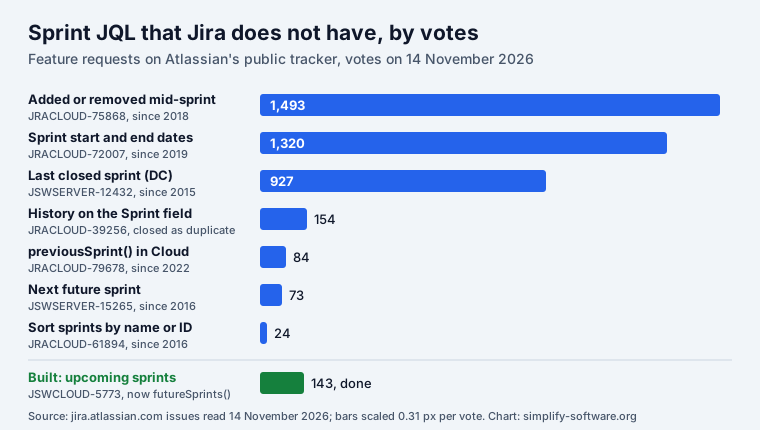
The Data Center request for the last closed sprint puts it plainly: such queries “are completely
analogous to the specific JQL function latestReleasedVersion()”. Versions have had
latestReleasedVersion() for years (see Jira fix version); sprints
still have no equivalent.
Works and fails: every sprint query we ran
Run on our Jira Cloud site on 14 November 2026 through Jira’s own search and its JQL check.
| Query | Result |
|---|---|
sprint in openSprints() | 23 work items, every board |
project = SPR AND sprint in openSprints() | 9 |
sprint in openSprints("SPR") | 9 (undocumented argument) |
sprint in openSprints(41) | Could not resolve the project '41' provided to function 'openSprints'. |
project = SPR AND sprint in closedSprints() | 12 |
project = SPR AND sprint in futureSprints() | 7 |
sprint = 40 and sprint = "SPR Sprint 6" | 9 each |
sprint = "Sprint 1" | 30, from four sprints |
sprint = "Sprint 14" | 14, one sprint |
sprint in (35, 36) | 10, one from another project |
sprint = 37 (deleted) | Sprint with id 37 does not exist or you do not have permission to view it. |
sprint = "Sprint 99" | Sprint with name 'Sprint 99' does not exist or you do not have permission to view it. |
sprint = openSprints() | Operator '=' does not support the list value 'openSprints()' for field 'sprint'. |
sprint in openSprints (no brackets) | Operator 'in' does not support the non-list value '"openSprints"' for field 'sprint'. |
sprint ~ "Sprint 6" | The operator '~' is not supported by the 'sprint' field. |
sprint > 39 | The operator '>' is not supported by the 'sprint' field. |
sprint in previousSprint() | Unable to find JQL function 'previousSprint()'. |
sprint in nextSprint() | Unable to find JQL function 'nextSprint()'. |
sprint in activeSprints() | Unable to find JQL function 'activeSprints()'. |
sprint CHANGED | History searches do not support the 'sprint' field. |
"Sprint end date" < now() | Field 'Sprint end date' does not exist or you do not have permission to view it. |
project = SPR AND sprint != 40 | 15 (empty Sprint skipped) |
project = SPR AND (sprint != 40 OR sprint is EMPTY) | 25 |
project = SPR AND sprint is EMPTY | 10 |
More JQL beyond sprints, all tested the same way, is in our JQL cheat sheet.
Sprint dates as real fields
We build JQL Blocks, a Jira app that is in Marketplace review as we write. It adds what recipes 13 to 15 lack, as read-only Jira fields: Sprint start date, Sprint end date, Sprint complete date, Sprint count, Sprint state and Added after sprint start, plus two JQL functions. On a second test site with the app installed, on 14 November 2026:
| Query | Result |
|---|---|
issue in sprintEndsBetween("2026-11-01", "2026-11-30") | 11 work items |
"Sprint state" = active | 11, the same as sprint in openSprints() |
"Sprint start date" >= startOfMonth() AND statusCategory != Done | 9 |
issue in addedAfterSprintStart() | 6 |
"Sprint end date" = "2026-11-23" | 0 |
"Sprint end date" >= "2026-11-23" AND "Sprint end date" < "2026-11-24" | 11 |
The zero is a trap of its own: the fields hold a date and a time, like created, so search a day
as a range. Added after sprint start is filled from the install on; earlier sprints stay empty.
The app’s During a sprint block covers the “previous sprint” case: it finds work created,
resolved or moved during a board’s current, previous or last few sprints, and writes those
sprints’ days into plain JQL. The app has no AI in it. To write any JQL from a form first, try our
free JQL builder; nothing you type leaves the browser.
How we tested
Two Jira Cloud sites of ours, 14 November 2026, about 07:00 Central European time. Each query went
to Jira’s JQL check (/rest/api/3/jql/parse, strict validation) for the error text and to Jira’s
search (/rest/api/3/search/jql) for the work items, from a signed-in browser on the same site.
Sprint IDs, states and dates came from the board API. We only read: no sprint, filter or work item
was changed for this page. Votes were read from jira.atlassian.com the same day. The Atlassian
quotes are from the JQL fields and functions references, fetched that morning.
Frequently asked questions
What is the JQL for the current sprint?
sprint in openSprints(). It finds work in every sprint that was started and not completed, on every board of the site, so add your project: project = PAY AND sprint in openSprints(). A sprint whose end date has passed stays open until someone completes it, and its work stays in the results.
How do I find work from the previous or last sprint in JQL?
There is no previousSprint() or lastClosedSprint() function; Jira answers "Unable to find JQL function". Use the sprint ID of the last closed sprint, for example sprint = 39. Find it in the autocomplete of the JQL editor (the ID is shown in brackets) or in the board sprint list of the REST API. Do not pick the highest ID: IDs follow creation, not dates.
Can I search by sprint start date or end date in JQL?
Not in Jira itself. The Sprint field holds the sprint, not its dates, and "Sprint end date" gives "Field 'Sprint end date' does not exist". The request JRACLOUD-72007 has 1,320 votes and is still Gathering Interest. Without an app, copy the sprint's dates into the query by hand; with JQL Blocks, Sprint start date and Sprint end date become real fields.
How do I search for a sprint name that contains a word?
Use = with part of the name: sprint = "subtask" found our sprint "SPR Sprint 7 (subtask test)". The ~ operator is not supported. The same rule bites the other way: when no sprint has the exact name, = matches every sprint that contains the text, so sprint = "Sprint 1" also found Sprint 14, 15 and 16.
How do I find issues added to a sprint after it started?
Jira cannot: the Sprint field has no history in JQL, and sprint CHANGED gives "History searches do not support the 'sprint' field." The request JRACLOUD-75868 has 1,493 votes. The sprint report lists work added after the start for one sprint at a time; JQL Blocks adds issue in addedAfterSprintStart() for changes from its install on.
Why does sprint != return fewer issues than I expect?
!= and NOT IN skip work items whose Sprint field is empty, so the backlog disappears. On our site project = SPR AND sprint != 40 found 15 of the 25 work items outside sprint 40. Add OR sprint is EMPTY in brackets to get all 25.
Keep reading
- Jira, JSM and the Marketplace · 12 minJira Prioritization Plugins: 17 Apps Compared by Method
- Jira, JSM and the Marketplace · 10 minJira Gantt Chart: 12 Gantt Features Tested on the Timeline
- Jira, JSM and the Marketplace · 13 minDefinition of Ready: Examples and the AI Agent Version
- Free toolJQL builder