Skills vs MCP vs AGENTS.md: Which to Use, and When
On this page
Your team has a rule: refunds older than 30 days need a manager. Where do you tell the coding agent? In AGENTS.md, so it always knows? In a skill, so it loads only for refund work? Through an MCP tool that checks the payment’s age? In a hook that blocks the change? All four are possible, and they cost very different things.
Here is each option, when it loads, what it costs, and what it is for, from Claude Code’s own cost table and the Agent Skills spec, with what we measured this week.
Short answer: use AGENTS.md (or CLAUDE.md) for rules every task needs, because it is read in full on every request. Use skills for procedures needed sometimes: about 100 tokens each until used, then the full instructions. Use MCP when the agent must read or change something live in another system, such as Jira. Use a hook for a rule that must never be skipped. Use a subagent to keep a big side task out of the main conversation. For the refund rule: AGENTS.md if every task touches refunds, a skill if few do, and a hook or a test if breaking it is not an option.
The map
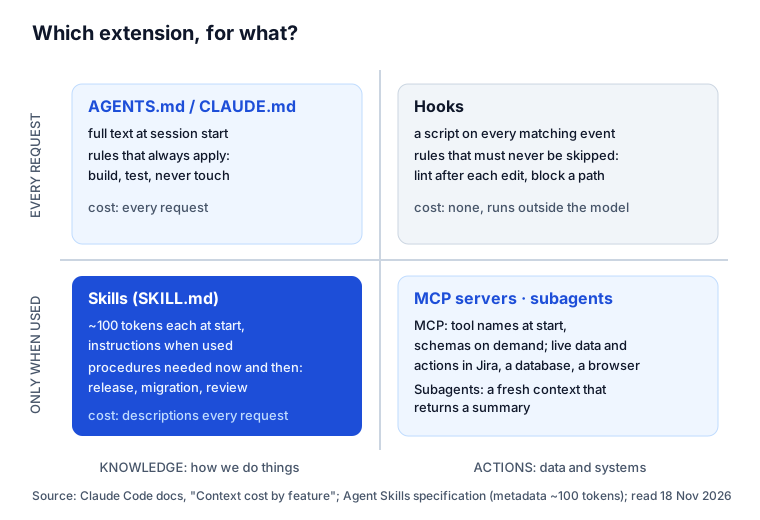
When each loads, and what it costs
Claude Code’s documentation has a table, “Context cost by feature”. The core of it:
| Option | When it loads | What loads | Context cost |
|---|---|---|---|
| AGENTS.md / CLAUDE.md | session start | the full text | every request |
| Skills | session start, and when used | descriptions at start, full content when used | low: descriptions every request |
| MCP servers | session start | tool names; full schemas on demand | low until a tool is used |
| Subagents | when spawned | a fresh context | kept out of the main session |
| Hooks | on their event | nothing; they run outside the model | zero, unless they return text |
The Agent Skills spec gives the size of a skill at rest: “Metadata (~100 tokens): The name and description fields are loaded at startup for all skills”, with the body (under 5,000 tokens recommended) loaded only when the skill is activated. In Claude Code all skill descriptions share a budget of 1% of the context window. MCP tools cost little at rest because tool search keeps their schemas out until Claude needs one.
Other agents that follow the Agent Skills spec load skills the same way, and Codex builds its AGENTS.md chain at the start of every run.
One rule, five ways
The refund rule, written each way:
In AGENTS.md (always loaded):
## Refunds
- Refunds older than 30 days need a manager's approval. Never auto-approve them.
Good when most work touches refunds. Bad when it does not: the line is paid for on every request in every task, and a 2026 ETH Zurich study found context files “increasing inference cost by over 20% on average” without generally raising success, while their instructions are “well followed”. Short, rule- shaped lines are the part worth paying for. More in our AGENTS.md study.
As a skill (loaded when the task is about refunds):
---
name: refund-rules
description: The team's refund rules and how to change refund code. Use when the task
  touches refunds, chargebacks, the refund window or the refunds API.
---
1. Refunds older than 30 days need a manager: return 403 refund_needs_approval.
2. Write a test for day 30 and day 31.
Good when refund work is occasional. The catch is selection: the agent must decide the skill applies. In our test in Claude Code, a description that said when to use the skill was picked on 15 of 15 runs that needed it; a vague one on 9 of 15. Details: Claude Code skills, tested. Check the frontmatter with our SKILL.md validator.
As an MCP tool (called when needed): a check-refund-policy tool on your payments service that
returns “needs approval” for a given payment. Good when the answer depends on live data the agent
cannot know: this payment’s age, this customer’s plan. The rule lives in your service, not in prose.
As a hook (always enforced): a script that runs before each edit and refuses changes to
refunds/approval.ts without a flag. Good when breaking the rule is not acceptable. It costs no context
and does not care whether the agent read anything.
As a subagent: not for the rule itself. Use one when checking every refund path in the codebase would flood the main conversation; it reads widely and returns a summary.
Most teams end up with a mix: the one-line rule in AGENTS.md, the procedure in a skill, the live check behind MCP, and a test in CI that fails when the rule breaks. The test is the one that never forgets.
What the 1,000 top repositories use
From the file trees of the 1,000 most-starred GitHub repositories on 18 November 2026:
- AGENTS.md at the root: 348; CLAUDE.md: 193.
- SKILL.md anywhere: 319 repositories, a median of 7 skills each among those with a file named exactly SKILL.md.
.claude/commands: 32 repositories;.claude/agents(subagents): 29.
Instruction files and skills are mainstream; custom subagents and commands are still rare. Skills have mostly replaced commands: Claude Code’s docs say a command file “still works” but to “prefer a skill for new work”.
Where a work item’s brief fits
There is one thing none of the five holds: what this task is. AGENTS.md is the same for every task, skills are the same for every task of a kind, MCP gives access, not intent. The work item’s own rules, its acceptance criteria, its repository and the team’s rules for that kind of work arrive with the task.
Agent Ready, our Jira app, assembles that per work item: the company’s and the
project’s brief, the issue type’s brief, the roles’ briefs and their skills, and the repository line,
checked for keys and hidden instructions. It reaches the agent through MCP (start-issue,
get-agent-brief, get-skill), as a comment at handoff, or with Copy brief for the agent. In map
terms, it is knowledge that arrives with the task, through the actions corner. How teams share skills
that way: agent skills for teams. The format itself:
SKILL.md format.
Sources
- Claude Code: Extend Claude Code (features overview), “Context cost by feature”; skills; MCP; read 18 November 2026.
- Agent Skills: Specification, progressive disclosure.
- Gloaguen et al.: Evaluating AGENTS.md, arXiv 2602.11988, 2026.
- Our data: Claude Code trigger test, 72 runs, and file trees of the 1,000 most-starred GitHub repositories, 18 November 2026.
Frequently asked questions
What is the difference between skills and MCP?
A skill is knowledge: instructions in a SKILL.md that tell the agent how to do a kind of work, loaded when the task needs it. An MCP server is a connection: tools the agent calls to read or change something outside, such as Jira, a database or a browser. A skill can tell the agent which MCP tools to use and in what order.
Should I use CLAUDE.md, AGENTS.md or skills?
Put rules that apply to every task in AGENTS.md (or CLAUDE.md for Claude Code only): how to build and test, what never to touch. Put procedures needed only sometimes in skills: a release, a migration, a report. AGENTS.md is read in full on every request; a skill costs about 100 tokens until it is used.
When should I use a hook instead of a skill or AGENTS.md?
When the rule must hold every time, whether the agent remembers it or not: running the linter after each edit, blocking writes to a folder. A hook is a script the tool runs on an event; it costs no context and does not depend on the model following instructions.
Do I need MCP if I have skills?
Only if the agent has to reach live data or act in another system. A skill can describe your Jira workflow; only a tool can read the current status of PAY-31 or move it. Many teams use both: the MCP server for access, a skill for how the team uses it.
Keep reading
- Jira, JSM and the Marketplace · 8 minAGENTS.md: What 1,000 Top Repos Put in It, and CLAUDE.md
- Jira, JSM and the Marketplace · 9 minClaude Code Skills, Tested: What Makes Claude Use One
- Jira, JSM and the Marketplace · 8 minAgent Skills for Teams: 6 Ways to Share Them, Compared
- Free toolSKILL.md validator