Out of Office in Jira: Outlook, Teams and Auto-Reply Loops
On this page
Monday morning in the support queue: a customer replied to their own request, “Hi, this is Anna, I am out of the office until 18 November.” Anna is the agent. Jira emailed her about the request, Outlook answered on her behalf, and Jira added the answer to the request the customer is watching. Three new requests in the queue are called “Automatic reply: …”. And six requests still sit assigned to Anna, because nothing in Jira knows she is away.
Each of those is a known gap, and Atlassian’s public tracker documents every one of them. Here is what Jira, Outlook and Teams do, and the three places to cut the loop.
Short answer: Jira has no out-of-office status and no holiday replacement (requested since 2018, JSDCLOUD-6191). Outlook and Teams send automatic replies to Jira’s notification emails, and Jira’s mail handler can turn them into comments or new requests. Stop them at the source: send external replies to My contacts only. Catch the rest with an automation rule. Reassigning work needs a person or an app, because Jira cannot see who is away.
What Outlook and Teams do
In Outlook, automatic replies for a work account have two audiences: inside your organisation and
outside it. Microsoft’s own advice on the outside one: replies to anyone outside “will send your
automatic reply to every email, including newsletters, advertisements, and potentially, junk email.
If you want to send automatic replies to those outside your organization, we recommend choosing My
contacts only.” In Microsoft Graph, the same setting is externalAudience with the values none,
contactsOnly and all.
Teams uses the same switch. Microsoft: your out-of-office status “will also sync with automatic replies in your Outlook calendar”, and the message “will also be sent as an automatic reply in Outlook”. Setting it in Teams turns on the Outlook reply, and that reply is the one Jira receives.
Why the reply ends up in Jira
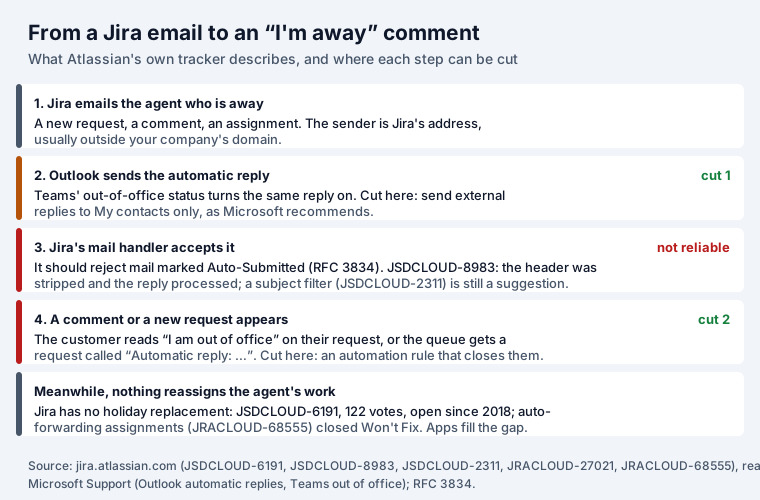
The rules for automatic mail are old and clear. RFC 3834 (2004) says an automatic responder “MUST
NOT blindly send a response for every message received”, and that the header Auto-Submitted: auto-replied “SHOULD be included in the message header of any automatic response”, so receiving
systems can recognise it.
Jira’s side is where it breaks, and Atlassian’s tracker says so in plain words:
| Ticket | What it says | Status (7 Nov 2026) |
|---|---|---|
| JRACLOUD-27021 | An out-of-office message “will auto-post as a comment on the Jira issue” | Closed, Won’t Do (2015) |
| JSDCLOUD-8983 | Mail handlers “strip the Auto-Submitted header and email gets processed successfully” | Closed, Tracked Elsewhere (2025) |
| JSDCLOUD-2311 | Ignore emails by subject; a customer: “We get dozens of ‘Out of Office’ responses created as ticket/requests” | Gathering Interest, 86 votes |
| JRACLOUD-84647 | Out-of-office mail to the default Cloud mail server “either end up creating issue or comment” | Closed, Timed out (2025) |
In JSDCLOUD-8983 Atlassian’s support engineer added that Microsoft Exchange “filters out some of the headers”, and pointed the fix to JSDCLOUD-2311, which is still a suggestion. So the header that should stop the loop does not always arrive, and Jira has no subject filter to fall back on.
Three places to cut the loop
1. In Outlook or Teams (the person who is away). Send replies outside the organisation to My
contacts only, or not at all. Jira’s notification address is normally outside your company’s
domain and not in anyone’s contacts, so it gets no reply. This also follows Microsoft’s own advice.
Admins who manage mailboxes through Microsoft Graph can set the same with externalAudience: contactsOnly.
2. In Jira Service Management (the queue). Add an automation rule for the requests that still come in:
Trigger:    Work item created
Condition:  Summary contains "Automatic reply"
            (add "Out of office" and the phrases your mail system uses in other languages)
Action:     Transition work item to "Closed" (or your Done status)
Action:     Comment on work item (internal) "Closed automatically: out-of-office reply"
Every run counts towards your automation usage; how Atlassian counts it is in our Jira automation examples. Comments added to an existing request are harder to catch after the fact, which is why the first cut matters more.
3. For the people who are away (the work). Before leaving, reassign open work and tell the queue who covers it. Jira cannot do this on a date, and the request to forward new assignments during an absence was closed as Won’t Fix. Apps that know who is away can:
| App | Installs | Rating | What its listing says it does |
|---|---|---|---|
| Out of Office Automation for Jira (Outlook, Google, Tempo) | 667 | 4.6 | “Automate backups for Assignee & Approval while on Vacation. Integrates Outlook & Tempo Planner.” |
| Out Of Office Assistant | 399 | 4.6 | “Reassign your tasks automatically when you are away” |
| Out of Office Sync for Jira and Microsoft | 40 | 5.0 | “Quickly identify unavailable team members in Jira when assigning tasks” |
Figures from the Atlassian Marketplace API on 7 November 2026. We have not tested these apps.
Seeing who is away before you assign
Most damage happens earlier: a request lands on someone who left on Friday. If your team plans leave in Jira rather than in Outlook, our OutSync puts requests and approvals in Jira and Confluence, shows a Who’s out panel on the board, and tells you on the work item when its assignee is away. Approved leave can also go one way to a Google Calendar. It does not read or write Outlook calendars, so for a Microsoft-only team the apps in the table above are the closer fit.
Planning a sprint around time off is a separate problem; the sprint capacity calculator takes each person’s days off, and Jira holidays covers where Jira uses public holidays and where it ignores them.
Writing the out-of-office message itself
A message that helps the customer and the queue says four things, and nothing about where you are:
I'm away until Monday 18 November and won't see email before then.
For support requests, please reply to your request or write to [email protected]:
the team is watching the queue.
For anything urgent about payments, call +1 555 0100.
Keep the external version shorter than the internal one, and leave out names of colleagues outside the company: an automatic reply goes to anyone who writes, as Microsoft’s warning says.
Sources
- Atlassian public tracker (read 7 November 2026): JSDCLOUD-6191, JRACLOUD-27021, JSDCLOUD-8983, JSDCLOUD-2311, JRACLOUD-84647, JRACLOUD-68555.
- Microsoft Support: Send automatic out of office replies from Outlook, Schedule an out of office status in Microsoft Teams.
- Microsoft Graph: automaticRepliesSetting.
- RFC 3834, Recommendations for Automatic Responses to Electronic Mail (2004).
- Atlassian Marketplace REST API, 7 November 2026.
Frequently asked questions
Does Jira have an out-of-office status?
No. Jira Cloud has no out-of-office status and no holiday replacement. The request for one in Jira Service Management, JSDCLOUD-6191 “Vacation of agents”, has 122 votes and has been open since 2018; a request to forward new assignments during absence, JRACLOUD-68555, was closed as Won't Fix in 2021.
Why do out-of-office replies show up as comments in Jira?
Because Jira emails the person who is away, Outlook answers Jira's notification address, and Jira's mail handler can treat that answer as a reply to the work item. Atlassian's tracker describes it in JRACLOUD-27021: the out-of-office message “will auto-post as a comment on the Jira issue”. That request was closed as Won't Do.
How do I stop Outlook auto-replies from reaching Jira?
On the sender's side, limit replies to people outside your organisation to “My contacts only”, which Microsoft recommends anyway; Jira's notification address is usually outside your domain. On the Jira side, a rule that closes new requests whose summary starts with “Automatic reply” catches what still gets through.
How do I set out of office in Microsoft Teams?
Select your profile picture, Set status message, then Schedule out of office, turn on automatic replies and write the message. Microsoft says the status “will also sync with automatic replies in your Outlook calendar”, so the same reply goes out by email.
Can Jira reassign work automatically when someone is on vacation?
Not by itself, because Jira does not know who is away. Apps that read Outlook or a leave calendar can: Out of Office Automation for Jira and Out Of Office Assistant both describe reassigning work during an absence.
Does OutSync work with Outlook?
No. OutSync keeps leave requests and approvals in Jira and Confluence and syncs approved leave one way to Google Calendar. It does not read or write Outlook calendars.