How to Track Team Vacations in Jira: A Complete Guide
On this page
Four real ways teams track vacations, and what each one actually costs you
There isn’t one right answer to “how should we track vacations” — the right choice depends on team size, how formal the approval process needs to be, and — the thing most guides on this topic skip — what the tracking is actually for. Recording that someone took a vacation and knowing it before assigning them work are different requirements, and the method that’s fine for one is often useless for the other.
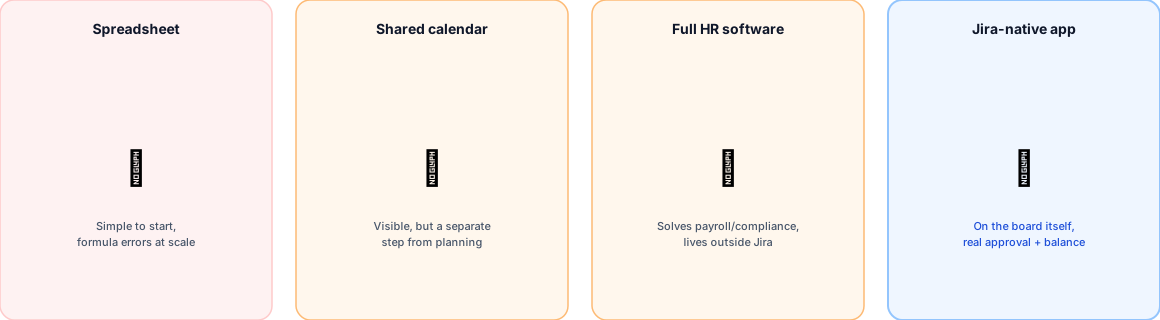
Method 1: a shared spreadsheet
The most common starting point, and it works — for a while. List names down one side, dates across the top, mark who’s out when. The real cost shows up as the team and the policy grow: Ray Panko’s spreadsheet-error research, spanning field studies of hundreds of real operational spreadsheets over more than a decade, found that the large majority of audited spreadsheets contained at least one error — not a knock on any specific team’s diligence, but a structural property of manual, formula-driven tracking at any scale beyond the trivial. Carryover math, accrual rates that differ by tenure, and blackout-period exceptions are exactly the kind of logic that’s easy to get subtly wrong in a cell formula and hard to notice until a balance is visibly off.
Method 2: a shared calendar
A genuine improvement in visibility — anyone can check it. The limitation isn’t the calendar’s accuracy; it’s that checking it is a separate, optional step from the moment a scheduling or assignment decision actually gets made. The ghost-resource problem is precisely this failure mode: correctly recorded information, in a place nobody was required to look before making the decision it should have informed.
Method 3: full HR software
Solves problems a Jira-focused team usually isn’t trying to solve — payroll integration, compliance tracking, benefits administration. The structural mismatch between HR-cadence tools and sprint-planning cadence is real: an HRIS is built around periodic, batch processes (payroll runs, compliance audits), not the specific, moment-of-decision visibility a sprint or space plan needs. If payroll and compliance aren’t the actual goal, this is usually more system than the problem requires.
Method 4: a Jira-native leave-tracking app
Purpose-built for exactly the requirement the first three methods each fall short on in a different way: availability visible in the tool where planning happens, backed by a real approval workflow and an accurate balance rather than a manually maintained list.
Setting it up properly in Jira, step by step
Whichever tool a team lands on, the actual setup sequence that gets this right looks like this:
- Define the accrual policy first — days per year, whether half-day increments are allowed, and any carryover cap. Get this settled before requests start coming in; retrofitting a policy onto already-approved requests is where inconsistency creeps in.
- Configure approvers per team, with an org-wide default as a fallback rather than leaving any team without a working approval path.
- Set a public holiday region if your teams span more than one country’s calendar — a flat, single holiday list is exactly the gap our comparison against Vacation Manager covers in more depth.
- Put visibility on the board itself, not a separate dashboard or calendar someone has to remember to open — this is the one step that actually closes the ghost-resource gap, not just relocates it.
- Connect Google Calendar only if it adds real value for people who live in their calendar day-to-day — it’s additive, not a replacement for board-level visibility, as covered in the full sync how-to.
- Handle contractors and non-licensed people explicitly, rather than discovering the gap later — see logging leave without an Atlassian account for exactly this case.
The honest recommendation
For a team whose actual requirement is “leave requests, approvals, and knowing who’s out before assigning work” — not payroll, not compliance, not a broader HR system — a Jira-native purpose-built app is the more direct fit than adapting a spreadsheet, a calendar, or a full HRIS to a job none of them were built for. That’s the specific gap OutSync is built to close, and this whole series exists to make that case with evidence rather than assertion — see the full seven-app competitor comparison for how existing Jira-native options stack up against each other too, not just against a spreadsheet.
Related reading
Frequently asked questions
What's the simplest way to track team vacations?
A shared spreadsheet or calendar is the simplest to set up, and it's genuinely fine for very small teams with informal processes. It stops being simple the moment more than one person edits it, or the team needs the data to actually prevent a scheduling conflict rather than just record one after the fact.
Do I need separate HR software just to track vacations for a Jira team?
Not necessarily. Full HR platforms solve real problems (payroll, compliance, benefits) that a Jira team usually isn't trying to solve at all — if the actual goal is "can I see who's out before I assign work," a tool built specifically for that, inside Jira itself, is a narrower and more direct fit than standing up a broader HR system.
How does OutSync differ from a shared calendar?
A shared calendar requires someone to remember to check it. OutSync's "who's out" panel is a board action on the Jira board itself and a Team Availability tab on Confluence — visible in the same screen where planning happens, with an approval workflow and a real accrual balance behind it, not just a manually maintained list of dates.