Jira Diagram: Every Way to Draw on a Work Item, 61 Apps
On this page
The architect pastes a Mermaid flowchart into the ticket. Jira shows it as three lines of code. Someone draws the same thing in a whiteboard tool and attaches a PNG, and a week later the PNG is out of date and nobody can edit it.
This guide answers what Jira can do on its own, then counts every Jira Cloud diagram app on the Atlassian Marketplace, read through its API on 5 November 2026, by how each one makes a diagram and where it keeps it.
Short answer: Jira Cloud has no drawing tool on a work item, and a Mermaid code block stays code. You attach an image or add an app. Of 61 Jira Cloud diagram apps (34,563 installs), 65% of installs go to connectors such as Miro and Lucidchart, where the diagram lives in another service. Pick an editor inside Jira for sketches, a text-based app (Mermaid, PlantUML) for diagrams that change with the code, and a BPMN modeler for processes.
What Jira does without an app
We tested it on our Jira Cloud site. A description with a code block set to the Mermaid language:
Without an app you have three options, none of them a diagram you can edit in the issue:
- Attach an image from any tool. It is a picture: no editing, no history of the drawing.
- Link to a whiteboard somewhere else, such as Confluence whiteboards or Miro, and paste the URL.
- Use Jira’s own diagrams of the process: the workflow diagram an admin sees in the workflow editor (our Jira workflow guide shows one) and report charts such as the cumulative flow diagram. These describe how work moves, not what the work is.
61 apps, four ways to draw
We searched the Marketplace for Jira Cloud apps with 15 diagram words (diagram, draw.io, Mermaid, PlantUML, UML, flowchart, whiteboard, BPMN, Gliffy, Lucid, Excalidraw, Graphviz, mind map, architecture diagram, sequence diagram), kept the ones that draw, and read each one’s installs and price list. Charts built from Jira data (cumulative flow, throughput) were left out.
| Kind | Apps | Installs | Share | Leaders by installs | Where the diagram lives |
|---|---|---|---|---|---|
| Connectors to another service | 18 | 22,445 | 64.9% | Miro for Jira Cloud 12,200; Lucidchart Diagrams Connector for Jira 7,760 | in the other service; Jira shows or links it |
| Drawing editors inside Jira | 16 | 9,503 | 27.5% | draw.io Diagrams for Jira 8,496; DevSamurai Draw UI 364 | with the work item |
| Diagrams from text | 20 | 2,355 | 6.8% | Mermaid for Jira 939; weweave Mermaid Charts 570 | the text and its picture, with the work item |
| BPMN process models | 7 | 260 | 0.8% | Flower BPMN 211; our BPMN Process Modeler 37 | with the work item |
| All | 61 | 34,563 | 100% |
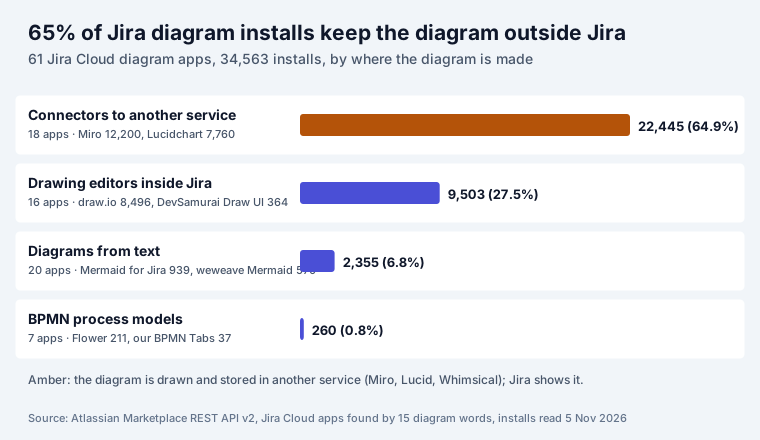
The market is three apps deep. Miro, draw.io and Lucidchart hold 28,456 of the 34,563 installs, 82%. The other 58 apps share the rest, and 20 of them render text into diagrams, mostly Mermaid.
The ten most installed
| App | Kind | Installs | Free up to 10 users |
|---|---|---|---|
| Miro for Jira Cloud | connector | 12,200 | no Marketplace price; Miro account |
| draw.io Diagrams for Jira | editor | 8,496 | yes |
| Lucidchart Diagrams Connector for Jira | connector | 7,760 | no Marketplace price; Lucid account |
| Lucidspark Boards Connector for Jira | connector | 991 | no Marketplace price; Lucid account |
| Mermaid for Jira (Mermaid Chart Inc) | text | 939 | no Marketplace price |
| Mermaid Charts & Diagrams for Jira (weweave) | text | 570 | yes |
| Whimsical | connector | 407 | no Marketplace price; Whimsical account |
| Moqups for Jira Cloud | connector | 373 | no Marketplace price; Moqups account |
| Draw UI Wireframes, Mockup, Prototype & Diagrams (DevSamurai) | editor | 364 | yes |
| Markdown Rich Text Editor with LaTeX, Mermaid UML (Fulstech) | text | 297 | yes |
“Free up to 10 users” means every tier of the app’s Marketplace price list up to 10 users costs $0. “No Marketplace price” means the listing has no price list: the app is free to install, and what you pay, if anything, is the account at the service it connects to.
Which kind fits which job
| Job | Kind that fits | Why |
|---|---|---|
| Sketch a flow in a refinement meeting | editor (whiteboard) | free-hand, fast, editable later by anyone who can edit the work item |
| An architecture or sequence diagram that changes with code | text (Mermaid, PlantUML) | the source is a few lines you can review, copy and diff |
| A business process people sign off | BPMN | a standard notation, with gateways and events, that analysts already read |
| The team already designs in Miro or Lucid | connector | one place for the drawing, Jira shows it |
| Security review says nothing leaves Atlassian | editor or text app on Atlassian’s platform | check the listing’s data residency and “Runs on Atlassian” details |
The last row is the one people skip. With a connector, the diagram is in another company’s cloud, and the Jira app is a window onto it. That can be the right choice, but it is a data decision, not a drawing one. Our post on app data egress shows what to check on a listing.
Mermaid, BPMN and whiteboards on a work item
For diagrams from text, Mermaid in Jira compares 16 Mermaid apps and has seven tested templates for Jira work. For the same choice in Confluence, with 118 apps priced, see Confluence free diagram plugins.
Our own Jira diagram apps are small next to the leaders: eight apps with 303 installs in all on 5 November 2026. They cover the three kinds that keep the diagram with the work item:
- Excalidraw Whiteboard & Mermaid Diagrams for Jira: a hand-drawn whiteboard on the work item, as above, that also turns Mermaid, LaTeX, Graphviz, Vega-Lite and WaveDrom text into editable diagrams. The source stays editable.
- Mermaid Tabs for Jira: tabs on a work item or project page, each with one diagram from text: Mermaid 11, Graphviz, LaTeX, Vega-Lite or WaveDrom.
- BPMN Process Modeler in Tabs: a full BPMN 2.0 modeler in a tab,
with
.bpmnimport.
All of them store diagrams in Forge storage inside your Atlassian site and make no outside calls, and they are free for up to 10 users.
How we counted
- Source: Atlassian Marketplace REST API v2,
/rest/2/addons?application=jira&hosting=cloud&text=..., 15 search words, up to 100 results each, read 5 November 2026. 92 distinct apps came back. - Kept: 61 apps whose name or tagline says they draw diagrams, sorted by hand into the four kinds. Left out: 31 apps that chart Jira data (cumulative flow, throughput, reports), map issue links, or matched a word by chance.
- Installs:
distribution.totalInstallsfor each app. Prices: each app’s live Cloud price list. - Script and data: in our research notes for this post.
Sources
- Our Jira Cloud site, 5 November 2026: a Mermaid code block in a work item description, and the Excalidraw panel on PAY-12.
- Atlassian Marketplace REST API v2, Jira Cloud apps, installs and live Cloud price lists read 5 November 2026.
Frequently asked questions
Can Jira draw diagrams?
Not on a work item. Jira Cloud has its own diagrams of the process (the workflow diagram in the workflow editor, the cumulative flow diagram report), but no drawing tool in an issue. You can attach an image, or install an app: on 5 November 2026 the Marketplace had 61 Jira Cloud diagram apps.
Does Jira support Mermaid?
Not natively. On our Jira Cloud site a code block marked as Mermaid in a description showed the code with line numbers, no diagram. A Mermaid app renders it; the largest by installs on 5 November 2026 was Mermaid for Jira by Mermaid Chart Inc with 939 installs. Our Mermaid guide compares 16 of them.
Is there a free diagram tool for Jira?
Many are free for small sites. Of the diagram apps with a Marketplace price list, 11 of 13 drawing editors and 15 of 18 diagram-from-text apps were free up to 10 users, including draw.io Diagrams for Jira. Connectors to Miro or Lucid are free apps, but the diagrams live in an account at that service.
Where are Jira diagram app diagrams stored?
It depends on the kind. Connectors (Miro, Lucidchart, Whimsical and others) draw and keep the diagram in the other service and show it in Jira. Editors and text-based apps keep it with the work item, either in the app's storage on Atlassian's platform or on the vendor's servers, which the listing's privacy and security tab states. Ask before you put architecture diagrams anywhere.
What is a Jira workflow diagram?
The picture of a workflow's statuses and transitions in Jira's workflow editor, a different thing from drawing on a work item. Admins see it under the workflow's settings; our Jira workflow guide shows a real one and explains the rules behind it.
Which diagram app is most used in Jira?
By installs on 5 November 2026: Miro for Jira Cloud (12,200), draw.io Diagrams for Jira (8,496) and Lucidchart Diagrams Connector for Jira (7,760). Those three hold 82% of all installs of the 61 apps we counted.