Claude Confluence Integration: Give Agents the Spec
On this page
MOBL-15 on our test site is a one-line Jira story: “Enable fingerprint identity to be used on mobile”. The description is empty. Everything that matters is on a Confluence page the team wrote, “Fingerprint sign-in: design notes”: use the platform prompt, three failed tries then the password screen, the token in the Keychain, payments out of scope.
A person picking up MOBL-15 would click the linked page. An AI coding agent gets the ticket. Whether it also gets the page depends on how you connected Claude to Confluence, and on whether it thinks to look.
Short answer: Claude reads Confluence in three ways: the Atlassian Skills in Claude chat, the
Atlassian MCP server (https://mcp.atlassian.com/v2/mcp) in Claude Desktop and Claude Code, and,
for coding work, whatever the Jira route passes on. With MCP, Claude can search and read any page you
may see, but only reads one when it decides to. For a Jira ticket whose decisions live in Confluence,
that is a gamble: on our test site Jira’s own prompt for MOBL-15 did not include its design page. Write
the ticket’s key on the page, keep decisions short, and use a tool that attaches the page to the brief.
Three ways Claude reads Confluence
From Atlassian’s Anthropic partner page, read 18 November 2026:
- Atlassian Skills in Claude. Add the Jira and Confluence skills from Claude’s Skills directory, authorize your Atlassian account, and ask: “Summarize the payments launch decision in Confluence and show the open Jira work.” Best for questions, in chat.
- The Atlassian MCP server. For “Claude, Claude Desktop, Claude Code, or another MCP-compatible client”. Users sign in with OAuth 2.1 and “the server respects their existing Jira, Confluence, and Compass permissions”. The first connection may need a site admin’s approval.
- Through a coding agent’s Jira route. The Jira Coding Agent uses “your team’s knowledge directly from Jira, Confluence, your codebase”; GitHub Copilot gets Confluence only if you configure the Atlassian MCP server with a personal access token; Claude Agent for Jira reads the summary, description and repository link. Our comparison of all seven routes has the details.
Connect Claude Code to Confluence in two commands
claude mcp add --transport http atlassian https://mcp.atlassian.com/v2/mcp
claude          # then type /mcp and sign in to your Atlassian site
Search results still show the old SSE address from 2025, including in Google’s AI answer. Use the
/v2/mcp one. What you approve at sign-in, admin controls and API tokens for jobs are in our
Jira MCP guide; the same server serves Confluence.
The gap: the agent has to think of the page
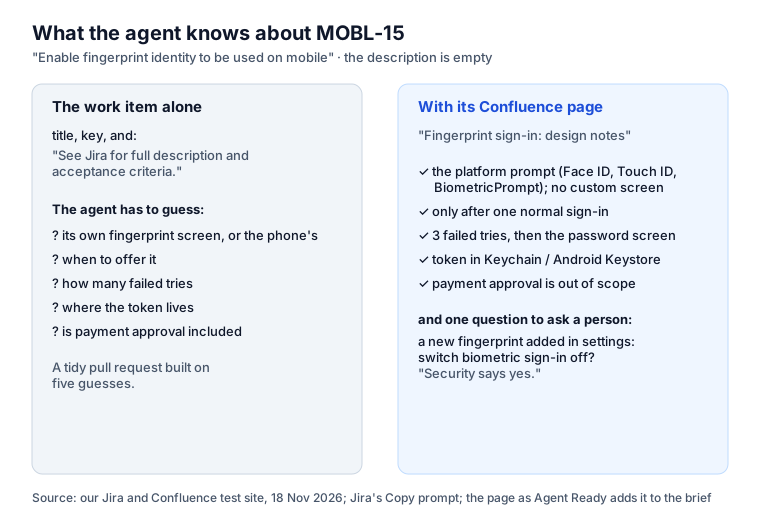
On MOBL-15, Jira’s Open in coding tool → Copy prompt produced the title, the key, the line “See Jira for full description and acceptance criteria”, and “For additional context about this work item use the Atlassian MCP.” Nothing from the page. A thorough agent will search Confluence for “MOBL-15” and find it. A quick one will see an empty description and fill it in: its own fingerprint screen, five retries, the token in shared preferences. The pull request will be clean and wrong.
This is not about one tool. It is how context works for agents: what is in the prompt is used, what is one search away is used sometimes.
Attach the page instead of hoping
Agent Ready, our Jira app, closes that gap when it is installed in Confluence
as well as Jira. When an agent starts a work item through its MCP tools (start-issue,
get-ready-spec or get-agent-brief), the brief ends with Linked pages and issues:
- the Confluence pages linked to the work item, and the pages whose text mentions its key;
- up to 5 pages, the first 4,000 characters of each;
- read as the person the agent works for, so it gets only what they may open;
- passwords and keys masked, lines that look like orders to an AI agent removed;
- nothing stored: the pages are read each time an agent asks.
For MOBL-15 the end of the brief reads:
## Linked pages and issues

### Confluence: Fingerprint sign-in: design notes
Design notes for MOBL-15: Enable fingerprint identity to be used on mobile.
Decisions
Use the platform biometric prompt (Face ID / Touch ID on iOS, BiometricPrompt on Android).
No custom fingerprint screen.
Biometric sign-in is offered only after one normal sign-in on the device.
After 3 failed biometric attempts, fall back to the password screen.
The refresh token stays in the Keychain / Android Keystore, unlocked by the biometric check.
Out of scope
Biometric approval of payments (separate epic).
...
The open question at the bottom of the page (“Security says yes”) is the kind an agent should not
settle alone. With Agent Ready’s tools it asks it in Jira (ask-question) and waits for a person’s
answer. Setup is one switch for a site admin; see
Agent Ready in Confluence.
It asks Confluence only for read and search permissions.
How to write Confluence pages an agent can use
Most of this helps people too.
- Put the work item key in the first line. “Design notes for MOBL-15.” One key in the text is enough for search, for people and for tools, and survives when someone forgets to link the page.
- Decisions first, history last. An agent that reads the first 4,000 characters should get the decisions, not three paragraphs of background. Use the headings Decisions, Out of scope and Open questions.
- One page per decision area. A 30-page spec is read as its opening. Split it, and link the parts that matter to the work item.
- Write the open questions as questions. “Should a new fingerprint switch biometric sign-in off?” tells the agent to ask, not to choose.
- No secrets, ever. A page is read by everyone with access, and now by their agents. Old pages with passwords are the usual leak; our secret sprawl study shows how they spread.
- Watch who can edit. A page anyone can edit is a page anyone can use to give your agents orders. Agent Ready strips lines that look like instructions; your other tools may not.
Reading vs writing
The Atlassian MCP server can also create and edit pages. For a coding agent that only needs context, leave writes to people: fewer surprises, and nothing for a prompt injection to use. Claude Code asks before each tool call unless you allow it, and admins can review connected apps in Atlassian Administration. If you do let an agent write, have it draft into a page a person publishes.
Sources
- Atlassian: Atlassian + Anthropic, What is the Jira Coding Agent?, Open a Jira work item in an AI coding tool, read 18 November 2026.
- GitHub changelog: Confluence context via MCP.
- Agent Ready: Agent Ready in Confluence and Linked pages and issues.
- Our test site: MOBL-15 and the page “Fingerprint sign-in: design notes”, 18 November 2026.
Frequently asked questions
How do I connect Confluence to Claude Code?
Add Atlassian's MCP server: claude mcp add --transport http atlassian https://mcp.atlassian.com/v2/mcp, then run /mcp in Claude Code and sign in to your Atlassian site in the browser. Claude can then search and read the Confluence pages you may see. Older guides give an SSE address from 2025; use the current one.
Can Claude work with Confluence?
Yes. In Claude chat, add the Atlassian Skills from the Skills directory or the Atlassian connector; in Claude Desktop and Claude Code, connect the Atlassian MCP server. Claude reads, searches and, if you allow it, creates pages, always with your own Confluence permissions.
Does a coding agent read the Confluence pages linked to a Jira ticket?
Only if it goes looking. Jira's Copy prompt for a work item gives the title, key and a pointer back to Jira; the agent must think to search Confluence through MCP. Agent Ready, installed in Jira and Confluence, attaches the linked pages and the pages that mention the key to the agent's brief.
Is it safe to give an AI agent Confluence access?
It sees what the person it works for may see, through OAuth with their permissions. The risks are the same as with any page: old pages with passwords, and text written by someone else that tells the agent what to do. Prefer reading over writing, and keep write tools off for agents that only need context.
Keep reading
- Jira, JSM and the Marketplace · 8 minClaude Jira Integration: 5 Ways, and 3 Real Claude Code Runs
- Jira, JSM and the Marketplace · 6 minSkills vs MCP vs AGENTS.md: Which to Use, and When
- Jira, JSM and the Marketplace · 7 minAcceptance Criteria for AI Agents: 3,375 Criteria Checked
- Free toolSKILL.md validator