Claude Jira Integration: 5 Ways, and 3 Real Claude Code Runs
On this page
The first time we pointed Claude Code at a Jira work item, it read the ticket, read the repository, and stopped. The ticket asked it to rotate credentials that had leaked into another work item. Claude explained that this was work in AWS, GitHub and Slack, not in the code it could see, and that it would not mark the ticket done “as if the keys had been rotated”.
That is the behaviour you want, and it is not guaranteed. Here are the official ways to connect Claude and Jira, what each needs, and three runs of Claude Code on real work items, call by call.
Short answer: Atlassian and Anthropic list five ways to connect Claude to Jira: Atlassian Skills in Claude for chat, the Atlassian MCP server for Claude, Claude Desktop and Claude Code, Open in coding tool from a work item into Claude Code, Claude Agent for Jira to assign tickets to a Claude agent that opens draft pull requests, and Claude models in Rovo agents. For coding on your own machine, use Claude Code with the MCP server. To delegate from Jira, use Claude Agent for Jira, with your Anthropic API key and a GitHub machine user. In our three Claude Code runs, each ticket cost 17 to 37 cents.
The five ways, side by side
From Atlassian’s Anthropic partner page, read on 18 November 2026:
| Way | Best for | You need |
|---|---|---|
| Atlassian Skills for Claude | asking Claude about Jira and Confluence | an eligible Claude plan, your Atlassian sign-in |
| Atlassian MCP server | Claude, Claude Desktop, Claude Code | an MCP client; OAuth 2.1; maybe a site admin’s approval the first time |
| Open in coding tool → Claude Code | starting work from the ticket | Claude Code installed; the button copies a command for your terminal |
| Claude Agent for Jira | assigning tickets to Claude | Jira Standard, Premium or Enterprise with Rovo; Anthropic API key; GitHub machine user |
| Claude in Rovo agents | Atlassian-built agents on a Claude model | an eligible Rovo plan |
Atlassian’s own advice for picking: “Start with Atlassian Skills for the lowest-setup, guided experience; use the Atlassian MCP Server when you need an open, permission-aware protocol; use AI coding tool deeplinks to move a Jira work item straight into Claude Code; use Claude Agent for Jira to delegate an issue to a Claude coding agent.”
Claude Agent for Jira: assign the ticket to Claude
You install the app from the Marketplace and configure two credentials: a Claude Managed Agents API key from the Anthropic Console, and a GitHub personal access token from a machine user, with read and write access to repository contents and pull requests. Jira then creates a default agent and environment in your Anthropic account.
After that, assign the work item to Claude, @mention it in a comment, or add it to an automation rule. According to Atlassian, the agent “reads the Jira summary, description, and repository link”, clones the repository in Anthropic’s sandbox, pushes a branch and opens a draft pull request, with progress shown on the work item.
Two limits to check before you start:
- Data. “Claude Managed Agents is stateful and does not support Zero Data Retention.” Atlassian’s advice: “organizations with ZDR requirements should not use this beta.”
- Where it works. Jira Software and business projects, not Jira Service Management; not HIPAA or FedRAMP sites. It is in beta.
Claude Code and Jira: three real runs
Claude Code talks to Jira through the Atlassian MCP server: claude mcp add with the server’s URL, sign
in once with OAuth, and Claude can read and update work items as you. Our Jira MCP guide
has the setup and what you approve. On 9 November 2026 we added Agent Ready’s
MCP tools as well, gave Claude Code 2.1.319 a scratch repository with no AGENTS.md or CLAUDE.md rule
at all, and asked one thing per run: “Please work on KAN-n.”
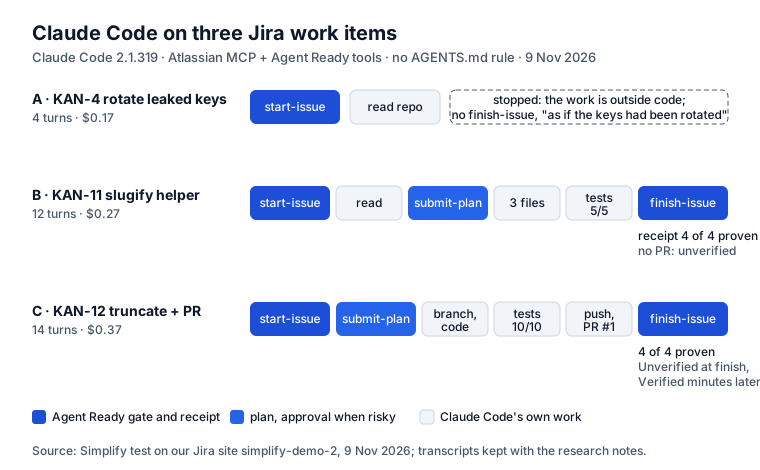
Run A: KAN-4, a ticket that is not code ($0.17, 4 turns)
KAN-4 was “Rotate credentials: secret leaked in Jira issue (KAN-1)”, created by our secret scanner. It
passed every readiness check, but its acceptance criteria were placeholders. Claude called start-issue
first, without being told, read the repository’s README, and stopped. Its answer, shortened:
The work isn’t code. Rotating these means revoking and reissuing keys in AWS IAM, GitHub, Slack and wherever the password and JWT signing key live. I have no access to any of those. […] I haven’t called
finish_issue, because that would move KAN-4 to review as if the keys had been rotated.
It then listed the steps a person with access should take. Two lessons. A checklist score is not understanding: the ticket passed the checks with “test” and “test2” as criteria, which we then fixed in Agent Ready. And a good agent stops; a gate is what makes stopping the default rather than luck.
Run B: KAN-11, a small helper ($0.27, 12 turns)
KAN-11 asked for slugify(title) with four acceptance criteria. The calls, in order: start-issue,
read the README, list the files, submit-plan (Agent Ready answered that no approval was needed),
write package.json, src/slugify.js and a test file, run node --test (5 of 5 passed), then
finish-issue with a receipt: 4 of 4 acceptance criteria proven, each named with its test. Agent
Ready marked the receipt unverified: Jira showed no pull request, because there was none. The ticket
moved to In Review. Claude’s last message said, unprompted, that the ticket named no repository and it
had worked in the current one.
Run C: KAN-12, with a pull request ($0.37, 14 turns)
Same shape, plus “open a pull request”. Claude created a branch, wrote the code and tests (10 of 10),
committed with the key in the message, pushed and ran gh pr create. finish-issue came seconds later
and the receipt said Unverified: GitHub had not told Jira about the pull request yet. A few minutes
later the work item showed Verified. We changed Agent Ready the same day to check an unverified
receipt again when someone opens the work item.
What the runs show
- Tool descriptions alone were enough for Claude to start and finish through the gate, with no rule in the repository. A rule in AGENTS.md makes it dependable; the one we use is in the Agent Ready guide.
- The ticket decides the outcome. A ticket without a repository got worked in whatever folder was open. A ticket with placeholder criteria got an honest refusal, this time.
- Cost is small and visible. 17 to 37 cents for small work items, reported by Claude Code per run.
What reaches Claude, and what should not
Whatever route you use, the work item’s text goes to the model: summary, description, and on most routes the comments. Two things should not be there:
- Credentials. A token pasted in a comment to unblock a teammate leaves your company with the prompt. Agent Ready finds about 50 kinds of keys and shows them only masked; its MCP tools hand the agent the text with keys masked.
- Instructions written to the agent. “Ignore previous instructions” in a customer’s ticket is a documented attack on agents that read Jira. Agent Ready’s hidden-instruction check is always on, and its tools remove such lines before the agent sees them.
The rest is what the agent needs and rarely gets: the repository and branch, the team’s rules, and the Confluence page where the decision lives. Our comparison of all seven routes shows what Jira’s own prompt gave Claude for a real ticket, next to Agent Ready’s brief.
Where Agent Ready fits with Claude
- With Claude Agent for Jira: the “Issue is agent-ready” validator holds unready work items back from a Ready for agent status, an unready ticket assigned to the Claude account goes back with a comment, and the project’s brief is posted as a comment at handoff for the agent to read.
- With Claude Code through MCP: the full loop from the runs above:
next-ready-issue,start-issue(an unready ticket is refused), questions answered by people in Jira, a plan for risky areas, and a receipt that names the test for each criterion. - Either way: the AI agents report counts what went to Claude, what came back, and what was done the first time.
It is free for up to 10 users, and the checks use no AI and no Rovo credits.
Sources
- Atlassian: Atlassian + Anthropic, Introducing Claude Agent for Jira, Set up Claude Agent for Jira, read 18 November 2026.
- Atlassian Marketplace: Claude Agent for Jira.
- Claude Code: Connect Claude Code to tools via MCP.
- Our runs: Claude Code 2.1.319, Atlassian MCP server with Agent Ready’s tools, three work items on our Jira test site, 9 November 2026. Transcripts are kept with our research notes.
Frequently asked questions
Can Claude connect to Atlassian?
Yes, in five ways Atlassian and Anthropic list together: Atlassian Skills in Claude, the Atlassian MCP server (Claude, Claude Desktop and Claude Code sign in with OAuth and keep your Jira permissions), Open in coding tool from a work item into Claude Code, Claude Agent for Jira, and Claude models inside Rovo agents.
What is the Claude Skill for Jira?
Atlassian Skills are Jira and Confluence skills you add from Claude's Skills directory. They teach Claude common Atlassian tasks, such as summarizing a decision page and listing the open work, using your own Atlassian sign-in. They are for chat in Claude, not for writing code.
Does Claude Agent for Jira work with Jira Service Management?
No. Atlassian's partner page says it is available for Jira Software and business projects, not Jira Service Management, and not on HIPAA or FedRAMP sites. It needs Jira Cloud on Standard, Premium or Enterprise with Rovo.
How much does Claude cost per Jira ticket?
In our three Claude Code runs on small work items, 17, 27 and 37 cents, at 4 to 14 turns. Claude Agent for Jira runs on your own Anthropic API key, so the model usage is billed to your Anthropic account.
Is it safe to give Claude my Jira tickets?
It is as safe as what is in them. Everything in the work item, including comments, goes to the model. Remove pasted keys, watch for text written to steer an agent, and check the data terms: Claude Managed Agents does not support Zero Data Retention.