Jira Limits 2026: Every Cloud Limit in One Table
On this page
The admin adds one more custom field to the support space, and Jira refuses. The space already has 700. Since March 2026 that is a hard limit, and it is one of about forty numbers that now shape a Jira Cloud site, spread across five Atlassian pages that each cover one corner.
This is all of them on one page, read from those pages on 13 November 2026, with the date each limit started and what Jira does when you reach it.
Short answer: 700 fields and 150 work types per space (enforced since March 2026), eight more configuration limits rolling out since September 2026, per work item caps such as 2,000 attachments and 5,000 comments, files up to 2 GB, automation billed by steps from 3 December 2026 (Standard: 400 per user a month), apps on a points-based API quota, and CSV export up to 10,000 work items. Reaching a limit blocks adding more; nothing is deleted.
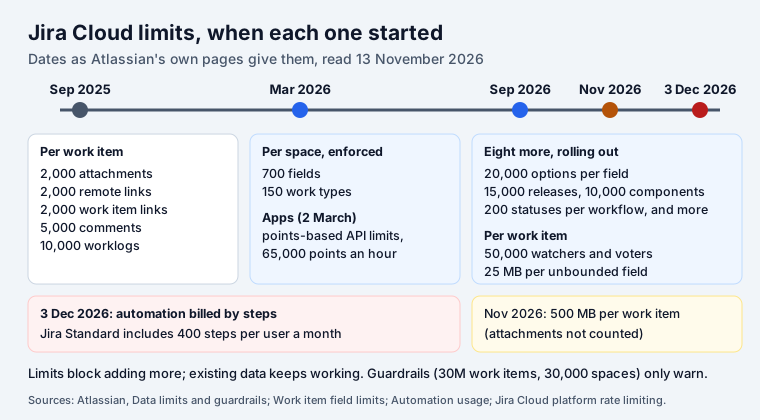
Limits and guardrails are different things
Atlassian’s data limits and guardrails page draws the line. A limit is “a software-enforced maximum”: Jira refuses to add more. A guardrail is “a recommended threshold”; exceeding it “won’t automatically block an action, but it may increase configuration complexity or affect performance”. Neither can be raised by an admin: “they can’t change the limit values in Jira settings.”
Per space: fields, work types and configuration
| Limit | Value | Since |
|---|---|---|
| Fields | 700 per space | March 2026 |
| Work types | 150 per space | March 2026 |
| Field options | 20,000 per field | rolling out from September 2026 |
| Work item security levels | 50 per space | from September 2026 |
| Permission grants | 50 per permission | from September 2026 |
| Releases | 15,000 per space | from September 2026 |
| Workflows | 150 per workflow scheme | from September 2026 |
| Workflow statuses | 200 per workflow | from September 2026 |
| Jira components | 10,000 per space | from September 2026 |
| Priorities | 100 per space | from September 2026 |
The custom field limit is the one people search for, and it is narrower than it sounds:
- It counts “fields included in field configuration schemes associated with the space”, so a field shared by five spaces counts once in each.
- “Trashed fields don’t count toward the 700-field limit.”
- “There is no limit on the total number of custom fields that can exist across the site.”
The September 2026 limits are “a progressive rollout, the exact date on which enforcement becomes active for an individual entity or site may vary”. Archived releases are not meant to count, and the component limit applies to Jira components, not Compass ones.
Per site: guardrails, not limits
| Guardrail | Value |
|---|---|
| Work items per site | 30,000,000 |
| Spaces per site | 30,000 |
| Space role actors per space | 5,000 |
| Space roles per user per site | 2,000 |
Atlassian adds that performance at scale also depends on JQL complexity, boards, custom-field usage, traffic, automation, apps and integrations. On plan size, the pricing page gives the Free plan “up to 10 users with 2GB of storage” and lists up to 100,000 users per site.
Per work item
From the knowledge base article work item field limits, which says they apply to every work item type and are not configurable:
| Each work item can have up to | Enforced from |
|---|---|
| 2000 attachments | September 2025 |
| 2000 remote links | September 2025 |
| 2000 work item links (excluding child issues and subtasks) | September 2025 |
| 5000 comments | September 2025 |
| 10,000 worklogs | September 2025 |
| 50,000 watchers | September 2026 |
| 50,000 voters | September 2026 |
| 25 MB in any previously unbounded field | September 2026 |
| 500 MB in total, excluding file attachments | November 2026 |
Rich-text fields (description, comments, worklogs) already had a 1 MB cap per entry, which stays. The caps apply to the REST API, automation rules and transitions too: “An error response will occur if the limit is exceeded.” The 2,000-link cap is the one integrations hit first, for example a sync tool that links every commit.
Attachments and storage
| Value | Source | |
|---|---|---|
| File size, default | 1 GB per file | Configure file attachments |
| File size, maximum an admin can set | 2 GB per file | same |
| Attachments per work item | 2,000 | work item field limits |
| Storage, Free | 2 GB per app | Configure file attachments |
| Storage, Standard | 250 GB per app | same |
| Storage, Premium | unlimited | same |
Automation
Two sets of numbers. The service limits protect a site from one runaway rule (automation service limits; Atlassian now calls rules “flows”):
| Limit | Value |
|---|---|
| Steps (conditions, branches, actions) per flow | 65 |
| Steps per advanced flow | 500 |
| Work items a scheduled JQL search returns | 999 |
| Work items the Lookup work items action uses | the first 100 |
| New subtasks per action | 50 |
| Items one flow run may fetch | 5,000 (the flow is disabled above it) |
| Loop detection | a flow triggering itself 10 times in quick succession |
| Processing time | 60 min per 12 hours |
| Emails, Free plan and trials | 100 in 24 hours |
| Flows running at the same time | Free 5, Standard 10, Premium 20 |
The usage allowance is how much automation a plan includes. Atlassian’s usage page says “Usage-based billing starts December 3, 2026”, and usage is now counted in steps: “Every trigger, condition, action, branch, and loop that runs in a flow counts as a step toward your usage.”
| Steps per month | Free | Standard | Premium | Enterprise |
|---|---|---|---|---|
| Jira | 150 per subscription | 400 per user | 750 per user | 1000 per user |
| Jira Service Management / Service Collection | 1,250 per subscription | 3,000 per user | 6,500 per user | 9,500 per user |
| Confluence | 50 per subscription | 100 per user | 250 per user | 500 per user |
| Jira Product Discovery | 100 per subscription | 300 per user | 500 per user | 750 per user |
Allowances are pooled across the organization and refresh monthly. Some runs cost nothing: aborted or throttled runs, and from 5 November 2026 runs that end with no action performed. A loop or a branch counts once, however many items it goes through.
Steps are counted for automation flows. A Marketplace app that does the same job with its own code is not a flow, so it uses none of them. One example of ours: a “remind me of overdue work” rule runs every day and spends steps each time, while Deadline Tracker sends its daily reminder e-mail from the app itself, a scheduled function that calls Jira’s notify API. Its calls count against the app’s own API quota, not your automation allowance.
REST API for apps
Since 2 March 2026, Forge, Connect and OAuth 2.0 apps run on a points-based quota (rate limiting). Each call costs points by the work it does; by default an app “shares a single 65,000 point hourly quota across all tenants”, reset at the top of each UTC hour, with a per-second burst limit on top. Apps with heavy use can move to a per-tenant pool (for Standard sites, 100,000 points plus 10 per user an hour). Over the limit, Jira answers HTTP 429 with a Retry-After header.
Search and export
| Value | |
|---|---|
| CSV export from search | up to 10,000 work items (asynchronous) |
Old URL workaround (&pager/start=) | 1,000 per batch, deprecated March 2026 |
| Jira Cloud for Excel add-in | 10,000 work items per query |
| JQL through the REST API | needs at least one condition (“unbounded” queries are refused) |
The export numbers, and how to split a bigger export with JQL, are in Jira export to Excel; the unbounded-query error and other search traps in the JQL cheat sheet.
What happens at a limit
From Atlassian’s page, in short:
- Jira checks the admin action when it is submitted and rejects one that would add more.
- A bulk action that would cross the limit is rejected whole, not applied in part.
- Existing configuration keeps working; nothing is deleted, archived or disabled.
- Users still create and update work items; unrelated admin changes still work.
- A message in Jira says which limit was reached.
On Premium and Enterprise, the site optimizer finds unused fields and schemes. On Standard, Atlassian points to the usage shown in Jira settings, the REST API and scripts. Moving from Server or Data Center, a space at 90 % or more of a limit gets a three-month exemption after migration.
Sources
All read on 13 November 2026:
Frequently asked questions
What is the custom field limit in Jira Cloud?
700 fields per space, counted from the field configuration schemes associated with the space, enforced since March 2026. Trashed fields do not count, and Atlassian says "There is no limit on the total number of custom fields that can exist across the site."
What is the maximum attachment size in Jira Cloud?
The default is 1 GB per file and the maximum an admin can set is 2 GB. A work item can hold up to 2,000 attachments. Total storage is 2 GB per app on the Free plan, 250 GB on Standard and unlimited on Premium.
How many automation runs do I get in Jira?
Automation is now measured in steps, not runs: every trigger, condition, action, branch and loop that runs is a step. Jira includes 150 steps a month per subscription on Free, 400 per user on Standard, 750 on Premium and 1,000 on Enterprise, pooled across the organization. Usage-based billing starts on 3 December 2026.
How many issues can a Jira Cloud site have?
There is no hard limit. Atlassian gives 30,000,000 work items and 30,000 spaces per site as guardrails, recommended thresholds that do not block anything.
What happens when a Jira limit is reached?
Jira rejects the admin action that would add more, such as a 701st field in a space. Existing configuration keeps working, nothing is deleted, and users can still create and update work items.
Keep reading
- Jira, JSM and the Marketplace · 7 minOne on One Questions: 60 by Situation, and an Agenda
- Jira, JSM and the Marketplace · 5 minIs Jira Being Phased Out? What Ends in 2029, What Stays
- Jira, JSM and the Marketplace · 6 minJira Reporter vs Assignee (and Creator): Who Is Who
- Free toolBusiness days calculator