Acceptance Criteria: 18 Examples, Given/When/Then and Jira
On this page
The story says “Agents can refund a payment”. It passes review, goes to Done, and on Friday an agent refunds €4,000 to the wrong card because nothing stopped a refund larger than the original payment. Nobody broke a rule: there was no rule. The story had a title and a sentence, and every person who read it filled the gaps differently.
Acceptance criteria are the gaps, filled in before the work starts. Below are 18 criteria and 7 scenarios to copy, for six kinds of work, in the two formats teams use, plus the difference from the Definition of Done that causes most confusion, and a Jira setup that makes them stick.
Short answer: acceptance criteria are the testable conditions one story must meet. Write them as a rule list (“A refund cannot exceed the payment”) or as Given/When/Then scenarios (“Given a €40 payment, When the agent refunds €50, Then the refund is refused”). They are not the Definition of Done, which applies to every story. In Jira, keep them where something checks them before Done.
Where acceptance criteria come from
The phrase is not in the Scrum Guide: the 2020 edition talks about items becoming “ready for selection” after refinement and defines the Definition of Done, nothing more. The modern shape comes from Dan North’s “Introducing BDD”, first published in Better Software magazine in March 2006. His team “started describing the acceptance criteria in terms of scenarios, which took the following form: Given some initial context (the givens), When an event occurs, Then ensure some outcomes.” His story template that followed reads:
Title (one line describing the story)
Narrative:
  As a [role]
  I want [feature]
  So that [benefit]
Acceptance Criteria: (presented as Scenarios)
  Scenario 1: Title
    Given [context]
      And [some more context]...
    When [event]
    Then [outcome]
      And [another outcome]...
Cucumber’s Gherkin reference turned the three words into a test language: Given steps describe “the initial context of the system”, When steps “an event, or an action”, and Then steps “an expected outcome, or result”, which “should be on an observable output”. That last rule is the useful one even if you never automate a test: an outcome nobody can see cannot be accepted.
Bill Wake’s INVEST checklist for user stories (2003) ends in T for Testable: a story card carries “an implicit promise: ‘I understand what I want well enough that I could write a test for it.’” Acceptance criteria are where that promise gets written down.
Rules or scenarios: the two formats
| Format | Looks like | Best for |
|---|---|---|
| Rule list | “A refund cannot exceed the payment.” | Simple stories, constraints, non-functional needs |
| Given/When/Then | Given…, When…, Then… per scenario | Behaviour with conditions and edge cases |
Most teams mix them: rules for limits and wording, scenarios where the result depends on a situation. Either way, three tests keep a criterion honest:
- Observable. Someone outside the team can see whether it holds (“shows an error”, not “handles the error”).
- One condition. One rule or one scenario per line, so it can be ticked on its own.
- No solution design. Say what, not how: “search returns results in under 2 seconds”, not “add an index on the table”.
18 examples to copy
1. A feature: refunds by support agents
Rules:
- A refund cannot exceed the amount paid, minus earlier refunds.
- A refund over €500 needs a second agent to approve it.
- The customer gets an email when the refund is issued.
Scenarios:
Scenario: Refund larger than the payment is refused
  Given a payment of €40 with no earlier refunds
  When the agent refunds €50
  Then the refund is refused
  And the agent sees "You can refund at most €40.00"

Scenario: Large refund waits for approval
  Given a payment of €900
  When the agent refunds €600
  Then the refund status is "Waiting for approval"
  And no money moves until a second agent approves it
2. A bug fix
Rules:
- The steps in the bug report no longer reproduce the problem.
- An automated test covers the case and fails on the old code.
- The fix does not change the behaviour of the screens around it.
Scenario:
Scenario: Discount code applies on mobile Safari
  Given a cart of €80 on iPhone Safari
  And the code SAVE10
  When the customer applies the code
  Then the total shows €72.00
3. An API endpoint
Rules:
POST /refundsreturns 201 with the refund id when it succeeds.- A request without authentication returns 401 and creates nothing.
- Sending the same idempotency key twice creates one refund, not two.
Scenario:
Scenario: Duplicate request does not refund twice
  Given a refund request with idempotency key "r-1042"
  When the same request is sent a second time
  Then the response is the first refund
  And only one refund exists for the payment
4. A user interface change
Rules:
- The form can be completed with the keyboard alone.
- Every field shows its error next to it, in text, not only in colour.
- The page works at 390 px wide without scrolling sideways.
Scenario:
Scenario: Missing card number
  Given the payment form is open
  When the customer submits it without a card number
  Then "Enter your card number" appears under the field
  And focus moves to the card number field
5. Security and data
Rules:
- Card numbers never appear in logs, emails or Jira tickets; only the last four digits.
- Only agents in the Payments group can open the refund screen.
- Every refund is recorded with who did it and when.
Scenario:
Scenario: Agent outside the Payments group
  Given an agent who is not in the Payments group
  When they open the refund screen
  Then they see "You do not have access to refunds"
  And the attempt is recorded
6. A performance or data migration task
Rules:
- The payment search returns the first page in under 2 seconds for 1 million payments.
- After the migration, the count and the total amount match the old table exactly.
- The migration can run again without creating duplicates.
Scenario:
Scenario: Migration totals match
  Given 1,204,331 payments in the old table totalling €18,442,019.55
  When the migration finishes
  Then the new table holds 1,204,331 payments
  And their total is €18,442,019.55
Acceptance criteria, Definition of Done, Definition of Ready
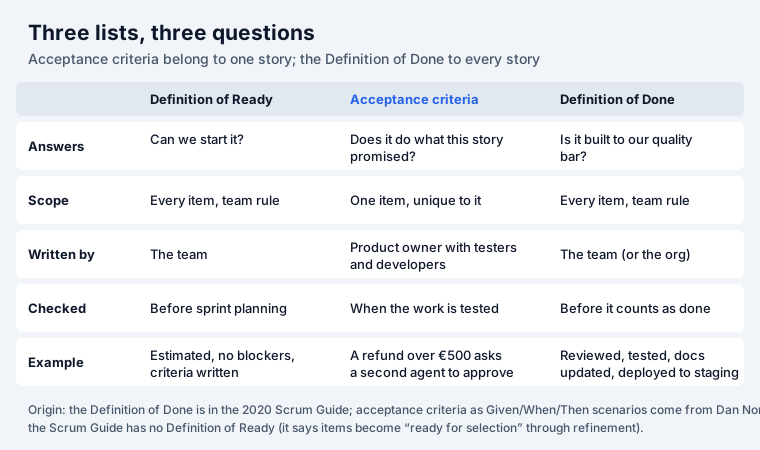
The two are easy to mix up because both are checklists. The test: if the line would be true for every story (“code reviewed”, “tests pass”), it belongs in the Definition of Done. If it only makes sense for this story (“a refund over €500 needs approval”), it is an acceptance criterion. The Scrum Guide is strict about the first: “If a Product Backlog item does not meet the Definition of Done, it cannot be released or even presented at the Sprint Review.”
A Definition of Ready is a third, optional list: what a story needs before the team takes it (estimated, criteria written, no blocking dependency). The Scrum Guide does not define one; many teams use it as their own rule for “ready for selection”.
Keeping acceptance criteria in Jira
Jira has no acceptance criteria field. Four places teams use:
| Where | Good | The catch |
|---|---|---|
| The description | Zero setup; Given/When/Then reads well | Nothing checks it; ticks are not searchable |
Native action items ([]) | Checkboxes in the description | Our test item went to Done with 2 of 3 unticked |
| A custom text field | Same place on every story | Still text; no ticking, no gate |
| A checklist app with a validator | Each criterion ticked; Done blocked | An app to install |
We tested the last two rows on our own Jira Cloud site for our
Jira checklist guide on 5 November 2026. A work item with native action items
moved to Done with two of three open. With Team Checklist
and its validator on the Done transition, the same move was refused, even through the REST API, with
“Finish the team checklist first: every item must be done (the Team Checklist panel shows what is
left).” Team Checklist ships an Acceptance criteria template next to Definition of Done, so a
project can add both to every new story; open items are searchable with JQL
(teamChecklistOpen > 0).
If the criteria are scenarios, keep them in the description where they read as a story, and put one checklist line per scenario (“Scenario: Duplicate request does not refund twice”) so each can be ticked when its test passes.
Common mistakes
- Criteria written after the work. They then describe what was built, not what was needed. Write them in refinement, before the story is “ready for selection”.
- The Definition of Done copied into every story. Twenty identical lines hide the three that matter. Keep the shared list once.
- Untestable words. “Fast”, “user-friendly”, “secure”: replace each with a number or an observable result.
- A story with fifteen criteria. It is several stories. INVEST’s S is for Small.
- Edge cases left for the tester to find. Ask in refinement: what if it is zero, empty, twice, too large, or not allowed?
Ordering the stories once their criteria are clear is a different problem; our RICE & WSJF calculator and the cost of delay calculator help there, and our epic vs story vs task guide covers where a story sits in Jira.
Sources
- Dan North, Introducing BDD (Better Software, March 2006) and What’s in a Story?.
- Cucumber, Gherkin reference.
- Bill Wake, INVEST in Good Stories, and SMART Tasks (2003).
- The 2020 Scrum Guide (Definition of Done; no Definition of Ready, no acceptance criteria).
- Our tests on simplify-demo.atlassian.net, 5 November 2026, in Jira checklist.
Frequently asked questions
What are acceptance criteria?
The conditions one piece of work must meet to be accepted: what it does, written so that anyone can check it. Dan North, who introduced the Given/When/Then form in 2006, put it as the answer to “how do we know when we have delivered this story?”.
What is the difference between acceptance criteria and the Definition of Done?
Acceptance criteria belong to one story and say what it must do. The Definition of Done applies to every story and says how it must be built: reviewed, tested, documented, deployed. The 2020 Scrum Guide calls the Definition of Done “a formal description of the state of the Increment when it meets the quality measures required for the product”. A story is finished when it meets both.
What is the Given/When/Then format?
A scenario in three parts: Given a starting situation, When something happens, Then a result you can observe. Cucumber’s Gherkin reference describes Given as “the initial context of the system”, When as “an event, or an action” and Then as “an expected outcome, or result”. Extra conditions join with And.
How many acceptance criteria should a story have?
Enough to cover the behaviour and its edge cases, usually three to eight. More than about ten often means the story is too big and should be split; Bill Wake’s INVEST asks for stories that are Small and Testable.
Who writes acceptance criteria?
The product owner owns them, but they work best written together with a tester and a developer before the sprint, so that each criterion is testable and nobody discovers a hidden case on the last day.
Where do I put acceptance criteria in Jira?
In the description, in a checklist, or in a custom text field. The description is the simplest but nothing checks it. A checklist app with a workflow validator can stop a story moving to Done until every criterion is ticked; on our site Team Checklist refused the move with “Finish the team checklist first”.
Keep reading
- Jira, JSM and the Marketplace · 14 minJira Backlog: Sort by Priority, Rank and Missing Items
- Jira, JSM and the Marketplace · 11 minDeveloper Burnout: 2026 Research, Causes and Warning Signs
- Jira, JSM and the Marketplace · 18 minJira Deadlines: Due Date JQL, Reminders, the Day Rule (2026)
- Free toolRICE & WSJF calculator