Jira Reporter vs Assignee (and Creator): Who Is Who
On this page
A bug comes in from support: “Checkout fails on Safari”. The support lead files it, so they are the reporter. The team lead hands it to a developer, who becomes the assignee. Three weeks later someone asks “who raised this?”, and the history says the support lead, though the person who actually hit the bug was a customer. Jira has three fields for people on a work item, and each answers a different question.
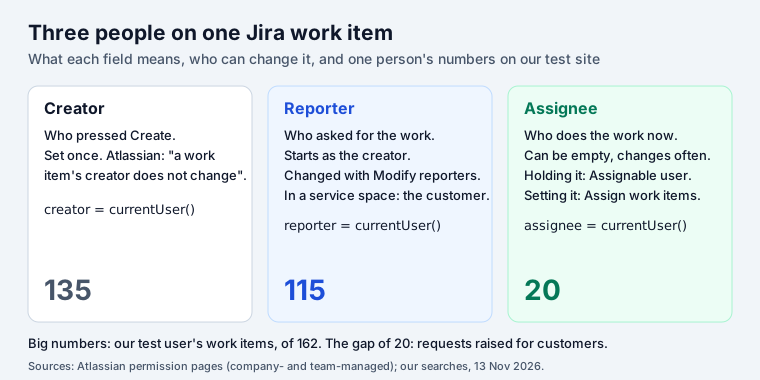
Short answer: the reporter asked for the work, the assignee does it, the creator
pressed Create. The reporter starts as the creator and can be changed with the Modify reporters
permission; the creator never changes. To be the assignee you need Assignable user; to change
the assignee, Assign work items. In JQL, reporter != assignee does not compare the two: it
returned every assigned work item on our site.
The three fields
| Creator | Reporter | Assignee | |
|---|---|---|---|
| Means | who pressed Create | who asked for the work | who does it now |
| Set by | Jira, once | Jira, then people | people, rules, defaults |
| Can be empty | no | not normally (0 on our site) | yes |
| Changes | never | rarely | often |
History search (WAS) | no | yes | yes |
Atlassian’s JQL reference spells out the first and the second: the creator “does not change, so you cannot search for past creators (e.g. WAS)”, and the reporter “may be the same as the creator, but can be distinct”.
When reporter and creator differ
On our test site one user created 135 work items and was the reporter of 115. Every one of the 20
differences was in a service space: the user raised requests on behalf of customers, so the
customer became the reporter and the user stayed the creator. reporter CHANGED returned 0, so
none of them were edited later: the reporter was set at creation.
That is the normal pattern in Jira Service Management. The reporter is the customer, the one who gets the notifications and sees the request in the portal, which is why changing it in a service space changes who hears back. In a software space the reporter and the creator are usually the same person, unless someone files work for a colleague and edits the field.
Who can change what
The four permissions, quoted from Atlassian’s work item permissions page for company-managed spaces:
| Permission | What it allows |
|---|---|
| Modify reporters | “allows users to change the Reporter field on a work item, which is set automatically when the work item is created” |
| Assign work items | “allows users to update the Assignee field on work items. This doesn’t allow work items to be assigned to a user” |
| Assignable user | “allows users to be assigned work items via the Assignee field. This doesn’t allow a user to update the Assignee field” |
| Edit work items | the other fields: summary, description and anything not restricted by its own permission |
The pair that confuses people is the last two in the middle: Assign work items is for the person setting the field, Assignable user is for the person whose name goes in it. “I can’t assign this to Priya” almost always means Priya lacks Assignable user in that space.
Team-managed spaces simplify this. The reporter permission is called Edit reporters, and in Atlassian’s default table only the Administrator role has it; Viewer and Member show “Not granted” (team-managed permissions). For the assignee, “if you grant a role any of the permissions that appear under the Work on space work items set, anyone with that role can be assigned work items in the space”.
Searching by reporter and assignee
| You want | JQL | On our site |
|---|---|---|
| Everything I reported | reporter = currentUser() | 115 |
| Everything I created | creator = currentUser() | 135 |
| I reported it, someone else has it, still open | reporter = currentUser() AND assignee != currentUser() AND statusCategory != Done | 58 |
| I reported it and nobody has it | reporter = currentUser() AND assignee is EMPTY AND statusCategory != Done | 24 |
| Assigned to me, reported by someone else | assignee = currentUser() AND reporter != currentUser() | 10 |
| Created by me for someone else | creator = currentUser() AND reporter != currentUser() | 20 |
Mind the third row. assignee != currentUser() leaves out work items with no assignee at all, so
“someone else has it” really means “someone else has it”. For “not me, including nobody”, add OR assignee is EMPTY in brackets; the JQL cheat sheet has that trap and six
more with numbers.
reporter != assignee does not compare them
The query people try first for “work where the reporter is not the assignee” is reporter != assignee. Jira accepts it. On our site, with 106 assigned work items, it returned all 106,
including the 10 where reporter and assignee were the same person. reporter = assignee returned
0.
JQL compares a field with values, never with another field. The right side is read as a user
called “assignee”. To answer the question, filter by person: reporter = currentUser() AND assignee != currentUser() is the version that works for your own work. For a whole team there is no plain
JQL; an export to a spreadsheet (see Jira export to Excel) or an app
does the comparison.
Our free JQL builder flags a field-to-field comparison when you paste one. In Jira, JQL Blocks builds people searches from blocks, with OR groups such as “assigned to me or to nobody” that Jira’s basic search cannot make.
Rules that set the assignee for you
- Default assignee. A space can assign new work to its lead or leave it unassigned, and components can set their own default.
- Automation. A rule can set the assignee when a work item is created or moves, for example “assign to the reporter” when it comes back for more information.
- Service spaces. Queues and rules often assign requests by request type or round-robin.
Whichever sets it, the reporter stays. That is the field to use when someone asks who to go back to.
How we checked
- Permission wording from Atlassian’s work item permissions and team-managed space permissions pages, and field wording from the JQL fields reference, read on 13 November 2026.
- Counts from our Jira Cloud test site (162 work items in software, service and business spaces) on the same day.
Frequently asked questions
What is the difference between reporter and assignee in Jira?
The reporter is the person who asked for the work; the assignee is the person doing it now. The reporter starts as whoever created the work item and rarely changes; the assignee can be empty and changes as work moves between people.
Can the reporter and the assignee be the same person?
Yes, and it is common for work people file for themselves. On our test site 10 of the 20 work items assigned to one user were also reported by that user.
How do I change the reporter in Jira?
Edit the Reporter field on the work item. You need the Modify reporters permission in company-managed spaces, or Edit reporters in team-managed ones, where Atlassian's default grants it to administrators only.
What is the difference between creator and reporter?
The creator is whoever pressed Create, and Atlassian notes that "a work item's creator does not change". The reporter starts as the creator but can be changed, and in a service space it is the customer the request is for.
Why can't I assign a work item to someone?
They need the Assignable user permission in that space. Being able to set the field is a different permission, Assign work items. In team-managed spaces anyone whose role has any of the "work on work items" permissions can be assigned.