Definition of Done Examples From 1,000 GitHub Projects
On this page
- What 1,000 open-source projects put in their Definition of Done
- The 2026 addition: rules about AI-written code
- Three real Definitions of Done
- Eight Definitions of Done to copy
- How to write items that work
- Definition of Done, acceptance criteria, Definition of Ready
- Making Jira check it
- How we counted
- Sources
A story moves to Done on Thursday. At Friday’s review the product owner clicks through the demo and asks where the setting is documented. It is not. Nobody skipped anything on purpose: the developer thought “done” meant merged, the tester thought it meant tested on staging, and the writer never heard about the change.
A Definition of Done is the list that settles that argument before it happens. Most articles about it give one invented example. We went looking for real ones instead, and found 335 of them, published, in the pull-request templates of the most popular projects on GitHub.
Short answer: the Definition of Done is the quality bar every item must pass before it counts as done. The 2020 Scrum Guide calls it “a formal description of the state of the Increment when it meets the quality measures required for the product.” A good one is short and checkable:
[ ] Code reviewed by someone other than the author
[ ] Tests for the change added and passing in CI
[ ] Acceptance criteria met and checked by the reporter
[ ] Docs, help text or release note updated
[ ] Deployed to staging and tried there
In 335 open-source checklists, 70% ask for tests, 57% for docs, the median length is 6 items, and 56 projects added a rule about AI-written code since June 2025.
What 1,000 open-source projects put in their Definition of Done
GitHub lets a project add a pull-request template: text that pre-fills every new pull request. Many projects put a checklist in it. Each box is something the contributor must have done before the change can be merged. That is a Definition of Done, written down and in daily use, for one change at a time.
On 13 November 2026 we read the template of each of the 1,000 most-starred repositories on GitHub (every one had at least 34,700 stars). 513 have a template. 335 have a checklist in it. We left out the boxes that only classify a change (“Bug fix”, “New feature”, “Breaking change”) and sorted the rest into kinds of check.
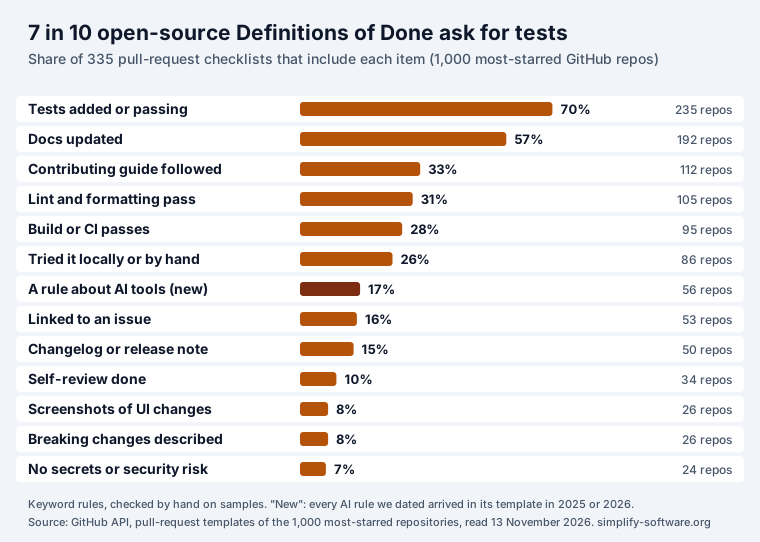
Four things stand out.
- Two items are near universal. Tests (70%) and docs (57%) are the core of almost every list. If your Definition of Done has only two lines, these are the two.
- The lists are short. The median checklist has 6 items. Half have between 3 and 9; the longest has 39. A list people read every time beats a complete one they skim.
- Process items are as common as quality items. A third ask the contributor to follow the contributing guide, and 16% want the change linked to an issue. Inside a company these become “linked to the Jira work item” and “follows our coding conventions”.
- Some items are rarer than you would expect. Only 10% ask for a self-review, 8% for screenshots of UI changes, and 7% for a check that no secrets or credentials are in the change. These are cheap to add and catch real mistakes.
The open-source context is not the same as a sprint team, so treat these numbers as what experienced maintainers find worth asking for, not as a standard. Some items do not carry over: signing a contributor licence agreement (4%) matters to a project that accepts code from strangers, not to an in-house team.
The 2026 addition: rules about AI-written code
The newest item in these checklists did not exist two years ago. 56 of the 335 checklists (17%) now have a rule about AI tools. We looked up when each rule first appeared in its template’s history: the earliest is June 2025, and 45 of the 56 arrived in 2026.
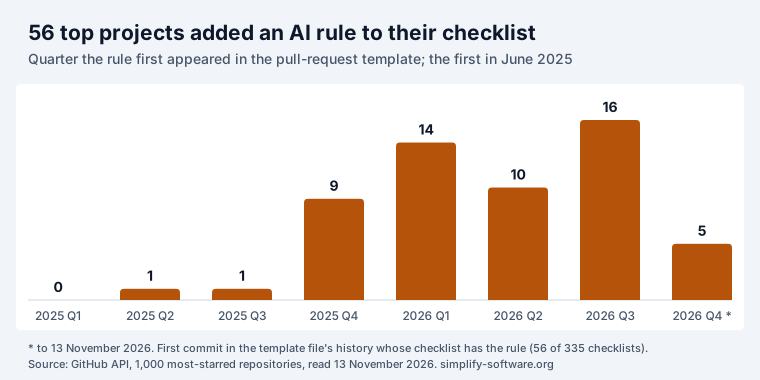
The rules fall into three kinds:
- Disclose it (33 projects). Django asks contributors to tick either “No AI tools were used” or that they “have disclosed which ones, and fully reviewed and verified their output”. Vim wants the AI involvement named in the commit message.
- Own it (27 projects). pandas offers a second box for people who did use AI: they “reviewed and understood every change”. Flutter points to its AI contribution guidelines and asks contributors to confirm they understand their responsibilities. Home Assistant asks that any generated code be “carefully reviewed for correctness” and, separately, that the author can explain how the code works.
- Do not use it (4 projects). yt-dlp has a box confirming the change complies with its “NO AI / NO LLM POLICY”. The awesome list does not accept fully AI-generated pull requests.
A project can be in more than one group. The lesson for an internal team is not which policy to pick. It is that the Definition of Done is where teams now write it down. If your team uses AI coding tools and has an agreed rule about review, a checkbox makes the rule visible on every change, the same way “tests added” does.
The checklist box is usually the short version of a longer policy. What 205 of the same 1,000 projects write in their full AI rules, from outright bans to “no disclosure needed”, with three policies to copy: AI contribution policy examples.
Three real Definitions of Done
Short extracts, so you can see how mature teams phrase their items. Each link goes to the project.
Django (11 items). Beyond the AI boxes, it asks for: the
change targets the main branch; the commit message follows the project’s format and names the
ticket; tests added or updated; docs and release notes updated; screenshots “in both light and dark
modes for any UI changes”; and a box confirming the pull request does not disclose a security
vulnerability, which belongs in the private reporting channel instead.
Home Assistant (14 items). The most demanding list we saw from a project of its size. Tests added and passing locally; code formatted with Ruff; no commented-out code; documentation updated in the separate docs repository; dependency changes linked to the library’s changelog; and “I have reviewed two other open pull requests in this repository”, a rule that turns every contributor into a reviewer.
freeCodeCamp (4 items). The minimum: read the
contribution guidelines, read the pull-request guide, target main, and test the change locally or in
GitHub Codespaces. Four items that people actually tick are worth more than twenty that nobody reads.
Eight Definitions of Done to copy
These are ours, built from the patterns above and the Scrum Guide’s rule that every item must be checkable before the work counts. Each item can be answered yes or no by someone other than the author. Pick the closest one and cut what does not apply; adding an item later is easier than getting people to take one seriously after it has been ignored.
Web app (feature)
[ ] Acceptance criteria met and demonstrated to the product owner
[ ] Code reviewed and approved by another developer
[ ] Unit and integration tests added; CI green
[ ] Works in the supported browsers at phone and desktop width
[ ] Keyboard and screen reader check of new controls done
[ ] Feature flag or rollout plan agreed
[ ] Help text, docs or release note updated
Backend or API
[ ] Code reviewed; no TODOs left without a linked work item
[ ] Unit tests plus a contract or integration test for each endpoint changed
[ ] API reference updated (OpenAPI or docs page)
[ ] Breaking changes listed, with a version or migration path
[ ] Database migration tested on a copy of production data, with a rollback
[ ] Logs and metrics added for the new path; no secrets or personal data in logs
[ ] Deployed to staging and smoke-tested
Mobile app
[ ] Code reviewed and approved
[ ] Tests added; CI build passes for iOS and Android
[ ] Tried on a real device for each platform, smallest supported screen included
[ ] Works offline or fails with a clear message
[ ] Text ready for translation; no hard-coded strings
[ ] Screenshots attached for UI changes, light and dark mode
[ ] Store notes or release notes drafted
Data pipeline
[ ] Code reviewed; SQL or transformation logic explained in the work item
[ ] Tests on sample data, including empty and malformed input
[ ] Row counts and key totals reconciled against the source
[ ] Schema change documented; downstream owners told
[ ] Backfill plan written if history changes
[ ] Monitoring and an alert on failure or late data set up
[ ] Data catalogue or README updated
Infrastructure or platform
[ ] Change made in code (Terraform, Helm, scripts), not by hand
[ ] Plan or diff reviewed by a second engineer
[ ] Applied to a non-production environment first
[ ] Rollback steps written and tried once
[ ] Alerts and dashboards cover the change
[ ] No credentials in code or logs; secrets in the vault
[ ] Runbook updated
Library or open-source project
[ ] Tests added; full suite passes
[ ] Public API documented with an example
[ ] Changelog entry added
[ ] Breaking change marked and version bump agreed
[ ] Lint and formatting pass
[ ] Linked to the issue it fixes
[ ] AI use disclosed and the output reviewed line by line, if used
Bug fix
[ ] Reproduced on the reported version before the fix
[ ] Root cause written in the work item
[ ] A test that failed before the fix now passes
[ ] Verified by someone other than the author
[ ] Same bug checked for in similar code
[ ] Reporter or support told the fix is released
Marketing or content team
[ ] Brief's goal and audience met, checked by the requester
[ ] Facts and numbers checked against their sources
[ ] Copy reviewed by a second person; brand and style guide followed
[ ] Links, images and alt text checked
[ ] Legal or compliance sign-off, if the piece needs one
[ ] Published or scheduled; tracking in place
How to write items that work
The Scrum.org trainer Chuck Suscheck puts the test well: items should be “actionable and binary”. The open-source templates show the difference in practice.
| Vague item | Checkable item |
|---|---|
| Tested | Tests for the change added; CI green |
| Documented | API reference and release note updated |
| Reviewed | Approved by one developer who did not write it |
| Works on mobile | Tried at 390 px width and on one real phone |
| Secure | No secrets in the diff; input validated on the server |
| High quality | (cut it: nobody can tick this honestly) |
| Customer is happy | (not within the sprint: track it as an outcome instead) |
Three more rules from the Scrum Guide and from what the 335 lists do:
- Every item must be possible inside one sprint. “Clinical trials completed” or “sales up 3%” cannot be ticked when the work is finished; they belong to outcomes, not to Done.
- Organisation first, team second. The Scrum Guide: if the Definition of Done is part of the organisation’s standards, “all Scrum Teams must follow it as a minimum.” A team can add items, not remove them. Several teams on one product share one list.
- Review it at the retrospective. The Scrum Guide has the team inspect “processes, tools, and their Definition of Done” there. Add an item when the same miss happens twice; remove an item that is marked “not applicable” most of the time.
Definition of Done, acceptance criteria, Definition of Ready
The three get mixed up because they are all lists. The difference is scope and timing:
| List | Belongs to | Answers | Checked |
|---|---|---|---|
| Definition of Ready | each item | can we start it? | before the sprint |
| Acceptance criteria | one item | does it do what was asked? | when the work is done |
| Definition of Done | every item | is it finished to our quality bar? | before it counts |
The Scrum Guide defines only the Definition of Done; it does not mention acceptance criteria at all. Our acceptance criteria guide has 18 examples with Given/When/Then and shows the two lists side by side. For the first row, see Definition of Ready examples, with a version for AI coding agents.
Making Jira check it
A Definition of Done that lives on a Confluence page is read once. One that sits on every work item, and stops the move to Done until it is ticked, is used. In Jira Cloud you have three options:
- The description. Paste the list as action items. It is visible, but nothing enforces it: in our test for the Jira checklist guide, a work item moved to Done with two of three boxes unticked.
- A workflow rule on a field. Company-managed workflows can require a field before a transition. That checks that a field is filled, not that each step happened.
- A checklist with a validator. Team Checklist, our app, ships a Definition of Done starter template (code reviewed, tests written and passing, acceptance criteria met, documentation updated, deployed to staging) that a project can add to every new story, and a workflow validator, “Team checklist is done”. With it on the Done transition, Jira refuses the move while any item is open and says: “Finish the team checklist first: every item must be done (the Team Checklist panel shows what is left).” The validator also applies to moves made through the REST API. Team Checklist is free for up to 10 users.
Whichever you choose, the list should be the same one the team agreed at the retrospective, kept in one place, and edited there. Team Checklist templates show Update available on work items when a project admin changes the template, so an edited Definition of Done reaches the stories already in progress without overwriting what was ticked.
The release needs its own Done too. Writing the notes for it, with four versions to copy (customers, support, developers, app stores) and the Jira steps for a first draft: release notes template.
How we counted
- Sample: the 1,000 most-starred public repositories from the GitHub search API
(
stars:>1000, sorted by stars), read on 13 November 2026. The smallest had 34,741 stars. - Templates: the files GitHub’s documentation lists as pull-request templates, in the root,
docs/or.github/(any case,.mdor.txt), plus every file in aPULL_REQUEST_TEMPLATEfolder. Two independent fetch methods gave the same result on a 60-repository check. - Checklist items: Markdown task lines (
- [ ]) outside HTML comments. Boxes in sections that classify the change (type, area, platform) and bare “Bug fix” or “New feature” boxes were left out. A repository counts once per kind of item, however many templates it has. - Kinds of item: keyword rules, with link targets removed first. We read samples of 12 items per kind by hand and tightened rules that caught the wrong thing. For AI rules we read all 65 matches and dropped 9 that were not about AI-written contributions (for example “Tested with Claude Code” in repositories that build tools for AI clients).
- AI dates: for each of the 56, the oldest commit in the template file’s history whose checklist already had the AI rule. A template moved to a new path starts its history there, so a few rules may be older than shown.
- Not counted: rules that live only in a CONTRIBUTING file, in CI, or in branch protection. Many projects enforce tests and formatting in CI without a checkbox, so the real share of projects that require tests is higher than 70%.
The scripts and raw data are in our research notes.
Sources
- Ken Schwaber and Jeff Sutherland, The 2020 Scrum Guide, sections “Commitment: Definition of Done”, “Developers” and “Sprint Retrospective”.
- Chuck Suscheck, Definition of Done (DoD) Explanation and Example, Scrum.org, 9 January 2024.
- Scrum.org, What is a Definition of Done?
- GitHub Docs, Creating a pull request template for your repository.
- Pull-request templates of Django, Flutter, Home Assistant, pandas, Vim, yt-dlp, awesome and freeCodeCamp, read through the GitHub API on 13 November 2026.
- Our own test of Jira action items and the Team Checklist validator, 5 November 2026, described in Jira checklist.
Frequently asked questions
What is the Definition of Done?
A short list of quality checks that every piece of work must pass before the team calls it done. The 2020 Scrum Guide defines it as “a formal description of the state of the Increment when it meets the quality measures required for the product.” It applies to every item, unlike acceptance criteria, which belong to one item.
What are the three functions of the Definition of Done?
The Scrum Guide gives it three jobs. It creates transparency, “providing everyone a shared understanding of what work was completed”. It sets the quality bar, “the quality measures required for the product”. And it decides what counts: an item that does not meet it “cannot be released or even presented at the Sprint Review.”
Who decides the Definition of Done?
The organisation sets the minimum if it has one, and the team adds to it. The Scrum Guide says that if it is an organisational standard, “all Scrum Teams must follow it as a minimum”; if not, “the Scrum Team must create a Definition of Done appropriate for the product.” Teams working on one product share the same one.
What is the difference between the Definition of Done and acceptance criteria?
Acceptance criteria say what one story must do, for example “a refund cannot exceed the payment”. The Definition of Done says how every story must be finished: reviewed, tested, documented, deployed. A story is done when it meets both. Our acceptance criteria guide has 18 examples of the first kind.
How long should a Definition of Done be?
Short enough that people read it every time. In the 335 open-source checklists we counted, the median was 6 items and half had between 3 and 9. Past about ten, items start being ticked without being checked.
Can the Definition of Done change during a sprint?
It can, but it usually waits for the retrospective, where the Scrum Guide has the team inspect “processes, tools, and their Definition of Done.” A change mid-sprint changes the scope of work already in progress, so agree it with the whole team.
Does a bug fix need the same Definition of Done?
Yes, the team Definition of Done applies to every item, bug fixes included. Many teams add bug-specific items on top: reproduced on the reported version, covered by a test that failed before the fix, verified by someone other than the author.