Excalidraw Math & LaTeX: Every Way to Add Equations in 2026
You are sketching a model on Excalidraw. Boxes, arrows, a hand-drawn threshold line — and then the
formula that ties it together: s = 1 / (1 + e^{-z}). You look for an equation tool. There isn’t
one. You type the formula as text, and the superscript sits on the baseline like a typo.
That moment is common enough to have a history. The first request for math in Excalidraw was opened in April 2020. A pull request with MathJax support has been waiting since December 2022. As of 24 October 2026 the latest release, v0.18.1, still cannot typeset an equation.
Short answer: Excalidraw has no built-in LaTeX. You have six practical options:
| You work in… | Use | Equation stays editable |
|---|---|---|
| excalidraw.com, once in a while | an SVG of the formula, pasted in | no — keep the source |
| excalidraw.com, simple formulas | Unicode characters (x², ∑, ≤) | yes, it is text |
| a browser, math-heavy notes | math.preview.excalidraw.com | yes |
| Obsidian | the Excalidraw plugin’s “Insert LaTeX formula” | yes |
| your own web app, or offline | ExcaliMath | yes |
| Confluence or Jira | an Excalidraw app with a LaTeX editor | yes |
The rest of this guide explains each one, what it costs you, and why the native feature is taking so long. At the end there are formulas ready to paste.
Why Excalidraw has no LaTeX button yet
We went through the Excalidraw repository on GitHub and counted. The request is old, popular and still open:
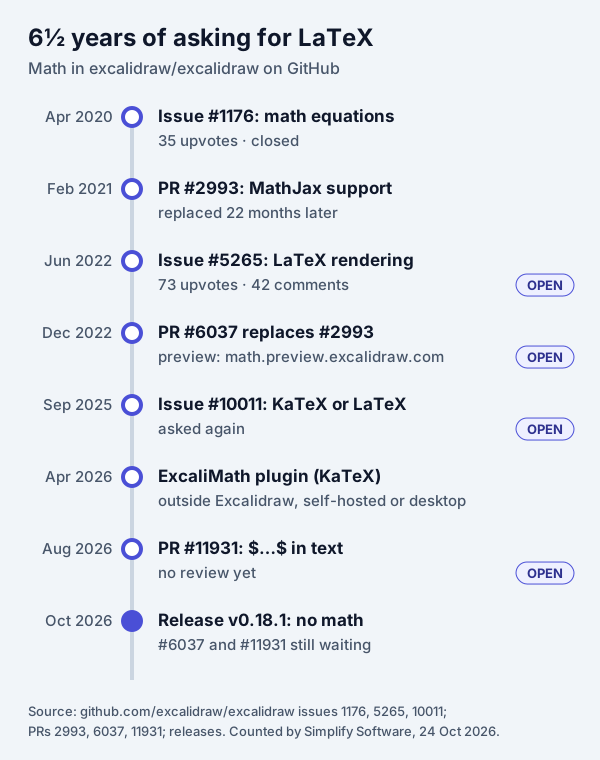
- Issue #1176, “Support for writing / rendering math equations”, opened 3 April 2020: 35 upvotes, 22 comments.
- Pull request #2993, February 2021: MathJax rendering through a new “Math” tool. It was closed in December 2022 and “Replaced by #6037.”
- Issue #5265, “Add LaTeX rendering support”, June 2022: 73 upvotes and 42 comments — the main place people ask, and still open.
- Pull request #6037, “Support LaTeX and AsciiMath via MathJax”, December 2022: 49 comments, still open. On 16 October 2026 a user wrote: “4 years later, one still can’t use Excalidraw for math notes…”
- Pull request #11931, August 2026: a smaller design, described below. Open, with no review yet.
The two pull requests show why this is hard. #6037 adds a new kind of element — the author’s
“subtypes” system — so math becomes a first-class object. That touches the core data model of a
project with 134,000 GitHub stars and many apps built on its file format. #11931 goes the other
way: “Text elements whose content is wrapped in $…$ (inline) or $$…$$ (display) are typeset as
math equations”, with no new element type, so “older clients … simply show the raw source”. The price
is size: its author notes the MathJax engine is “~611 kB gzip”, loaded the first time someone uses
math.
Until one of them is merged, every option below is a workaround. They differ in what you give up.
1. math.preview.excalidraw.com: the official preview
What it is. The preview deployment of pull request #6037, hosted by the Excalidraw project. In the pull request thread the author asks people to “use #5265 to report any bugs you find while using https://math.preview.excalidraw.com/”.
How to use it. Choose the Math tool and type LaTeX between the delimiters. The
original pull request describes them: “The
delimiters are the usual ‘\(’ and ‘\)’ for Latex, and backward tick marks (‘`’) for AsciiMath.” So
\(\frac{a}{b}\) is a fraction, and `a/b` is the same fraction in AsciiMath, the simpler
notation meant for people who don’t know LaTeX. A Math only mode renders the whole element as math,
which suits aligned and cases blocks.
What it costs you. It is a branch, not a product:
- It falls behind excalidraw.com. In October 2025 a user noted that “lasso selection is not available”.
- Links may not last. The same user worried that “all my math preview permalinks may fail once
it’s merged”. Save important scenes as
.excalidrawfiles, not only as links. - In February 2026 a user reported that SVG
exports clip subscripts at the bottom (
a_1), and used asedcommand to addoverflow="visible"as a fix.
Use it when you want real LaTeX in a browser, today, for notes or teaching, and you keep your own copies of the files.
2. Obsidian Excalidraw plugin
If your diagrams live in Obsidian, this is the easiest option. The Obsidian Excalidraw plugin (7,774 stars, release 2.29.0 on 12 October 2026) has LaTeX built in. From its README: “Insert LaTeX formulas using the Command Palette action ‘Insert LaTeX formula’. You can edit formulas either in Markdown view or by CTRL/CMD + Click on the formula.”
What it costs you. It only exists inside Obsidian. A colleague who opens the scene on excalidraw.com will not get the same editing experience.
Use it when your notes are already in Obsidian.
3. ExcaliMath: a KaTeX companion plugin
ExcaliMath was
announced in April 2026. It “wraps —
never forks — the @excalidraw/excalidraw React component” and adds “LaTeX authoring via KaTeX with
live preview and click-to-edit”, a toolbar for fractions, integrals and matrices, function graphs and
STEM shape libraries. There is a desktop app whose features “work fully offline”. The README promises
that you can “save and reopen .excalidraw files with equations and graphs intact”.
What it costs you. It is not excalidraw.com. You run the desktop app, or build it into your own
React app (npm install, npm run dev). It is a young project (MIT licence, 35 stars).
Use it when you build your own whiteboard on Excalidraw, or want a math-first desktop whiteboard.
4. Render the formula and paste it as an SVG
This works on plain excalidraw.com, with no add-ons. Excalidraw accepts images; its source lists the types: SVG, PNG, JPEG, GIF, WebP, BMP, ICO, AVIF and JFIF.
- Typeset the formula in any equation editor that exports SVG (prefer SVG to PNG: it stays sharp when you zoom or resize).
- Paste it, or drag the file onto the canvas.
- Put the LaTeX source next to it — in a small text element, or in the image’s link field — so you can render it again later.
What it costs you. The formula is now a picture. To change one sign you render it again and replace the image. In his 2023 write-up on bulk-importing lecture equations into Excalidraw, Baptiste notes that these equations can’t be edited on the canvas. His post is also the place to look if you need to import hundreds of equations at once.
Use it when you need a formula or two in a diagram that otherwise lives on excalidraw.com.
5. Unicode characters for simple formulas
Many formulas on a whiteboard are short: x² + y² = r², Δt ≤ 5 s, ∑ xᵢ. Unicode has the
characters, and Excalidraw text accepts them. You can edit them like any text, and they survive copy,
paste and export.
| Need | Characters |
|---|---|
| Powers | ⁰ ¹ ² ³ ⁴ ⁵ ⁶ ⁷ ⁸ ⁹ ⁿ ⁱ ⁺ ⁻ |
| Indices | ₀ ₁ ₂ ₃ ₄ ₅ ₆ ₇ ₈ ₉ ₙ ᵢ ⱼ |
| Operators | × ÷ ± ∓ · √ ∑ ∏ ∫ ∂ ∇ |
| Relations | = ≠ ≈ ≡ ≤ ≥ ≪ ≫ ∝ → ⇒ ⇔ |
| Sets | ∈ ∉ ⊂ ⊆ ∪ ∩ ∅ ℝ ℕ ℤ |
| Greek | α β γ δ ε θ λ μ π σ φ ω Δ Σ Ω |
| Other | ∞ ° ′ ″ ½ ¼ ¾ |
What it costs you. There is no layout: no stacked fractions, roots over long expressions, matrices or limits under a sum. Not every font has every symbol either — adding characters to Excalidraw’s hand-drawn font is still an open request. If a symbol looks wrong, switch that text to another font in the font picker.
Use it when the formula fits on one line.
6. Excalidraw with LaTeX in Confluence and Jira
Teams often draw their diagrams on Confluence pages and Jira issues, not on excalidraw.com, and an Atlassian app can ship its own editors. We make one: Excalidraw Math Equations & LaTeX Whiteboard for Confluence and the same app for Jira.
How it works:
- In the whiteboard you open the LaTeX Math editor, type the formula and see a live preview. If the LaTeX is wrong, the preview names the error (for example “Missing close brace”) and Insert stays disabled.
- The formula is typeset with MathJax and placed on the canvas in its real proportions. You can draw arrows and notes around it.
- The LaTeX source is stored with the drawing. Update reopens it, and the formula keeps its place and scale.
- The same whiteboard has Mermaid, Graphviz, Vega-Lite charts and WaveDrom, so a formula can sit next to the chart or flowchart it explains.
- Everything is stored in your Atlassian site and rendered in the browser. The app makes no external calls. Exporting a Confluence page to PDF or Word includes the diagram.
What it costs you. It works only in Confluence or Jira Cloud, and editing at the same time is protected against conflicts but is not live co-editing.
Use it when the formula belongs with a team’s specs, models or tickets. You can try it free on the Atlassian Marketplace (Jira version).
Formulas ready to paste
These work in MathJax and KaTeX, so they work in options 1, 2, 3 and 6. For the preview build, put
each one between \( and \), or use Math only.
| What | LaTeX |
|---|---|
| Fraction | \frac{a+b}{2} |
| Sigmoid | \sigma(z) = \frac{1}{1 + e^{-z}} |
| Sum with limits | \sum_{i=1}^{n} x_i |
| Integral | \int_{0}^{\infty} e^{-x}\,dx = 1 |
| Root | x = \frac{-b \pm \sqrt{b^2 - 4ac}}{2a} |
| Matrix | \begin{pmatrix} a & b \\ c & d \end{pmatrix} |
| Cases | f(x) = \begin{cases} 1 & x \ge 0 \\ 0 & x < 0 \end{cases} |
| Aligned steps | \begin{aligned} y &= 2(x+1) \\ &= 2x + 2 \end{aligned} |
| Big-O | O(n \log n) |
| Probability | P(A \mid B) = \frac{P(B \mid A)\,P(A)}{P(B)} |
Three tips that save time on a whiteboard:
- Keep formulas short and split them. One equation per element is easier to place, align and connect with arrows than a long block.
- Use
\,for thin spaces (as indxabove) and\text{...}for words inside a formula. - Keep the source. Whatever the method, store the LaTeX somewhere you can copy it from, even for formulas you pasted as images.
Which one should you pick?
- You need one formula on excalidraw.com, now: Unicode if it fits on one line; otherwise an SVG.
- You take math notes in a browser: math.preview.excalidraw.com, and save the files.
- Your notes are in Obsidian: the plugin’s “Insert LaTeX formula”.
- You are building a product on Excalidraw: look at ExcaliMath, or follow #6037 and #11931.
- Your team documents in Confluence or tracks work in Jira: Excalidraw Math for Confluence or for Jira.
If native support lands in Excalidraw, we will update this guide. The quickest way to see when is to watch issue #5265.
Frequently asked questions
Does Excalidraw support LaTeX?
Not in a release. The latest version, v0.18.1 (April 2026), has no math support. LaTeX works in the preview build at math.preview.excalidraw.com, which runs the unmerged pull request #6037, and in add-ons such as the Obsidian Excalidraw plugin and ExcaliMath.
How do I write a math equation in Excalidraw?
On excalidraw.com, render the formula as an SVG in any equation editor and paste or drag it onto the canvas, or type simple formulas with Unicode characters such as x², ∑ and ≤. For real LaTeX on the canvas, use math.preview.excalidraw.com, the Obsidian Excalidraw plugin, ExcaliMath, or an Excalidraw app with a LaTeX editor in Confluence or Jira.
What is math.preview.excalidraw.com?
It is the preview deployment of pull request #6037, which adds LaTeX and AsciiMath through MathJax. You choose the Math tool and type LaTeX between \( and \). It is not a release: users report it lags behind excalidraw.com in features, and some worry their links to it will stop working when the change is merged.
Can I edit an equation after I add it to Excalidraw?
Only if the formula was added as math, not as a picture. The preview build, the Obsidian plugin, ExcaliMath and the Confluence and Jira apps keep the LaTeX source, so you can open it and change it. A pasted SVG or PNG is just an image: keep the LaTeX source next to it so you can render it again.
Does the Obsidian Excalidraw plugin support LaTeX?
Yes. Run the command palette action "Insert LaTeX formula". To change a formula, open it in Markdown view or Ctrl/Cmd-click it on the canvas.
Can I use LaTeX in Excalidraw in Confluence or Jira?
Yes, with an app that ships a LaTeX editor. Excalidraw Math Equations & LaTeX Whiteboard for Confluence and for Jira typeset formulas with MathJax inside the whiteboard, keep the source editable and store everything in your Atlassian site.