.env File Format: 11 Parsers Tested, 31 Disagreements
On this page
- The short answer: rules every loader agreed on
- What a .env file is, and how to create one
- How we tested
- 1. A # inside a value
- 2. A $ inside a value
- 3. Referencing other variables
- 4. Quotes, line breaks and \n
- 5. Line endings, BOM and odd keys
- 6. Who wins: the shell or the file
- 7. The surprise: some loaders run commands from the file
- All 43 results
- A .env file that reads the same everywhere
- Keep the secrets in it out of tickets and git
A teammate’s new database password is Xk9#vR2$mq. It goes into .env as
DB_PASSWORD=Xk9#vR2$mq. The Python worker connects. The Node API gets “password authentication
failed”. In Docker Compose it fails too, with a different wrong password.
We tested it. Node’s dotenv read the value as Xk9: everything after # is a comment.
Docker Compose read Xk9#vR2: it kept the #, but treated $mq as a variable that is not
set. Python’s dotenv and Go’s godotenv read the whole password. That is one line, one file and three
different values.
The reason is simple: there is no .env specification. Each library has its own parser, and the
pages that rank for “env file format” each describe one of them. So we wrote 38 small .env files,
loaded every one with 11 loaders in five languages, and wrote down what landed in the environment.
The short answer: rules every loader agreed on
Of 43 values we checked, all 11 loaders agreed on 12. If a .env file keeps to them, it reads the
same in Node, Python, Go, Ruby, PHP, Docker Compose and bash:
KEY=valuewith no spaces around=(bash fails onA = hello).- Keys of capital letters, digits and
_only (MY-KEYis skipped by two loaders and makes two others reject the whole file). - A
#comment on its own line, or after a space at the end of the line. export KEY=valueworks everywhere.- A value with a space,
#or$goes in single quotes:DB_PASSWORD='Xk9#vR2$mq'came through intact in 9 of 11 loaders. The two that cut it are dotenv-expand 12 and 1000, which expand$mqeven in single quotes. - A value over several lines goes in double quotes, with real line breaks. All 11 loaders read
that the same way. Single-quoted multi-line values break phpdotenv, and
\ninside double quotes stays as two characters in Ruby’s dotenv 3 and in bash. - Do not reference other variables (
${BASE}/app) if more than one tool reads the file: loaders split three ways on it, and two of them turn${MISSING:-fallback}into:-fallback}. - Never write
$(…)in a value. Four loaders run it as a command (see below). - Save as UTF-8 without a BOM, with LF line endings. A BOM hid the first key from Node’s built-in loader and bash;
CRLF left
\rat the end of every value in bash. - The last duplicate wins in all 11, but do not rely on it: delete the first one.
What a .env file is, and how to create one
A .env file is a plain text file of KEY=value lines in the root of a project. A library reads it
when the program starts and puts each pair into the process environment, so the code reads
process.env.DB_PASSWORD or os.environ["DB_PASSWORD"] and the value is not written in the code.
The idea comes from the Twelve-Factor App
rule of keeping configuration in the environment; the file is the convenient local copy of that
environment.
To create one, make a file named .env (nothing before the dot) next to package.json,
pyproject.toml or compose.yaml:
In Windows PowerShell:
New-Item .envOn macOS, Linux or in Git Bash:
touch .envIn VS Code use File, New File and type .env. In editors that offer it, set the encoding to UTF-8
(not “UTF-8 with BOM”) and the line ending to LF; the next sections show why. Add .env to
.gitignore before the first commit, and commit a .env.example with the same keys and no real
values instead.
How we tested
On 9 November 2026 we wrote 38 small .env files, each testing one thing: a # in a value, a $,
quotes, line breaks, odd keys, CRLF, a BOM and so on. Each loader loaded each file into the
process environment, the way an application does, in a fresh process. A variable named PRESET
was already set in that process, so we could see whether the shell or the file wins.
| Loader | Version | How it loaded the file |
|---|---|---|
| dotenv (Node) | dotenv 18.0.10 | require('dotenv').config() |
| dotenv + dotenv-expand (Node) | dotenv-expand 12.0.3 | expand(config()) |
| dotenv + dotenv-expand (Node) | dotenv-expand 1000.0.0 | expand(config()) |
| dotenvx (Node) | dotenvx 2.38.2 | require('@dotenvx/dotenvx').config() |
| Node built-in | Node 24.22.1 | process.loadEnvFile() |
| Python | python-dotenv 1.2.4 | load_dotenv() |
| Go | godotenv 1.5.1 | godotenv.Load() |
| Ruby | dotenv gem 3.2.0 (Ruby 3.4.12) | Dotenv.load |
| PHP | phpdotenv 5.8.0 (PHP 8.5.12) | Dotenv::createImmutable()->load(), as Laravel does |
| Docker | Docker Compose 5.0.2 | env_file: in compose.yaml |
| Shell | bash 5.2.37 | set -a; . ./.env; set +a |
Node, Python, Go and Compose ran on Windows 11; Ruby, PHP and bash ran in Linux containers. The test files, the scripts and the raw results are kept with our research notes, so every number below can be rerun.
1. A # inside a value
A=pa#ss gave pa in dotenv, both dotenv-expand versions, dotenvx, Node, Ruby and PHP, and
pa#ss in python-dotenv, godotenv, Docker Compose and bash. Both groups follow their own
documentation. Node’s says that “Hash-tag ( # ) characters denote the beginning of a comment”
(Node.js docs), and dotenv’s README adds that
this “is a breaking change from >= v15.0.0 and on”. Docker’s says “Inline comments for unquoted
values must be preceded with a space”
(Docker docs).
This is the commonest way a generated password breaks. Password managers put # in passwords, and
the loader gives no error: the app just receives a shorter password.
Fix: single quotes. In DB_PASSWORD='Xk9#vR2$mq' the # survived in all 11 loaders (the $ is
the next section).
2. A $ inside a value
A=pa$word gave pa in both dotenv-expand versions, dotenvx, Ruby, Docker Compose and bash:
they read $word as a variable, find nothing and put in an empty string. dotenv, Node, python-dotenv,
godotenv and phpdotenv kept pa$word. python-dotenv and phpdotenv expand only the ${NAME} form;
their READMEs say a bare $NAME is not expanded.
godotenv is a case of its own. Its pattern for a variable name is [A-Z0-9_]+, capitals only, so
pa$word survives, pa$WORD becomes pa, and pa$Word becomes paord: it expands $W and
keeps the rest. We checked all three.
Escaping is no fix either. A="pa\$word" gave pa$word in eight loaders, but dotenv, Node and
python-dotenv kept the backslash: pa\$word.
Fix: single quotes again, with one exception. 'Xk9#vR2$mq' came through whole in nine
loaders. dotenv-expand (12.0.3 and 1000.0.0) still cut it to Xk9#vR2, and it also expanded
'${BASE}/app' to /srv/app, as did python-dotenv for the ${…} form. dotenv removes the
quotes before dotenv-expand sees the value, so dotenv-expand cannot know they were there.
3. Referencing other variables
BASE=/srv then A=${BASE}/app is the main reason people add an “expand” library. The loaders
split three ways:
- plain dotenv and Node’s
process.loadEnvFile()do not expand at all:${BASE}/app; - the other nine expand
${BASE}; seven of them also expand$BASEwithout braces; ${MISSING:-fallback}(shell syntax for a default) gavefallbackin six loaders, the literal text in three, and:-fallback}in godotenv and the Ruby gem, which read${MISSINGas the variable and keep the rest.
Order matters too. With A=${LATER}/x above LATER=late, only dotenv-expand gave late/x. The
other six loaders that expand gave /x: they read top to bottom, and LATER did not exist yet.
4. Quotes, line breaks and \n
Everybody agrees on double quotes across real line breaks: a private key pasted between "…"
on several lines came through the same in all 11 loaders. The differences start with the other
forms:
"one\ntwo"became a real line break in nine loaders and stayed as the two characters\nin Ruby’s dotenv and bash. Ruby’s README says the gem used to replace\nbut “that behavior is deprecated”, andDOTENV_LINEBREAK_MODE=legacybrings it back.'one\ntwo'in single quotes stayed as\neverywhere.one\ntwowithout quotes stayed asone\ntwoin nine loaders. Ruby and bash dropped the backslash and gaveonentwo.- A single-quoted value over two lines worked in ten loaders. phpdotenv rejected the whole file: “Failed to parse dotenv file. Encountered a missing closing quote”.
A=`hello`in backticks: the Node loaders removed the backticks, five loaders kept them as part of the value, and bash ranhelloas a command (“hello: command not found”) and set an empty value.- A quote that is never closed (
A="hello, thenB=after) showed how each parser fails. The Node loaders and Ruby kept"hellowith the quote. python-dotenv skipped that line with a warning and loadedB. godotenv, phpdotenv and Docker Compose rejected the whole file. bash loaded nothing.
The last point matters more than it looks. With godotenv, phpdotenv and Compose, one bad line stops the app from starting. With the Node loaders, the app starts with a wrong value and no warning.
5. Line endings, BOM and odd keys
A .env file written on Windows can carry two invisible things: CRLF line endings and a byte-order
mark. Ten loaders stripped the carriage return; bash kept \r at the end of every value, which
is how DATABASE_URL ends up with an invisible character on a Linux server. A UTF-8 BOM before the
first key made Node’s process.loadEnvFile() and bash lose that key, and godotenv rejected the
file.
Keys outside A-Z0-9_ are not portable either:
| Line | Set by | Not set |
|---|---|---|
MY-KEY=1 | Node loaders, python-dotenv, Compose | Ruby and bash skip it; godotenv and phpdotenv reject the whole file |
my.key=1 | 10 loaders | bash skips it |
A: hello (YAML style) | dotenv, dotenv-expand, dotenvx, godotenv, Ruby, Compose | Node, python-dotenv (with a warning) and bash skip it; phpdotenv rejects the file |
JUSTAWORD (no =) | Ruby sets it to an empty string | 9 skip it; godotenv rejects the file |
6. Who wins: the shell or the file
If PRESET is already set when the app starts, every library we tested keeps the existing value and
ignores the file. That is the documented default: python-dotenv will “Not override existing
environment variables”, godotenv says “Existing envs take precedence”, the Ruby gem will not
overwrite “unless you set overwrite: true”.
Docker Compose env_file: and bash source do the opposite: the file wins. In Compose this is
by design. Its precedence list puts a value “interpolated from your shell” above a plain env_file
value (Docker docs),
so a shell variable reaches the container only if the Compose file says environment: PRESET: ${PRESET}. If DEBUG=false in your shell does nothing to a container, this is why.
7. The surprise: some loaders run commands from the file
We put A=$(echo X) (with the word EXECUTED in place of X) in a .env file. Four loaders ran
it and stored the command’s output as the value.
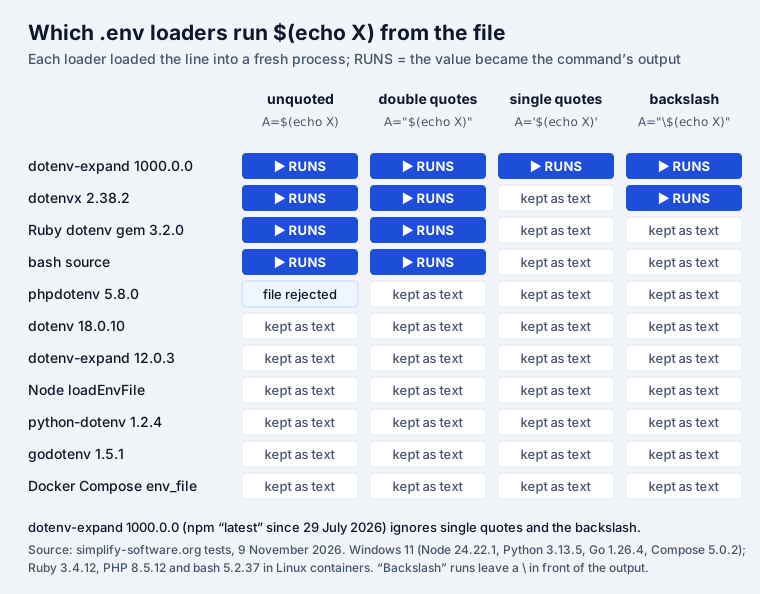
For bash this is obvious: source runs the file as a script. For dotenvx and the Ruby gem it is a
documented feature, used to pull a secret from a password manager when the app starts
(API_KEY=$(op read …)).
The new one is dotenv-expand 1000.0.0. Its changelog for 29 July 2026 says: “Command
substitution and encryption are now supported automatically during expansion”, and “Yes, the jump to
major version 1000 is intentional.” It is the version npm install dotenv-expand installs today. Two
details make it riskier than the others:
- It ran the command in single quotes, which every other loader treats as plain text. dotenv strips the quotes first, so dotenv-expand never sees them. We confirmed it with a single-quoted command that wrote a file: the file appeared.
- A backslash does not stop it.
A="\$(echo X)"gave\EXECUTED: the command ran and the backslash stayed in front of the output. dotenvx did the same.
Its options are processEnv and parsed; there is no switch to turn the commands off. The README
gives the rule itself: “Only use command substitution with .env files you trust. Commands run with
the permissions of the current process.”
How many projects does this reach? Not many yet. In the week of 2–8 November 2026, dotenv-expand was
downloaded 66.3 million times and version 1000.0.0 about 93,000 times. Popular tools pin older
majors: dotenv-cli 11.1.0 asks for ^12.0.0, @nestjs/config 12.1.1 for exactly 13.0.0. Vite 8.3.7
bundles its own copy, listed under the BSD-2-Clause licence that 1000.0.0 replaced, and Next.js’s
@next/env 16.4.5 has no code that starts processes. The risk is the next npm install dotenv-expand in a project that loads a .env file it did not write: a sample .env in a cloned
repository, a pull request that changes one, or a file pasted from a ticket.
What to do:
- If you use dotenv-expand directly, check the version. If you do not need commands, stay on 12 or 13, or pin the exact version.
- Treat a
.envfile from someone else like a script. Read it before you run the app. - In CI, do not load
.envfiles from pull requests of forks.
All 43 results
Every line we tested and what landed in the environment. “Node loaders” means dotenv, dotenv-expand
12 and 1000, dotenvx and Node’s process.loadEnvFile().
| Line in .env | Most loaders | The others |
|---|---|---|
A=hello | hello (all 11) | |
export A=hello | hello (all 11) | |
A=hello # note | hello (all 11) | |
A=hello | hello, spaces trimmed (all 11) | |
A= | empty (all 11) | |
A=b=c | b=c (all 11) | |
A=" padded " | spaces kept (all 11) | |
A="pa#ss" # note | pa#ss (all 11) | |
A='one\ntwo' | \n kept as text (all 11) | |
A="line1 ⏎ line2" then B=after | both read correctly (all 11) | |
A=first then A=second | second (all 11) | |
A = hello | hello (10) | bash: line fails |
A=pa#ss | pa (7) | pa#ss: python-dotenv, godotenv, Compose, bash |
DB_PASSWORD=Xk9#vR2$mq | Xk9 (7) | whole password: python-dotenv, godotenv; Xk9#vR2: Compose, bash |
DB_PASSWORD='Xk9#vR2$mq' | whole password (9) | Xk9#vR2: dotenv-expand 12 and 1000 |
A=pa$word | pa (6) | pa$word: dotenv, Node, python-dotenv, godotenv, phpdotenv |
A="pa\$word" | pa$word (8) | pa\$word: dotenv, Node, python-dotenv |
A="one\ntwo" | line break (9) | \n as text: Ruby, bash |
A=one\ntwo | one\ntwo (9) | onentwo: Ruby, bash |
A='line1 ⏎ line2' | both lines (10) | phpdotenv rejects the file |
A=`hello` | backticks kept (5) | stripped: Node loaders; bash runs hello, value empty |
A="hello (never closed), then B=after | "hello and after: Node loaders, Ruby | python-dotenv skips A, keeps B; godotenv, phpdotenv, Compose reject the file; bash sets neither |
A=${BASE}/app | /srv/app (9) | literal: dotenv, Node |
A=$BASE/app | /srv/app (7) | literal: dotenv, Node, python-dotenv, phpdotenv |
A='${BASE}/app' | literal (8) | expanded: dotenv-expand 12 and 1000, python-dotenv |
A=${MISSING:-fallback} | fallback (6) | literal: dotenv, Node, phpdotenv; :-fallback}: godotenv, Ruby |
A=${LATER}/x, LATER below | /x (6) | late/x: dotenv-expand 12 and 1000; literal: dotenv, Node, phpdotenv |
A=$(echo X) | text (6) | runs: dotenv-expand 1000, dotenvx, Ruby, bash; phpdotenv rejects the file |
A="$(echo X)" | text (7) | runs: dotenv-expand 1000, dotenvx, Ruby, bash |
A='$(echo X)' | text (10) | runs: dotenv-expand 1000 |
A="\$(echo X)" | text (9) | runs: dotenv-expand 1000, dotenvx |
PRESET=from_file, shell has from_shell | shell wins (9) | file wins: Compose, bash |
MY-KEY=1 | set (7) | skipped: Ruby, bash; godotenv and phpdotenv reject the file |
my.key=1 | set (10) | bash skips it |
A: hello | hello (7) | skipped: Node, python-dotenv, bash; phpdotenv rejects the file |
| CRLF line endings | \r stripped (10) | bash keeps \r in every value |
| UTF-8 BOM before the first key | key read (8) | lost: Node, bash; godotenv rejects the file |
JUSTAWORD (no =), then B=after | line skipped (9) | Ruby sets it empty; godotenv rejects the file |
Some rows hold two values (a key and the line after it), so the table has 38 rows for 43 values.
A .env file that reads the same everywhere
Copy this as a starting point. We ran this exact file through all 11 loaders: every value came out
the same, except DB_PASSWORD in dotenv-expand, as shown above.
# Database
DATABASE_HOST=localhost
DATABASE_PORT=5432
# A value with #, $ or spaces: single quotes
DB_PASSWORD='Xk9#vR2$mq'

# A value over several lines: double quotes, real line breaks
PRIVATE_KEY="-----BEGIN PRIVATE KEY-----
MIIEvQIBADANBgkqhkiG9w0BAQEFAASC
-----END PRIVATE KEY-----"

# No ${OTHER} references, no $(commands), no spaces around =
APP_URL=http://localhost:3000
Then three checks before you blame the code when a value looks wrong:
- Print what the app received, length included:
node -e "require('dotenv').config(); console.log(JSON.stringify(process.env.DB_PASSWORD))". A shorter value means a#or$; a trailing\rmeans CRLF. - Check the shell.
echo $DB_PASSWORD(or$env:DB_PASSWORDin PowerShell). If it is set, every library ignores the file. - Check the encoding. In VS Code the status bar shows “UTF-8 with BOM” and “CRLF” when either is present; click to change them.
Keep the secrets in it out of tickets and git
The format quirks cost an afternoon. A .env file in the wrong place costs a key rotation. The
file is plain text by design, so it gets pasted into Jira tickets (“here is my config, it does not
connect”), Slack threads and commits.
- Before pasting a config into a ticket or chat, run it through our free API key leak checker: it runs in your browser and the page cannot send what you paste anywhere.
- If
.envfiles keep showing up in Jira issues and Confluence pages, Secret Sentinel finds the keys in them and redacts them in place, inside Atlassian’s infrastructure. - If the plaintext file itself is the problem, envseal keeps each secret encrypted in git
and injects it into the process at runtime, so there is no plaintext
.envto leak. - If a
.envfile has already been committed, deleting it is not enough. Our post on why .env files are a security risk explains why the history keeps it and what to rotate.
Frequently asked questions
What is a .env file?
A plain text file of KEY=value lines, one variable per line, that a library loads into the environment of a program when it starts. It keeps settings such as database URLs and API keys out of the code. There is no standard: the format is whatever the library reading it accepts, and in our test 11 loaders gave different values for 31 of 43 lines.
How do I create a .env file in Windows?
In the project folder run `New-Item .env` in PowerShell, or create the file in VS Code (File, New File, name it .env). Explorer refuses a name that starts with a dot in older Windows versions, so type it as `.env.` and Windows drops the last dot. Save it as UTF-8 without a BOM and with LF line endings: in our test a BOM hid the first variable from Node’s built-in loader and bash, and Windows CRLF endings left a carriage return at the end of every value in bash.
What happens if I push a .env file to GitHub?
Every secret in it is public, or visible to everyone with access to the repository, and stays in the git history after you delete the file. Rotate each key in it, then remove the file from the history. Adding .env to .gitignore only stops future commits. Our post on why .env files are a security risk walks through a real case.
Can a .env file run commands?
With some loaders, yes. In our test `$(echo X)` was run by dotenv-expand 1000.0.0, dotenvx, the Ruby dotenv gem and bash `source`; dotenv-expand 1000.0.0 ran it even inside single quotes and after a backslash. plain dotenv, Node, python-dotenv, godotenv, phpdotenv and Docker Compose kept it as text. Load a .env file only from a source you trust.
Do I need quotes in a .env file?
Only when the value has a space, a # or a $, or spans lines. Single quotes are the most portable choice for one-line values: nine of 11 loaders kept `Xk9#vR2$mq` intact in single quotes, and only dotenv-expand cut it. Unquoted, the same password became `Xk9` in seven loaders. For values over several lines, use double quotes: all 11 loaders read them the same way.
Is the .env file format the same in Node, Python and Docker?
The basics are: KEY=value, # comments on their own line, export in front, the last duplicate wins. The details are not. A # inside a value starts a comment in Node and Ruby but not in Python, Go or Docker Compose; $NAME is expanded by Docker Compose and Ruby but not by Node or Python; and a variable already set in the shell wins in every library but loses to the file in Docker Compose env_file and bash.