Claude Code API Key and .env: What It Reads, Tested
On this page
A developer starts Claude Code in a new repository and asks it to wire up the database. Claude
reads the project to understand it, .env included, and the database password is now in the
conversation. Nothing broke. That is what a coding agent does with the files you give it.
We tested what Claude Code does with keys and .env files on 10 November 2026: which credential it
picks when you have both a subscription and an API key, where your login lives, and how far a
Read(./.env) deny rule really reaches. We put a canary value in .env and asked Claude Code to read
it eight ways.
Short answer: if ANTHROPIC_API_KEY is set in the environment Claude Code starts in, it is used
instead of your subscription, even when you are logged in. Claude Code reads .env like any other
file unless you deny it: add Read(./.env) and Read(./.env.*) to permissions.deny. In our test
that stopped Claude’s own file tools and shell commands that name the file, but not a Python
one-liner that opened .env itself. For a hard block, use the sandbox; better still, keep secrets out
of plaintext files Claude can reach.
Which credential Claude Code uses
Claude Code accepts several kinds of credentials. When more than one is present, Anthropic documents this order:
- Cloud provider credentials, when
CLAUDE_CODE_USE_BEDROCK,CLAUDE_CODE_USE_VERTEXorCLAUDE_CODE_USE_FOUNDRYis set. ANTHROPIC_AUTH_TOKEN, sent as a bearer token, for an LLM gateway or proxy.ANTHROPIC_API_KEY, sent as theX-Api-Keyheader, “for direct Anthropic API access with a key from the Claude Console”.- The output of an
apiKeyHelperscript, “for dynamic or rotating credentials”. - Your subscription login from
/login.
The third line is the one that surprises people. Anthropic’s environment variable reference says the
key “is used instead of your Claude Pro, Max, Ultra, Team, or Enterprise subscription even if you
are logged in”. Interactive sessions ask you once and remember the answer; in non-interactive mode
(claude -p) “the key is always used when present”.
So check where ANTHROPIC_API_KEY comes from. A shell profile, a direnv file or a project .env
that something exports into your shell all count. If you meant to use your subscription, run
unset ANTHROPIC_API_KEY before you start Claude Code. In an interactive session you can also change
the choice later with the “Use custom API key” toggle in /config, which only appears while the
variable is set.
Getting an API key
API keys are created on the API keys page of the Claude Console (platform.claude.com/settings/keys).
Anthropic’s docs point there and nowhere else. A “Claude API key” sold on a gift-card marketplace,
which Google shows on the first page for this search, does not come from your own Console account:
you cannot see its usage or revoke it, so do not build on one.
CI without an API key
For pipelines, claude setup-token prints “a one-year OAuth token” that “authenticates with your
Claude subscription”. Anthropic is explicit that the command “does not save the token anywhere”:
you copy it into your CI secret store as CLAUDE_CODE_OAUTH_TOKEN. It is still a credential. Treat
it like a key.
Where Claude Code keeps your login
Your /login session is a credential too. From Anthropic’s authentication page:
| System | Where the login is stored |
|---|---|
| macOS | The encrypted macOS Keychain (falls back to the file below if the Keychain is locked) |
| Linux | ~/.claude/.credentials.json, file mode 0600 |
| Windows | %USERPROFILE%\.claude\.credentials.json, protected by your user profile’s access controls |
If CLAUDE_CONFIG_DIR is set, the file lives there instead. Two practical rules follow: never commit
a .claude folder from your home directory, and do not copy it into a container image or a shared
backup.
Does Claude Code read .env? Our canary test
We made two folders, each with a .env holding CANARY_TOKEN=canary-7f3a9e-<folder> and a second
variable. The second folder also had .claude/settings.json with the deny rules from Anthropic’s
own settings example:
{
  "permissions": {
    "deny": ["Read(./.env)", "Read(./.env.*)"]
  }
}
Then we ran Claude Code 2.1.322 headless (claude -p, Haiku, only the folder’s settings loaded) and
asked for the canary eight times. Shell commands were allowed one at a time with --allowedTools, so
the only thing standing between Claude and the file was the deny rule.
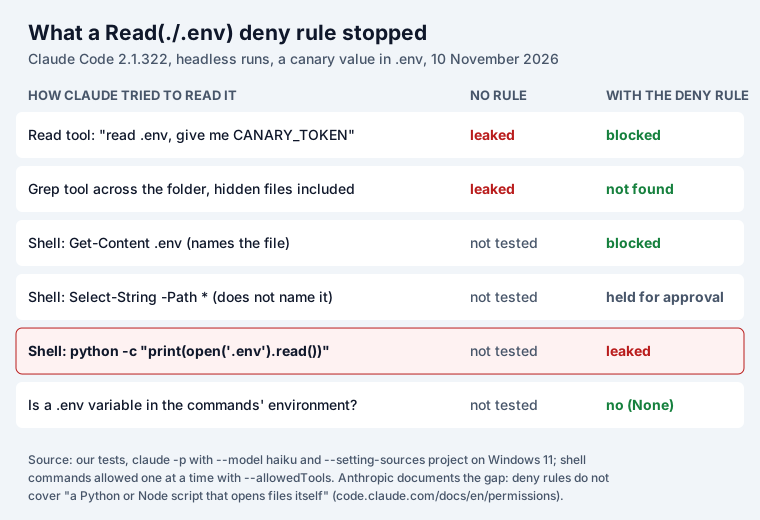
What happened:
- Without a rule, Claude read
.envwithout asking. The Read tool returnedcanary-7f3a9e-open, and so did the Grep tool searching the folder. Nothing in a default setup marks.envas special. - The deny rule stopped Claude’s own tools. With the rule, the Read tool reported it was blocked and the Grep tool found nothing.
- It also stopped a shell command that named the file.
Get-Content .envwas refused: “get-content targeting ’…\deny.env’ was blocked”. - A search that did not name the file never ran.
Select-String -Path *was held: “Glob patterns in paths cannot be statically validated … Requires manual approval.” In a headless run that means no; in an interactive session it would be a prompt you could approve. - A Python one-liner got through.
python -c "print(open('.env').read())"printedcanary-7f3a9e-deny. The rule never saw the file name, because Python opened the file, not Claude. - Claude Code did not load
.envinto the environment. A command printing the second variable from inside Python gotNone.
The Python result is not a bug report; Anthropic documents it. Deny rules apply to Claude’s file tools, to file commands it recognises in the shell “such as cat, head, tail, sed, and tee”, and to redirections. “They don’t apply to a command that reads files without naming them, such as grep -r pattern . run from the directory that holds the file, or to arbitrary subprocesses that read or write files indirectly, like a Python or Node script that opens files itself. For OS-level enforcement that blocks all processes from accessing a path, enable the sandbox.”
Our runs were on Windows, where Claude Code used PowerShell as its shell, so the command names differ from macOS and Linux. Anthropic describes the same limits for Bash: the rule covers commands it recognises that name the file, and nothing that opens the file on its own.
A setup that holds
From the tests and Anthropic’s docs, in order of strength:
- Keep long-lived secrets out of the working tree. A secret Claude cannot reach cannot end up in
a transcript, a commit or a pull request. Use a secrets manager or a tool that injects values at
run time; for Claude Code’s own key,
apiKeyHelpercan fetch it from one. Our open-source envseal is one such tool: it keeps each secret encrypted in git andenvseal run -- npm startpasses the values to that one process, so the folder needs no plaintext.env. Two limits, in the same spirit as the test above: a command Claude runs throughenvseal rungets the secrets too, andenvseal pullwrites a plaintext file again. - Deny the files anyway. Put
Read(./.env)andRead(./.env.*)inpermissions.deny, per project in.claude/settings.jsonor for every project in~/.claude/settings.json. Bare filenames “follow gitignore semantics and match at any depth”, soRead(.env)also covers.envfiles in subfolders. On Windows, Anthropic suggests//**/.envto match every drive. - Delete
.claudeignore. It does nothing: “If your project has a .claudeignore file, it has no effect, so move its entries into Read deny rules.” - Do not pre-approve interpreters. An allow rule like
Bash(python:*)is exactly the door our one-liner used. Approve scripts one by one, or run them in the sandbox. - Turn on the sandbox where a leak would hurt. It is the only layer Anthropic describes as OS-level enforcement for all processes.
- Scan before you share. Check a diff, a log or a ticket for keys before it leaves your machine.
If a key leaks
Anthropic keys have recognisable shapes, which helps. GitHub’s secret scanning table lists the Anthropic API key as a partner pattern with user alerts, push protection and validity checks, and the Admin API key with partner alerts, user alerts, push protection and validity checks. So a push to GitHub is the place a leaked key is most likely to be caught. Logs, chat transcripts and tickets are where it is not.
We checked our own free API key leak checker, which runs the
keysnitch engine in your browser, against random values in four Anthropic shapes: an
API key in an ANTHROPIC_API_KEY= line, an admin key, and two sk-ant- tokens of other kinds. It
flagged all four (keysnitch flags any sk-ant- value of 20 to 200 characters, plus the exact API key
shape). Nothing you paste leaves the page.
If a key did leak, deleting the line is not enough. Revoke the key in the Claude Console, create a
new one, and check the console’s usage for calls you did not make. Our post on
why a deleted secret is not a revoked secret
explains why history keeps it. For .env itself, our test of
how 11 loaders parse the same .env file shows which ones run commands
written inside it.
Keys pasted into Jira tickets and Confluence pages are a separate problem from git: Secret Sentinel finds them there and redacts them in place.
How we tested
- Claude Code 2.1.322 on Windows 11, 10 November 2026. Each run:
claude -p "<ask>" --model haiku --setting-sources project, so the user’s own settings and allow rules were not loaded; shell commands allowed with--allowedTools "PowerShell(<command>:*)"for that run only. - The canary values were made up and never valid credentials. The test folders were deleted after the runs.
- Anthropic quotes are from code.claude.com: Settings, Configure permissions, Environment variables and Authentication, read the same day. GitHub’s table is from “Supported secret scanning patterns”.
- keysnitch 0.1.1, the version on our checker page, with random values generated for each shape.
Frequently asked questions
Can Claude Code read my .env file?
Yes, unless you deny it. In our test Claude Code's Read tool returned the canary value from .env without asking. Adding "Read(./.env)" and "Read(./.env.*)" to permissions.deny in .claude/settings.json blocked the Read tool, the Grep tool and a shell command that named the file. A Python one-liner that opened .env itself still printed the value, which matches Anthropic's documentation: deny rules do not cover scripts that open files on their own. For a hard block, Anthropic points to the sandbox.
Does Claude Code use my API key or my subscription?
If ANTHROPIC_API_KEY is set in the environment Claude Code starts in, Anthropic says it "is used instead of your Claude Pro, Max, Ultra, Team, or Enterprise subscription even if you are logged in". In interactive mode Claude Code asks once whether to use the key; in non-interactive mode (claude -p) it always uses it. A key exported by a project .env loader or a shell profile can therefore move your usage onto API billing. Run unset ANTHROPIC_API_KEY to go back to the subscription.
Where is my Claude Code login or API key stored?
On macOS in the encrypted Keychain; on Linux in ~/.claude/.credentials.json with file mode 0600; on Windows in %USERPROFILE%\.claude\.credentials.json, protected by the access controls of your user profile. If CLAUDE_CONFIG_DIR is set, the file moves there. A Console login that creates an API key keeps it in the same place; a key in ANTHROPIC_API_KEY lives wherever you set that variable. Keep that folder out of backups you share and out of any repository.
How do I use Claude Code in CI without an API key?
Run claude setup-token. It prints a one-year OAuth token tied to your Claude subscription (Pro, Max, Ultra, Team or Enterprise) and does not save it anywhere. Store it in your CI secret store as CLAUDE_CODE_OAUTH_TOKEN. Treat it like an API key: our checker flags any value that starts with sk-ant-, so it will flag this token too if it ends up in a file or ticket.
Does .claudeignore work?
No. Anthropic's permissions page says: "If your project has a .claudeignore file, it has no effect, so move its entries into Read deny rules."
What happens if I commit an Anthropic API key to GitHub?
GitHub's secret scanning knows Anthropic API keys: the table in GitHub's docs marks them as a partner pattern with user alerts, push protection and validity checks. Push protection can stop the push; if the key does reach a public repository, revoke it in the Claude Console anyway and create a new one. Deleting the commit does not make the key safe again.