AI Coding Agents in Jira: 7 Ways to Hand Off Work, Compared
On this page
On Monday someone assigns PAY-214 to Cursor. On Tuesday there is a pull request: tidy, tested, and for the wrong currency, because the ticket said “fix rounding” and nothing else. The agent did exactly what it was given.
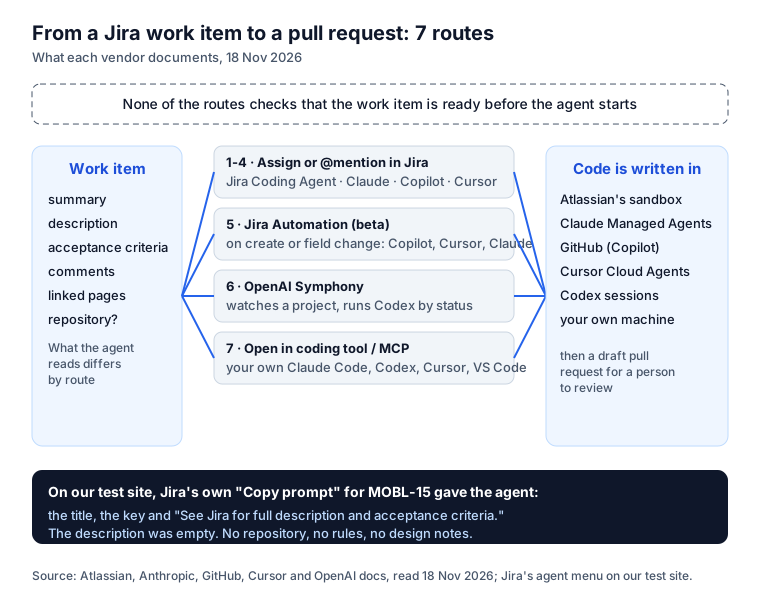
Since Atlassian’s Team ‘26 there are at least seven ways to give a Jira work item to an AI coding agent. Each vendor documents its own. Here they are side by side, from each vendor’s docs read on 18 November 2026, with what the agent actually receives, checked on our own Jira site.
Short answer: in Jira Cloud you can assign or @mention four coding agents (Atlassian’s Jira Coding Agent, Claude Agent for Jira, GitHub Copilot for Jira and Cursor), call Copilot, Cursor or Claude from a Jira Automation rule (beta), let OpenAI Symphony run Codex on a project’s work items, or use Open in coding tool and the Rovo MCP server with an agent on your own machine. All end in a pull request a person reviews. The agent-in-Jira routes need Rovo on the site. None of them checks that the work item is ready before the agent starts: what the ticket says is what you get.
The seven routes on one page
| Route | How it starts | Code is written in | Needs |
|---|---|---|---|
| 1. Jira Coding Agent | from the work item’s Agents menu | Atlassian’s cloud sandbox | Rovo credits (“a premium AI feature”) |
| 2. Claude Agent for Jira | assign, @mention, automation | Anthropic’s Claude Managed Agents | Standard, Premium or Enterprise with Rovo; your Anthropic API key; a GitHub machine-user token |
| 3. GitHub Copilot for Jira | assign, @mention | GitHub’s Copilot cloud agent | Jira Cloud with Rovo; Copilot coding agent enabled; a GitHub app |
| 4. Cursor | assign, @Cursor | Cursor Cloud Agents | Rovo; Cursor Teams and Enterprise plans; usage-based billing |
| 5. Jira Automation (beta) | work item created or a field changes | the agent you call (2, 3 or 4) | that agent set up; GitHub Cloud or Bitbucket Cloud connected |
| 6. OpenAI Symphony | Symphony watches a project’s statuses | Codex sessions | Symphony set up from its open-source repository |
| 7. Open in coding tool / Rovo MCP | a button on the work item, or your agent asks | your machine | a supported tool; the Atlassian Rovo MCP server for more context |
On our test site Jira’s Agents menu offered exactly the first four under “Software agents”: Jira Coding Agent by Atlassian, GitHub Copilot for Jira, Cursor and Claude Agent for Jira.
Route by route
1. Jira Coding Agent (formerly Rovo Dev in Jira)
Atlassian’s own agent. Its docs: “Start coding instantly in a secure, cloud-based session in a dedicated, sandbox environment,” using “your work item and your team’s knowledge directly from Jira, Confluence, your codebase, and more.” You review and edit in the session and open the pull request from the sandbox. It “consumes Rovo credits”.
Pick it when you want nothing outside Atlassian to set up. Watch the credits. Atlassian: What is the Jira Coding Agent?
2. Claude Agent for Jira
Built on Anthropic’s Claude Managed Agents and in beta. You install it from the Marketplace, paste a Claude Managed Agents API key and a GitHub personal access token from a machine user with read and write access to contents and pull requests. Assign or @mention it, or add it to an automation rule. Atlassian’s announcement says it reads “the work item summary, description, comments, and connected repository”; the code is written “in a secure sandbox” on Anthropic’s side, which pushes a branch and opens a draft pull request. The listing is blunt about data: “Zero Data Retention is not supported.” Not available in HIPAA and FedRAMP sites. Atlassian: Set up Claude Agent for Jira. Our Claude and Jira guide compares it with Claude Code through MCP, with our own runs.
3. GitHub Copilot for Jira
Public preview in March 2026, generally available since 25 June 2026. Assign a work item to Copilot or @mention it, and the cloud agent will “analyze the Jira issue’s description and comments”, open a draft pull request and “ask clarifying questions in Jira when more information is needed”. Since April it also reads custom fields “such as acceptance criteria”, takes a custom agent and a model from the ticket, and follows space-level instructions; since GA it streams progress into Jira and takes follow-up instructions on the same pull request. Confluence pages reach it only if you configure the Atlassian MCP server with a personal access token. Details: GitHub Copilot and Jira.
4. Cursor
Assign a work item to Cursor or write @Cursor in a comment. “Cursor uses the work item title,
description, comments, and available repository settings to start a Cloud Agent.” It needs Jira
Commercial Cloud with Rovo, and “is currently available only on Cursor Teams and Enterprise plans”;
Cloud Agents need usage-based billing. It works with GitHub, GitLab, Azure DevOps or Bitbucket, and it
picks the repository in a documented order: values in the comment, names in the ticket, your routing
rules, recent activity, then a default. Follow-ups go through Rovo chat.
Cursor docs: Jira. More in Cursor and Jira.
5. Jira Automation (beta)
A rule with a “Work item created” or field trigger can call Copilot, Cursor or Claude as an action, with a custom prompt and a link to the repository. The beta does not take scheduled triggers. Every run is in the automation audit log. This is the first route where no person looks at the ticket before the agent does, so it is the one that most needs a check upstream.
6. OpenAI Symphony
Atlassian describes Jira as “the system of record for OpenAI Symphony”, an orchestration layer for Codex: “Symphony picks up eligible work items, routes them to agent sessions, and keeps progress attached to the Jira work item.” Statuses decide what runs: you “configure which statuses are active, blocked, ready for review, or complete.” It is a setup for teams that run many Codex sessions, not a button.
7. Open in coding tool, and your own agent through MCP
On any work item, Open in coding tool in the Development panel opens Codex, Cursor, GitHub Copilot or VS Code with the work item in the prompt; for Claude Code and Rovo CLI it copies a command. Atlassian says it passes “the summary and description”, and the agent can fetch more through the Atlassian Rovo MCP server. Or skip the button: connect the MCP server to Claude Code, Codex or Cursor and say “work on PAY-214”. Setup and permissions are in our Jira MCP guide.
What the agent actually receives
The docs say “the work item context”. We looked at what that means on a real work item. MOBL-15 on our test site is “Enable fingerprint identity to be used on mobile”; its description is empty, and the decisions are on a linked Confluence page, “Fingerprint sign-in: design notes”. Jira’s Copy prompt gave this:
You have been assigned to a work item "Enable fingerprint identity to be used on mobile".
Analyze the details of the work item and get started. For additional context about this
work item use the Atlassian MCP.

<JIRA_WORK_ITEM>
<title>Enable fingerprint identity to be used on mobile</title>
<key>MOBL-15</key>
<description>See Jira for full description and acceptance criteria.</description>
...
</JIRA_WORK_ITEM>
No repository, no branch, no team rules, no design notes, and an instruction to “get started” on a ticket that has no description. A good agent will go and look through MCP. A busy one will guess.
The same work item through Agent Ready, our Jira app, starts like this (its Copy brief for the agent):
Repository acme/mobile-app · base branch release/3.2

Instructions for the agent working on MOBL-15 (the project's rules, from Agent Ready):
## Definition of Done
- Unit tests for every new branch; Detox flow for every new screen.
## Do not touch
- The payment SDK version: it is pinned for PCI.
## Role: Mobile security
- Ask a person before you touch token lifetimes or the keychain access group.
## Skill: Biometric sign-in
- Always offer the passcode fallback; after 3 failed scans lock biometrics ...

Readiness: 3 of 5 checks passed. Missing: Description long enough; Acceptance criteria.
Ask in a comment before you start.
Through its MCP tools the brief also ends with the text of the linked Confluence page. And the last line is the point: this ticket is not ready, and the agent is told so before it writes a line.
What none of the seven routes does
Every route is about getting the work item to the agent quickly. None decides whether the work item should go at all. That leaves three gaps a team fills itself:
- Is it ready? Acceptance criteria, steps to reproduce, an estimate small enough for one run, no open blocker. An agent will not push back the way a person does in refinement.
- Is it safe to send? The ticket’s text goes to someone’s model. A password pasted in a comment, or a customer’s “ignore previous instructions”, goes with it.
- Which repository, which rules? Cursor has routing rules and Copilot has space-level instructions; the others take what the ticket says.
Agent Ready fills those from inside Jira, for every route above:
- Checks every work item by rules, no AI in the checks: criteria, bug sections, blockers, size, passwords and keys, hidden instructions to an AI.
- A gate before the handoff: the “Issue is agent-ready” workflow validator on a transition such as Ready for agent, and an unready work item assigned to an agent account (Claude, Copilot and Cursor app accounts are recognised) goes back to the previous assignee with a comment that says what is missing.
- The brief at handoff: when a work item is assigned to an agent, the project’s brief, roles, skills and repository are posted as a comment. Copilot, Cursor and Claude all document that they read comments.
- The AI agents report: what was handed to agents, given back, reopened, and done the first time, by readiness at handoff.
Agents that work through its MCP tools (route 7) also start the work item through a gate, ask questions in Jira and finish with a receipt that names the test for each acceptance criterion. The agents that run inside Jira (routes 1 to 5) do not call those tools, so for them it is the gate, the brief and the report.
How to choose
- Your code is on GitHub and you pay for Copilot: route 3. It reads acceptance criteria from a custom field, which few others document.
- Your team lives in Cursor, or the code is on GitLab, Azure DevOps or Bitbucket: route 4.
- You want Anthropic’s models billed to your own Anthropic account: route 2, or Claude Code through MCP (route 7) for work you watch.
- You want everything inside Atlassian and you have credits: route 1.
- Many small, routine tickets: route 5 or 6, after you put a readiness gate in front.
Whatever you pick, write the ticket for a reader that will not ask. Our Definition of Ready for agents takes one story through four drafts to show what that means.
Sources
- Atlassian: What is the Jira Coding Agent?, Set up Claude Agent for Jira, Introducing Claude Agent for Jira, Use third-party coding agents in Jira automation, Open a Jira work item in an AI coding tool, Jira as the system of record for OpenAI Symphony. All read 18 November 2026.
- Atlassian Marketplace: Claude Agent for Jira.
- GitHub changelog: coding agent for Jira in public preview, April enhancements, generally available.
- Cursor: Jira integration.
- Our test site: Jira’s Agents menu and Copy prompt on MOBL-15, and Agent Ready’s Copy brief for the agent, 18 November 2026.
Frequently asked questions
Do I need Rovo to assign Jira work items to AI agents?
For the agents that live in Jira, yes. Claude Agent for Jira, GitHub Copilot for Jira and Cursor all list Jira Cloud with Rovo enabled as a requirement, and the Jira Coding Agent consumes Rovo credits. Open in coding tool and your own agent through the Atlassian Rovo MCP server work from your machine instead.
What does it cost to use AI coding agents from Jira?
Each vendor bills its own way. The Jira Coding Agent consumes Rovo credits. Claude Agent for Jira runs on your Anthropic API key, so Anthropic bills the usage. GitHub Copilot for Jira needs Copilot with the coding agent enabled. Cursor needs a Teams or Enterprise plan with usage-based billing. The Jira apps themselves are free on the Marketplace.
Which AI agent is best for Jira?
The one your code already lives with. Copilot if your repositories and reviews are on GitHub and you have Copilot; Cursor if your team uses Cursor and needs GitLab, Azure DevOps or Bitbucket; Claude if you want Anthropic models on your own Anthropic account; the Jira Coding Agent if you want everything inside Atlassian. All four open a pull request that a person reviews.
Can an AI agent pick up a Jira work item without anyone assigning it?
Yes, two ways. A Jira Automation rule (beta) can call Copilot, Cursor or Claude when a work item is created or a field changes. OpenAI Symphony watches a Jira project and runs Codex on work items in the statuses you mark as active. Both need the work items to be ready before they move, because nobody reads them first.
How do I stop an agent from getting a half-written ticket?
Put a gate in front of the handoff. Agent Ready adds an "Issue is agent-ready" validator to a transition such as Ready for agent, checks every work item for acceptance criteria, keys and hidden instructions, and can give an unready item back when someone assigns it to an agent account.
Keep reading
- Jira, JSM and the Marketplace · 6 minCursor Jira Integration: Setup and How It Picks the Repo
- Jira, JSM and the Marketplace · 6 minGitHub Copilot for Jira: Setup, What It Reads, the Risks
- Jira, JSM and the Marketplace · 8 minClaude Jira Integration: 5 Ways, and 3 Real Claude Code Runs
- Free toolSKILL.md validator