Cursor Jira Integration: Setup and How It Picks the Repo
On this page
Your team has four repositories and one Jira project. Someone writes “the mobile login breaks on Android 15” and assigns it to Cursor. Which repository does the agent clone? If the answer is “the one someone used yesterday”, that is in Cursor’s documented order, and it is how a fix lands in the web app.
Here is Cursor in Jira from Cursor’s own docs, read on 18 November 2026, with the repository choice traced on six tickets.
Short answer: install the Cursor app from the Atlassian Marketplace, connect it from Cursor’s
dashboard, and assign a Jira work item to Cursor or write @Cursor in a comment. A Cloud Agent starts
from “the work item title, description, comments, and available repository settings” and opens a pull
request. You need Jira Commercial Cloud with Rovo and Cursor’s Teams or Enterprise plan with
usage-based billing. Cursor picks the repository in five steps: repo= in the comment, names in the
ticket, your routing rules, recent activity, then the default. Put repo= in the ticket when it
matters.
What you need
From Cursor’s Jira docs:
- “Jira Commercial Cloud with Rovo enabled”, and admin access to that site.
- “Cursor admin access to the team you want to connect.” One person must be both: “A user that is both a Jira admin and Cursor team admin will need to do the initial setup.”
- GitHub, GitLab, Azure DevOps or Bitbucket connected to Cursor. This is the widest choice of any Jira coding agent; Copilot and Claude Agent for Jira work with GitHub.
- “The Cursor Jira integration is currently available only on Cursor Teams and Enterprise plans.” Cloud Agents need usage-based billing.
- Not for Atlassian HIPAA, FedRAMP or Government Cloud sites.
One Jira site connects to one Cursor team; one Cursor team can connect several sites.
Set it up
- As a Cursor admin, open Cursor’s Integrations dashboard and Connect next to Jira.
- Install the Cursor app from the Atlassian Marketplace on your site.
- On the app’s configuration page in Jira, wait a few minutes, then Connect to Cursor.
- Choose the sign-in mode (below).
- Finish the Cloud Agent setup in Cursor: repository provider, usage-based pricing, privacy settings, and a default repository, model and base branch.
Service account or each user
| Mode | Agents run as | Settings used | Good to know |
|---|---|---|---|
| Service account (default) | the team’s account | team Cloud Agent settings | “Team MCP servers aren’t available in service-account mode by default” |
| Require individual authentication | the person who started it | their own settings | they find their agents in their Cursor dashboard |
If an Enterprise team turns on Restrict Cloud Agent Usage, every Jira user must connect a Cursor account, whichever mode you chose. Per-user mode is the better audit trail: the pull request comes from a person who can be asked.
How Cursor picks the repository
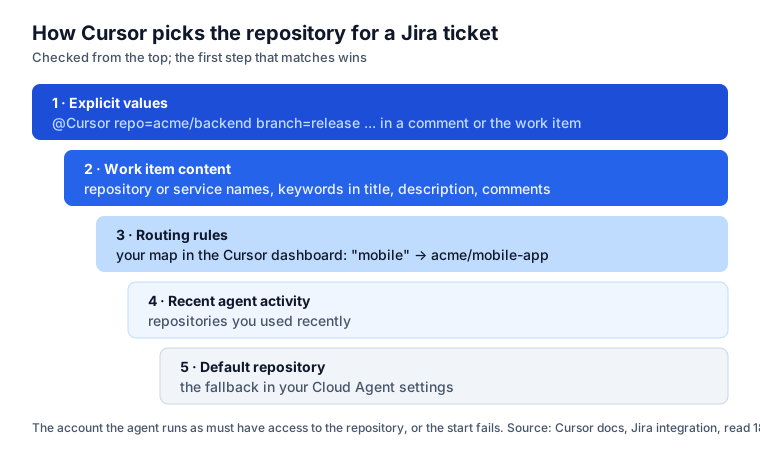
Cursor’s docs list the order: explicit values, work item content, routing rules, recent agent activity,
default repository. Here it is on six tickets, with the routing rules from Cursor’s own example
(frontend → acme/web-app, mobile → acme/mobile-app, api → acme/backend-services) and
acme/web-app as the default:
| Ticket and comment | Step that decides | Repository |
|---|---|---|
@Cursor repo=acme/backend branch=release fix this before the release cut | 1. Explicit values | acme/backend, branch release |
| “Fix the frontend nav bug” | 3. Routing rules | acme/web-app |
| “payments-service returns 500 on refunds”, a repository named payments-service | 2. Work item content | the payments-service repo |
| “@Cursor update the mobile onboarding flow” | 3. Routing rules | acme/mobile-app |
| “The login breaks on Android 15”, no rule matches, you used acme/web-app today | 4. Recent agent activity | acme/web-app, the wrong one |
| “Tidy up the README”, nothing matches, no recent activity | 5. Default repository | acme/web-app |
The fifth row is the one to worry about: “Android” is not a routing keyword, so the agent goes where
you were last. Two fixes: add the words your team uses (android, ios, login) to the routing
rules, or write repo= in the ticket. The docs warn that the account the agent runs as “must have
access to this repo or else the attempt to kick off a Cloud Agent will fail”.
Comment options
In an @Cursor comment, three options, from the docs:
repo=acme/web-app, the repository;branch=main, the base branch;model=opus, the model.
“Cursor skips options inside a code block and leaves the code in your prompt as written.” Follow-ups go through Rovo chat on the work item, or in Cursor itself; Jira notifies you when the agent needs input or the review is ready.
What leaves your Jira site
Cursor reads “work item fields, descriptions, comments, and related context” and posts “status updates, completion summaries, and pull request links”. The agent runs on Cursor’s Cloud Agents, which “support Privacy Mode”, with a catch: “Privacy Mode (Legacy) is not supported. Cloud Agents require temporary code storage while running.” Comments travel with the ticket, so a password pasted in one travels too.
A ticket that routes right
Summary: Android 15: login screen freezes after the biometric prompt

Repository: acme/mobile-app (base branch: release/3.2)

Steps to reproduce
1. Android 15, app 3.2.0, biometrics enrolled.
2. Open the app, choose "Sign in with fingerprint", cancel the prompt.

Expected: the password field gets focus.
Actual: the screen freezes until the app is closed.

Acceptance criteria
- Cancelling the prompt returns to the password field within 1 second.
- A test covers cancel, lockout and "not enrolled".
A Repository: line means step 2 finds it even without a rule; @Cursor repo=acme/mobile-app in the
comment makes it certain.
Where Agent Ready fits
Cursor’s routing rules answer “which repository”. Agent Ready, our Jira app, answers the questions before that, inside Jira:
- Is the ticket ready? Rules on every work item: acceptance criteria, steps for bugs, blockers, size, passwords and keys, hidden instructions. The Issue is agent-ready validator keeps unready tickets out of a Ready for agent status, and an unready ticket assigned to the Cursor app account can go back to the previous assignee.
- Which repository, by Jira’s own data? A per-project map by component, label or issue type, so the brief always starts with “Repository acme/mobile-app · base branch release/3.2”. With the brief at handoff on, that line, the project’s rules and the role’s skills are posted as a comment when the ticket is assigned, and Cursor reads comments.
- What came back? The AI agents report counts handoffs, give-backs and work done the first time.
Every way to hand Jira work to an agent, side by side: AI coding agents in Jira, compared.
Sources
- Cursor: Jira integration, read 18 November 2026.
- Atlassian: Cursor in Jira.
Frequently asked questions
Which Cursor plan do I need for Jira?
Cursor Teams or Enterprise. Cursor's docs say the Jira integration "is currently available only on Cursor Teams and Enterprise plans", and Cloud Agents need usage-based billing turned on. The Jira site must be Jira Commercial Cloud with Rovo; HIPAA, FedRAMP and Government Cloud sites are not supported.
How does Cursor know which repository a Jira ticket belongs to?
It checks five things in order: a repo= value in the comment or ticket, repository or service names in the ticket, your routing rules, the repositories you used recently, then your default. Write repo=org/name in the ticket or the @Cursor comment when it matters.
Should agents run as a service account or as each user?
A service account is quicker to set up and uses the team's settings, but team MCP servers are not available in that mode by default. Per-user sign-in, the Require individual authentication switch, runs each agent as the person who started it with their own settings and lets them find it in their Cursor dashboard. Enterprise teams that restrict Cloud Agents need every user connected either way.
Can I talk to the Cursor agent from Jira after it starts?
Yes, through Rovo chat on the work item, or in Cursor itself. Jira shows the agent's status on the work item, Cursor posts progress, and the completion message links the pull request.