GitHub Copilot for Jira: Setup, What It Reads, the Risks
On this page
A product manager assigns a bug to GitHub Copilot in Jira. Twenty minutes later there is a draft pull request, the branch name has the ticket key, and the pull request description has the ticket’s context. It also has the staging password someone pasted in a comment last month, because the repository is public and the comment was part of “the context”.
Nothing in that story is a bug in Copilot. It is how GitHub documents the integration. Here is the whole of it, from GitHub’s docs and changelog, read on 18 November 2026.
Short answer: GitHub Copilot for Jira lets you assign a Jira work item to Copilot cloud agent, or @mention it, and get a draft pull request. You need a Jira admin, a GitHub organization owner, Rovo on the Jira site and Copilot’s cloud agent on GitHub; only people with write access to the repository can trigger it. The agent reads the work item’s title, description, labels, comments and custom fields such as acceptance criteria, and puts that context in the pull request, “visible to everyone if the repository is public”. It bills GitHub Actions minutes and AI credits. Generally available since 25 June 2026.
What you need
From GitHub’s integration docs:
- “Administrator permission for your Jira site.”
- “Owner or GitHub App manager permissions for your GitHub organization.”
- Two apps: “This integration relies on an Atlassian Forge application and a GitHub application. Both are required.”
- From the launch post: “Jira Cloud with Rovo enabled”, “GitHub Copilot coding agent enabled” and “a connected GitHub repository”.
- In Atlassian Administration, Jira must be an AI-enabled app, or Copilot will not appear at all.
GitHub Enterprise Cloud with data residency has its own Marketplace listing, where you enter your
SUBDOMAIN.ghe.com.
Set it up in ten minutes
- In the Atlassian Marketplace, open GitHub Copilot for Jira, Get it now, choose your site, Review, Get it now.
- In the confirmation in Jira, Configure, then log in to GitHub and Install app.
- Choose the organizations and repositories the app may reach. GitHub enables your organizations by default; untick the ones you do not want.
- Each person connects their own GitHub account the first time they use it, from their Jira personal settings or the first prompt.
- Set custom instructions for the Jira workspace: the default repository, branch naming, and preferred model, so the agent does not stop to ask on every ticket.
What Copilot reads from a work item
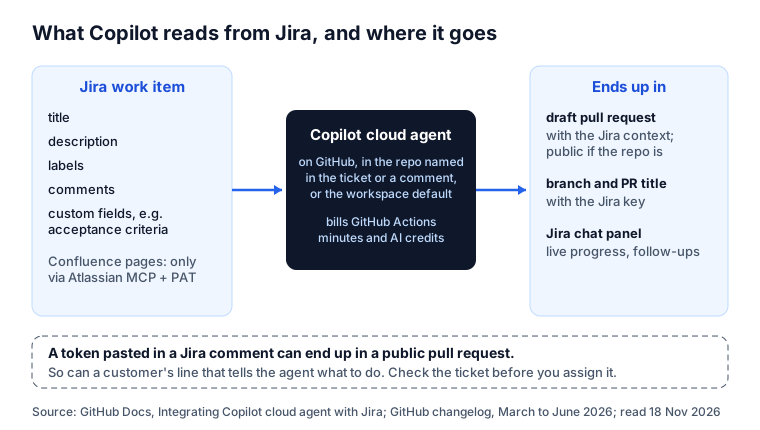
GitHub’s list is specific: “the context of the work item’s title, description, labels, comments, and any Atlassian custom fields such as acceptance criteria”. The custom fields came in April 2026; GitHub says they give the agent “richer, more structured context”. Since March the pull request title and branch carry the Jira key, and the pull request links back to the ticket “and the Jira context provided to the agent”.
What it does not read by default: Confluence. The March changelog: “Provide Copilot coding agent with access to your Confluence pages by configuring the Atlassian MCP server with a personal access token (PAT).” Linked design notes, specs and decisions stay out unless you do that.
The warning in GitHub’s docs
One sentence in the setup page deserves its own section:
When you assign Copilot to a Jira work item, the context the agent captures from Jira will be added to the pull request and visible to everyone if the repository is public.
Put that next to “comments” in the list above. Jira comments are where people paste things to unblock each other: a staging password, a token, a customer’s email. On a private repository they now sit in a pull request too; on a public one, they are public. A ticket from a service desk adds a second risk: text written by someone outside the company, read by an agent that acts on it.
Two habits fix most of it:
- Read the ticket as the agent will, before you assign it. Description and comments, not just the title.
- Keep secrets out of Jira in the first place. Our free API key leak checker finds them in pasted text; Secret Sentinel redacts them in Jira the moment they are saved.
Use it day to day
- Start: assign the work item to GitHub Copilot, or comment
@GitHub Copilotwith instructions. GitHub’s example: “@GitHub Copilot create a new API endpoint for user authentication in octo-org/octorepo”. - Pick a model: name it in the comment, for example a lighter model for routine work.
- Pick a custom agent: name one from your repository in the ticket, since April 2026.
- Follow it: since June the agent’s activity “streams live into the chat panel in Jira”, with a link to the session on GitHub. No confirmation after a minute? Refresh the work item.
- Steer it after: when the draft pull request is ready, give follow-up instructions in the Jira chat panel; it keeps working on the same pull request.
- Review it: your normal rules apply to every pull request Copilot opens. Jira gets a comment when Copilot requests your review.
A ticket Copilot can finish
Copilot will “ask clarifying questions in Jira when more information is needed”. Better that it does not have to. A template that fits what it reads:
Summary: Refunds over 30 days return 400 with a reason

Repository: acme/payments-api (base branch: main)

Problem
Refunds older than 30 days return 500 instead of a clear error.

Acceptance criteria
- Given a payment older than 30 days, when a refund is requested,
  then the API returns 400 with reason "refund_window_expired".
- Payments of 30 days or less still refund as today.
- A test covers day 30 and day 31.

Out of scope
- Partial refunds.

Check: npm test -- refunds
If your Jira has an “Acceptance criteria” custom field, put the criteria there; Copilot reads custom fields.
Copilot and Agent Ready
Agent Ready, our Jira app, sits in front of the handoff, for Copilot as for any agent:
- It checks the work item before Copilot gets it: acceptance criteria, steps for bugs, blockers, size, passwords and keys (shown only masked) and hidden instructions written to an AI.
- The Issue is agent-ready validator holds unready tickets out of a Ready for agent status. An unready ticket assigned to the Copilot account can go back to the previous assignee, with a comment that names what is missing.
- With the brief at handoff on, the project’s brief, roles, skills and repository line are posted as a comment when the ticket is assigned. Copilot reads comments, so the brief reaches it without a custom field or an MCP server.
- The AI agents report shows what went to Copilot, what came back and what was done the first time.
What it does not do: write the code or open the pull request. That stays Copilot’s job. For every route side by side, see AI coding agents in Jira, compared.
Sources
- GitHub Docs: Integrating Copilot cloud agent with Jira, read 18 November 2026.
- GitHub changelog: 5 March 2026, public preview, 25 March, enhancements, 22 April, custom agents and fields, 25 June, generally available.
Frequently asked questions
What does GitHub Copilot for Jira cost?
The work runs as Copilot cloud agent, which, in GitHub's words, "uses GitHub Actions minutes and AI credits" billed to your GitHub organization or enterprise. Your Jira site also needs Rovo, which the integration requires.
Why can't I assign a Jira work item to Copilot?
If Copilot is not in the assignee list, check in Atlassian Administration that Jira is an AI-enabled app. If you can see Copilot but cannot assign it, connect your own GitHub account to the app in your Jira personal settings. With SSO-protected organizations, start an active SAML session in GitHub. Only people with write access to the repository can trigger it.
Which repository does Copilot work in?
The one you name: GitHub says to mention it in the work item description or in a comment, for example "@GitHub Copilot create a new API endpoint for user authentication in octo-org/octorepo". Set a default in the workspace-level custom instructions so Copilot does not stop to ask.
Can Copilot read Confluence pages from Jira?
Only if you configure the Atlassian MCP server for Copilot cloud agent with a personal access token. GitHub added this in March 2026. Without it, the agent sees the work item's own fields: title, description, labels, comments and custom fields.
Is GitHub Copilot for Jira generally available?
Yes. It entered public preview on 5 March 2026 and became generally available on 25 June 2026, with live progress in the Jira chat panel and follow-up instructions on the same pull request.
Keep reading
- Jira, JSM and the Marketplace · 6 minSkills vs MCP vs AGENTS.md: Which to Use, and When
- Jira, JSM and the Marketplace · 7 minAcceptance Criteria for AI Agents: 3,375 Criteria Checked
- Jira, JSM and the Marketplace · 8 minAgent Skills for Teams: 6 Ways to Share Them, Compared
- Free toolAPI key leak checker