Claude Code Skills, Tested: What Makes Claude Use One
On this page
You wrote a skill for your release routine. “Add a changelog entry” works every time. Then you say
“bump the version for the fix” and Claude Code edits package.json, writes nothing in the changelog
and moves on. The skill is installed. Claude just did not think it applied.
We wanted to know how much of that is the description. So we gave one skill three descriptions and ran the same eight requests against each, three times: 72 runs of Claude Code.
Short answer: Claude Code reads every skill’s name and description at the start of a session and decides from them alone whether a skill fits your request. In our test the description that said what the skill does and when to use it was picked on 15 of 15 runs that needed it. A vague description and a “what only” description were picked on 9 of 15: they worked when the request named the changelog and missed “bump the version” and “wrap it up”. No description fired on requests that had nothing to do with it (0 of 27). Write “Use when …” with the words your team actually says.
How Claude Code finds and loads a skill
Three stages, from Claude Code’s own docs:
- The listing. At the start of a session Claude Code puts every skill’s name and description
into context. That is all Claude knows about a skill until it uses it. The description and the
optional
when_to_usetext are cut at 1,536 characters together, and the whole listing has a budget that “scales at 1% of the model’s context window”. Over budget, descriptions are dropped, and “a skill without its description” has nothing left to match. - The instructions. When you type
/skill-name, or Claude calls its Skill tool, the rendered SKILL.md “enters the conversation as a single message and stays there across later turns”. Claude Code does not re-read the file, so a rule meant for the whole task must be written as one. - The files. Scripts, references and templates in the skill’s folder are read only when the instructions point to them.
Skills load from several places. The docs list them, highest priority first when two share a name:
| Where | Path | Who gets it |
|---|---|---|
| Enterprise | .claude/skills/ in the managed settings folder | everyone on the organisation’s machines |
| Personal | ~/.claude/skills/<name>/SKILL.md | you, in every project on this machine |
| Project | .claude/skills/<name>/SKILL.md | everyone who opens the repository |
| Nested | <subdir>/.claude/skills/ | once Claude works on files in that folder |
| Plugin | <plugin>/skills/<name>/SKILL.md | where the plugin is on, as /plugin:name |
Cloud sessions do not read ~/.claude/skills/ on your laptop. They load the skills enabled for your
claude.ai account, or the ones committed to the repository.
The test
Setup. A tiny JavaScript repository: src/dates.js with one function, dueDate, a
CHANGELOG.md and package.json at 1.2.0. One project skill, changelog-entries, with the same body
every time:
# Changelog entries

1. Read CHANGELOG.md and package.json.
2. Add the change under `## [Unreleased]` in Keep a Changelog form.
3. One line per change, past tense, with the issue key if there is one.
Only the description changed:
- A, vague:
Helps with changelogs. - B, what:
Writes CHANGELOG.md entries in Keep a Changelog format. - C, what and when:
Writes CHANGELOG.md entries in Keep a Changelog format. Use when the user finishes a change, asks for release notes, or mentions the changelog, a release or a version bump.
Eight requests. Five should use the skill: “Add a changelog entry for the locale fix in src/dates.js”, “Write the release notes for what we just changed in dueDate”, “Bump the version to 1.2.1 for the dueDate fix”, “I fixed the off-by-one in dueDate. Wrap it up so it is ready to ship”, “What changed in this project since 1.2.0? Note it where users will see it”. Three should not: “Explain what dueDate does”, “Is the parameter name ‘days’ in dueDate clear enough? Just answer”, “How would you test dueDate? Describe it, do not write files”.
Each ran as claude -p "<request>" --model sonnet --max-turns 3 in Claude Code 2.1.327 on
18 November 2026, with read-only tools and the Skill tool allowed. The machine also had about thirty
other personal and plugin skills installed, as a real one would. A run counts as “used” when Claude
called the Skill tool with changelog-entries. Every request ran three times per description:
72 runs, $2.38 in all, about 3 cents a run.
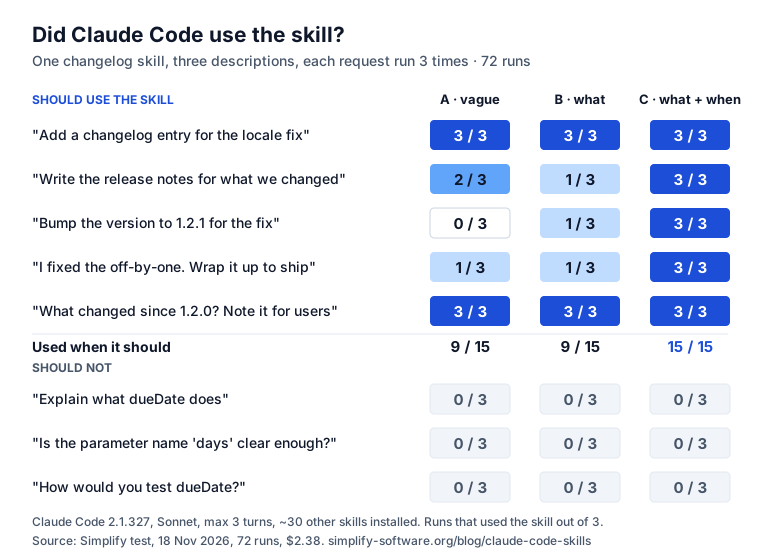
What the 72 runs show
- Naming the thing works without help. “Add a changelog entry” and “note it where users will see it” found the skill under every description, even “Helps with changelogs”. When the request contains the word, the description barely matters.
- Indirect requests need the trigger words. “Bump the version” never mentions a changelog. A vague description caught it 0 of 3 times, “what” 1 of 3, “what and when” 3 of 3, because “a version bump” was in its list. Same for “wrap it up so it is ready to ship”: 1, 1 and 3 of 3.
- The same request does not always get the same answer. “Write the release notes” used the skill 2 of 3 times with the vague description and 1 of 3 with the better-worded “what” one. One run tells you little; test a description several times before you trust it.
- A longer description did not cause false alarms. The three unrelated requests never triggered the skill, under any description: 0 of 27. Being specific about when also says when not.
One test of one skill is not a law. It is enough to change how we write descriptions: start with what the skill does, then list the situations and the words people use for them.
Write a description that gets picked
The rules, from Anthropic’s authoring guide and the test above:
- What, then when. “Formats SQL to the team style. Use when the user edits, reviews or pastes .sql files.” The spec asks for both; the test shows why.
- The words people say, not the words you think in. “Bump”, “ship”, “release notes”, “cut a release” all mean the same job to a person. Put the likely ones in.
- Third person. Anthropic: “Always write in third person. The description is injected into the system prompt.” “Writes …”, not “I can …” or “You can …”.
- Key use case first. If the listing runs out of budget or the text passes 1,536 characters, the end is what gets cut.
- Say when not, if it overlaps. “Not for internal notes” keeps a release skill out of a meeting-notes request.
Before you commit it, paste the file into our free SKILL.md validator: it checks the frontmatter for the spec, a claude.ai upload and Claude Code, and flags a description with no “when”. What 1,792 public skills get wrong is in the SKILL.md format study: 36.6% of them never say when.
Make one in five minutes
mkdir -p .claude/skills/changelog-entries- Create
.claude/skills/changelog-entries/SKILL.md: line 1---, thenname:anddescription:, then---, then the steps. - Start Claude Code in the repository and ask “What skills are available?”. Yours should be in the answer. Claude Code also watches skill folders, so edits apply during a session.
- Try
/changelog-entriesto run it by hand, then try two or three requests that do not name it. - Commit
.claude/skills/so the team gets it.
If Claude never picks it, the docs suggest: check the description has the words users say, check the
skill is listed, run with --debug to see a YAML error (“Claude can’t match against your description”
when the frontmatter does not parse), or claude plugin validate .claude/skills.
Control when and how a skill runs
Claude Code’s own frontmatter fields, all optional:
disable-model-invocation: truefor anything with side effects: deploys, releases, messages. Claude “can’t invoke the skill on its own”; you type/deploy. The description also leaves the listing, which saves budget.user-invocable: falsefor background knowledge, such as how a legacy system works: Claude uses it, the/menu hides it.allowed-toolspre-approves tools “during the turn that invokes this skill”; the grant clears with your next message. It does not restrict other tools.context: forkruns the skill in a subagent, so a long procedure does not fill your conversation.agentpicks the subagent type.pathsloads the skill automatically only for matching files, such asmigrations/**.modelandeffortswitch the model or effort for the rest of the turn.hooksfor a rule that must hold every time, not when Claude remembers it.
Remember that these fields are Claude Code’s. A claude.ai upload or the Skills API refuses a SKILL.md that has them (“Unexpected key(s) in SKILL.md frontmatter”). If the skill is meant to travel, keep the frontmatter to the spec’s six fields and let Claude Code users add the extras locally.
Skills for a team, not a laptop
A skill in ~/.claude/skills helps one person. Committed to .claude/skills, it helps everyone who
works in that repository with Claude Code, Copilot or Cursor. Two gaps remain: a skill that belongs to
a kind of work rather than a repository (how we do mobile security, how we write migrations), and the
same skill reaching agents that do not run in your repository at all.
Agent Ready, our Jira app, fills those from Jira. A company library and each
project’s own skills, imported from a SKILL.md, a .zip or an npm package; a role such as “Mobile
security” brings its skills to every work item it is on. Claude Code gets them through Agent Ready’s
MCP tools: get-agent-brief returns the brief with the skills’ instructions, get-skill one skill by
name. They arrive as text in the brief, not as installed Claude Code skills, so the listing budget is
not touched; Copy as SKILL.md puts one into a repository when you want it there.
More in agent skills for teams.
Sources
- Claude Code: Extend Claude with skills, including “Skill not triggering”, “Skill descriptions are cut short” and the frontmatter reference, read 18 November 2026.
- Anthropic: Skill authoring best practices.
- Agent Skills: Specification.
- Our test: Claude Code 2.1.327, Sonnet, 72 runs on 18 November 2026; prompts and results above.
Frequently asked questions
Do skills work in Claude Code?
Yes. Put a folder with a SKILL.md in .claude/skills/ (project) or ~/.claude/skills/ (just you). Claude Code lists every skill's name and description at the start of a session, and loads the instructions when you type /skill-name or when Claude decides the skill fits your request.
Why is Claude not using my skill?
Most often the description says what the skill does but not when to use it, so Claude cannot match your request to it. In our test that cost 6 of 15 runs. Add "Use when ..." with the words people actually type. Then check the skill is listed (ask "What skills are available?"), that line 1 of SKILL.md is ---, and that the frontmatter parses (claude plugin validate .claude/skills).
What is the difference between a skill and CLAUDE.md?
CLAUDE.md is loaded into every session in full, so it suits rules that always apply: how to build, test and name things. A skill costs only its name and description until it is used, so it suits a procedure needed now and then: a release, a migration, a report. Rules that must hold every time belong in CLAUDE.md or a hook, not in a skill.
How many skills can Claude Code handle?
Every skill name is always listed, but descriptions share a budget of about 1% of the model's context window. With many skills, Claude Code drops descriptions to fit, and a skill without its description is rarely picked. /doctor estimates the listing's cost; skillOverrides can set rarely used skills to name-only.
How do I stop Claude from running a skill on its own?
Add disable-model-invocation: true to its frontmatter. The skill then runs only when you type /skill-name, which is what you want for deploys, releases or anything that sends messages. The reverse, user-invocable: false, hides it from the / menu but lets Claude use it as background knowledge.
Keep reading
- Jira, JSM and the Marketplace · 8 minAgent Skills for Teams: 6 Ways to Share Them, Compared
- Jira, JSM and the Marketplace · 10 minSKILL.md Format: Rules, Examples and 1,792 Skills Checked
- Jira, JSM and the Marketplace · 6 minSkills vs MCP vs AGENTS.md: Which to Use, and When
- Free toolSKILL.md validator