SKILL.md Format: Rules, Examples and 1,792 Skills Checked
On this page
Your teammate wrote a deploy skill. It works in Claude Code every day. You upload the same folder to claude.ai so the rest of the team can use it, and get this:
Unexpected key(s) in SKILL.md frontmatter: argument-hint. Allowed properties are: allowed-tools, compatibility, description, license, metadata, name
Nothing is wrong with the skill. It was written for one reader and sent to another. A SKILL.md file has at least three readers today, and they do not share one rulebook. We ran 1,792 public skills from GitHub through all three to see how often that bites.
Short answer: a SKILL.md is a Markdown file in a folder named after the skill. It starts with YAML
frontmatter between --- lines. Two fields are required: name (lowercase letters, digits and
hyphens, up to 64 characters, the same as the folder) and description (up to 1,024 characters:
what the skill does and when to use it). Four are optional: license, compatibility, metadata
and allowed-tools. The instructions follow, ideally under 500 lines. On 18 November 2026 we checked
1,792 public skills: of the 1,601 with frontmatter, 38.2% would be refused by a claude.ai upload,
18.3% break the open spec, and 36.6% never say when to use the skill.
A SKILL.md, line by line
Here is a complete skill. Every line below is there for a reason a reader of the file will check.
---
name: changelog-entries
description: Writes CHANGELOG.md entries in Keep a Changelog format. Use when the
  user finishes a change, asks for release notes, or mentions the changelog, a
  release or a version bump.
license: MIT
metadata:
  author: platform-team
  version: "1.2"
---

# Changelog entries

1. Read CHANGELOG.md and package.json.
2. Add the change under `## [Unreleased]`: Added, Changed, Fixed or Removed.
3. One line per change, past tense, with the issue key if there is one.

## Example

Input: "Fixed the off-by-one in dueDate (PAY-31)"
Output, under ### Fixed: "- Due dates no longer land one day early (PAY-31)."

For the full style rules, see [references/style.md](references/style.md).- Line 1 is
---. Claude Code reads the frontmatter “only when the opening --- is the file’s first line”. A blank line or a title above it turns the whole file into instructions with no name. namematches the folder (changelog-entries/SKILL.md). The spec requires it.- The description has two halves. What it does, then “Use when” with the words a user would type. The agent sees only this line until it decides to load the skill.
- The version sits under
metadata, quoted. A top-levelversion:is the most common reason a public skill fails a claude.ai upload (14.5% of our sample). - The body is short. Steps, one example, a link one level deep for the rest.
The six fields, and what we found in each
The Agent Skills specification defines six frontmatter fields. The right column is what we saw in 1,601 public skills with frontmatter.
| Field | Rule in the spec | In public skills |
|---|---|---|
name | required, 1-64 characters, a-z, 0-9 and -, no - at either end, no --, = folder | 6.9% differ from their folder; 4.2% use capitals, spaces or _ |
description | required, 1 to 1,024 characters, “what the skill does and when to use it” | median 201 characters; 36.6% say what but not when |
license | optional, a licence name or a bundled file | 209 skills set it |
compatibility | optional, up to 500 characters, only if the skill needs a product or a tool | 44 skills set it |
metadata | optional, “a map from string keys to string values” | 5.7% nest maps or lists in it, which the spec does not allow |
allowed-tools | optional, experimental, a space-separated string | 1.7% write it as a YAML list (Claude Code takes it, the spec not) |
Everything else in the frontmatter is outside the spec. Other agents ignore it; a claude.ai upload
refuses it. The extra fields we saw most: version (234 skills), author (111), tags (104),
source (95), category (62).
Three readers, three rulebooks
The same folder is read by three kinds of software, and each checks different things.
- The open spec. What Codex, GitHub Copilot, Cursor, Gemini CLI and the other agents that adopted Agent Skills follow. Unknown fields are ignored, the name must match the folder.
- A claude.ai upload, the Skills API and
package_skill.py. Claude Code’s docs are blunt: “If you include any field the spec doesn’t allow, packaging or upload fails with a hard error instead of ignoring the field.” Anthropic’s overview adds two rules for the name: no XML tags and no reserved words, “anthropic” or “claude”. The folder name is not checked. - Claude Code. It accepts every spec field plus fourteen of its own:
when_to_use,argument-hint,arguments,disable-model-invocation,user-invocable,disallowed-tools,model,effort,context,agent,background,hooks,pathsandshell. It is also the most forgiving: a missing name defaults to the folder, a missing description to “the first non-empty line of the markdown content”, and YAML that does not parse still loads “with no fields set”.
That last point hides problems. A skill can work for months in Claude Code and fail the first time someone shares it. In our sample, 129 skills (8.1%) used Claude Code-only fields. Most were written for Claude Code on purpose; the trouble starts when they are shared as if they were portable.
| Rule | Spec | claude.ai upload | Claude Code |
|---|---|---|---|
--- on line 1 | required | required | else no frontmatter |
name format | required | required | optional (folder name) |
name = folder | required | not checked | not checked |
No “anthropic” or “claude” in name | not checked | required | not checked |
description | required | required | recommended |
| Fields beyond the six | ignored | refused | 14 more accepted |
| Under 500 lines, 5,000 tokens | recommended | recommended | recommended |
What 1,792 public skills get wrong
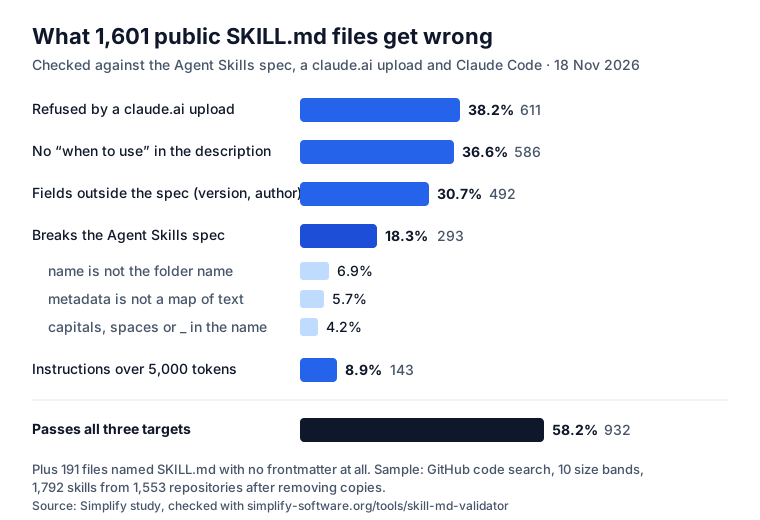
How we sampled. GitHub’s code search finds millions of files named SKILL.md (its own estimate, copies included, was about 7.5 million on 18 November 2026). We took the first 200 results in each of ten file-size bands, from under 500 bytes to over 20 KB, downloaded each from its default branch, and dropped exact copies: 1,792 skills from 1,553 repositories. Search results are ranked, not random, so read the numbers as a large sample, not a census. Each file went through the same SKILL.md validator you can use for free.
The six mistakes that came up most, with the fix:
- A field outside the six (30.7%).
version: 1.0.0andauthor: someoneat the top level. Move them undermetadataas text:version: "1.0.0". - A description with no “when” (36.6%). “Generates API docs” tells the agent what, not when. Add “Use when the user asks for API docs or changes a route”, with the words people actually type.
- No frontmatter on line 1 (191 more files). Some are notes that only share the name; others
start with a title or a blank line. Move
---to line 1. - The name is not the folder (6.9%).
name: pdf-toolsinskills/pdf/. Rename one of them. - Metadata that nests (5.7%).
metadata: { openclaw: { requires: ... } }. The spec wants a flat map of text; keep tool-specific settings in a file the skill reads. - Too long (8.9% over 5,000 tokens). The whole body loads every time. Keep the steps in SKILL.md
and move tables, API references and long examples into
references/.
Rarer, but each one a hard failure somewhere: 14 skills had “claude” or “anthropic” in the name, 14
had XML tags in the description, 27 wrote allowed-tools as a list.
What we did not find: a real API key. 34 skills tripped generic password rules, every one a
placeholder in a code sample (password: changeme); two tripped vendor rules, both fake examples. We
changed the validator to flag only vendor formats after reading all 36.
The description decides whether the skill is used
The spec says the name and description “are loaded at startup for all skills”, about 100 tokens each. The body is read only after the agent picks the skill. Anthropic’s authoring guide puts it plainly: Claude uses the description “to choose the right Skill from potentially 100+ available Skills”, and it should be written in the third person.
We tested this in Claude Code with one skill and three descriptions: a vague one (“Helps with changelogs”), one that said what it does, and one that said what and when. Five requests should use the skill and three should not, each run three times: 72 runs. The “what and when” description was picked on 15 of 15 runs that needed it; the other two on 9 of 15 each, missing “bump the version” and “wrap it up so it is ready to ship” most often. None fired on the 27 runs that had nothing to do with changelogs. The prompts, the misses and the cost are in Claude Code skills, tested.
How long should a SKILL.md be?
The spec’s numbers: under 500 lines for SKILL.md and under about 5,000 tokens for the instructions, with detail in files the agent opens “only when required”. Public skills are mostly well inside that: the median was 73 lines, the 90th percentile 392. The long tail is where problems are: 107 skills over 500 lines, some over 2,000, often a whole API reference pasted in.
A practical split:
- SKILL.md: when to use it, the steps, one example, what not to do. One screen if you can.
references/: API tables, style guides, long examples. Linked by relative path, one level deep.scripts/: code the agent runs instead of writing it each time, with clear error messages.assets/: templates and schemas the skill fills in.
Where each agent looks for skills
From each vendor’s own docs, read on 18 November 2026:
| Agent | In the repository | For one person |
|---|---|---|
| Claude Code | .claude/skills/<name>/SKILL.md | ~/.claude/skills/ |
| OpenAI Codex | .agents/skills/, from the working folder up | ~/.agents/skills/ |
| GitHub Copilot | .github/skills/, .claude/skills/, .agents/skills/ | ~/.copilot/skills/, ~/.agents/skills/ |
| Cursor | .cursor/skills/, .agents/skills/; also .claude/skills/, .codex/skills/ | ~/.cursor/skills/, ~/.agents/skills/ |
No folder is read by all four. .claude/skills reaches Claude Code, Copilot and Cursor;
.agents/skills reaches Codex, Copilot and Cursor. In our sample, most skills sat at a repository’s
root (45.8%) or in a skills/ folder of a skills collection (25.2%): published to be copied, not used
in place.
A template to copy
---
name: your-skill-name
description: Does X for Y. Use when the user asks to ..., mentions ..., or works on
  files like ... Do not use for ...
metadata:
  owner: your-team
  version: "1.0"
---

# Your skill name

## When to use
One or two sentences, the same triggers as the description.

## Steps
1. ...
2. ...
3. Check the result: the command or test that proves it worked.

## Example
Input: ...
Output: ...

## Do not
- ...

Details: [references/details.md](references/details.md)
Check it before you commit it: paste it into the SKILL.md validator. It runs in your browser and says, for each of the three readers, what fails and how to fix it.
Skills for a team, not one laptop
A skill in one developer’s ~/.claude/skills helps one developer. The harder part is getting the
same skill to every agent that touches a team’s work, in the right project, and keeping keys out of
it. That is where Agent Ready, our Jira app, keeps skills: a company library
and each project’s own, imported from a SKILL.md, a .zip or the .tgz that npm pack downloads (read
in the browser, nothing fetched). A project or a role, such as “Mobile security”, brings its skills to
every work item it is on, and they reach the agent in the brief or through MCP with get-skill. A
skill with a password or key in it is not saved, and Copy as SKILL.md takes it back to a
repository. How to run skills for a whole team: agent skills for teams.
Sources
- Agent Skills: Specification and overview, read 18 November 2026.
- Anthropic: Agent Skills overview and skill authoring best practices.
- Claude Code: Extend Claude with skills, frontmatter reference and “Using skill frontmatter outside Claude Code”.
- OpenAI: Codex skills. GitHub: About agent skills. Cursor: Skills. Visual Studio Code: Agent skills.
- Our data: 1,792 SKILL.md files from GitHub code search, 18 November 2026, checked with our validator (its rules are open in the page’s code).
Frequently asked questions
How do you structure a SKILL.md file?
Put the skill in a folder named after it. SKILL.md starts on its first line with ---, then YAML frontmatter with at least name (lowercase letters, digits and hyphens, the same as the folder) and description (what the skill does and when to use it), then a closing ---. Under it, Markdown instructions: the steps, an example of input and output, and the edge cases. Longer material goes into references/, scripts into scripts/, templates into assets/.
What does a SKILL.md file look like?
Three lines of frontmatter and a short Markdown body is enough: "---", "name: changelog-entries", "description: Writes CHANGELOG.md entries in Keep a Changelog format. Use when the user finishes a change, asks for release notes or bumps the version.", "---", then numbered steps. The template on this page is a complete one to copy.
How long should a SKILL.md file be?
The Agent Skills specification asks for under 500 lines and under about 5,000 tokens of instructions, because the whole file is loaded every time the skill runs. In our sample of public skills the median was 73 lines; 6.7% went over 500 lines and 8.9% over 5,000 tokens. Move reference material into separate files the skill links to.
Why does claude.ai refuse a skill that works in Claude Code?
Claude Code accepts fields of its own, such as argument-hint, disable-model-invocation and model. A claude.ai upload and the Skills API accept only the six fields of the Agent Skills spec and stop with "Unexpected key(s) in SKILL.md frontmatter". In our sample, 30.7% of skills carried a field outside the spec, most often version.
Where do I put SKILL.md so every agent finds it?
No single folder covers all four big agents. .claude/skills is read by Claude Code, GitHub Copilot and Cursor; .agents/skills by Codex, GitHub Copilot and Cursor. Copilot also reads .github/skills, Cursor also .cursor/skills. A team that uses Claude Code and Codex keeps the skill in one place and links or copies it into the other.
Are skills from GitHub safe to install?
Only after you read them. Anthropic says to use skills "only from trusted sources", because a skill can tell the agent to run code or call tools. Read the SKILL.md and every script it ships, and check what allowed-tools grants. We found no real API key in 1,792 public skills, but two had fake ones that a scanner flags.