OutSync Standard vs. Advanced: Which Edition Does Your Team Need?
On this page
Two names, not three
Atlassian’s Marketplace platform recognizes exactly two paid edition names for an app: Standard and Advanced. There’s no third “Premium” tier at the platform level — where other vendors use that word, it’s an informal marketing label for their own Advanced tier, not a distinct Marketplace mechanism. OutSync uses Atlassian’s own two real names throughout, including in its pricing CSVs and Marketplace listing, rather than inventing a third label the platform doesn’t actually support.
What’s in Standard
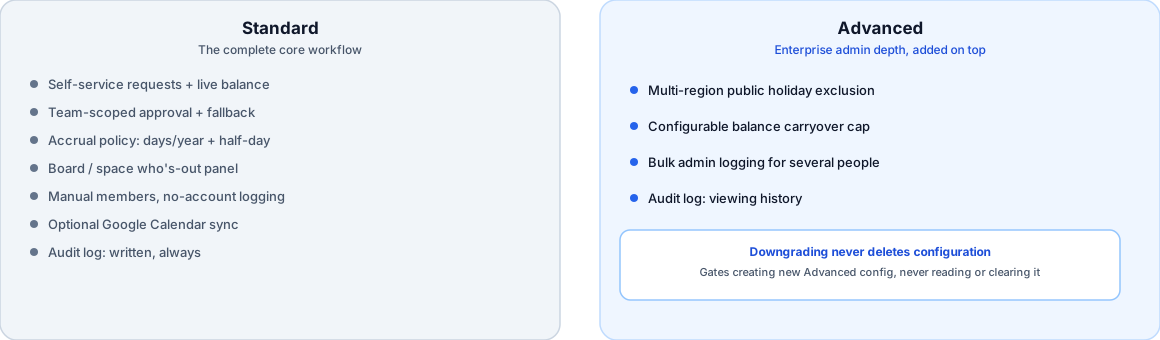
Everything needed to run a real leave-request-and-approval workflow, full stop — this isn’t a crippled trial tier:
- Self-service leave requests with a live balance
- Team-scoped approval, with an org-wide default and automatic fallback to the Jira project lead or Confluence space admin
- Configurable accrual policy — days per year and half-day increments
- Board action (“who’s out” panel) on Jira, Team Availability tab on Confluence
- Manual members and single-person admin logging for contractors without an Atlassian account
- Optional Google Calendar sync
Nothing above is a limited preview of something bigger — it’s the complete core workflow, and plenty of real teams will never need more than this.
What Advanced adds
Four specific depths, each targeted at a real gap this project’s own competitor research turned up (public reviews of other Jira leave apps, not a hypothetical wishlist):
- Multi-region public holiday exclusion — configure a public holiday calendar per team (US, GB, or DE today) so a leave request spanning a public holiday only deducts the days that were actually the employee’s to take.
- Configurable balance carryover — how many unused days roll into the next year, up to a cap. Standard’s accrual policy still covers days/year and half-day increments; carryover specifically is the Advanced depth on top.
- Bulk admin logging — logging leave for several manual members in one action, aimed at an admin processing an onboarding or offboarding wave rather than correcting one person’s record.
- Audit log viewing — a full history of every admin override (approver changes, bulk actions, accrual policy updates), each with who did it and when.
The one deliberate exception: the audit log always writes
This is worth stating precisely, because it’s the one place the edition split could easily be misunderstood: the audit log is written unconditionally, on every edition, regardless of whether anyone can currently view it. A Standard-tier organization’s admin actions are being recorded from day one. Upgrading to Advanced later doesn’t start a fresh, empty log — it unlocks visibility into history that was already being kept. The alternative design — only writing audit entries once an org is on Advanced — would mean a late upgrade loses exactly the history an audit trail exists to provide, which defeats the point of having one at all.
Downgrading never deletes your configuration
The general principle across all four Advanced features, not just the audit log: gate the ability to create new Advanced-tier configuration, never the ability to keep or remove configuration that already exists. Concretely — a team that had a holiday region set, or a non-zero carryover cap, while on Advanced keeps that configuration fully readable and clearable if the organization later moves to Standard; only setting a new value or bulk-logging a new action requires Advanced again. Nothing about a downgrade silently deletes data that was correctly saved while the org was paying for the tier that created it.
Why this specific split, not a different one
Competitor research for this project (see the full seven-app comparison) found something worth naming directly: none of the reviewed competitors offer tiered depth like this at all. Every one of them is effectively single-tier — a flat feature set at whatever price they charge, with no Standard/Advanced split and no path to unlock more admin depth as an organization’s needs grow. OutSync’s two-tier structure isn’t matching an existing category convention; it’s a deliberate choice to let a small team start on Standard’s real, complete workflow and grow into Advanced’s depth only when multi-region holidays, carryover, bulk admin actions, or audit visibility actually become a real requirement — not before.
Related reading
Frequently asked questions
Is there a "Premium" tier?
No — Atlassian Marketplace apps ship exactly two fixed edition names, Standard and Advanced. "Premium" isn't a real Marketplace edition; some vendors use it as an informal marketing nickname for their Advanced tier, but the platform itself only recognizes two.
If I downgrade from Advanced to Standard, do I lose my existing holidays or carryover configuration?
No. OutSync's gating principle is "gate creation, not consequences" — Advanced-only actions (setting a new public holiday region, changing the carryover cap, bulk-logging leave, viewing the audit log) require Advanced, but reading or clearing configuration that was already saved never gets blocked, and the audit log itself is always written regardless of edition, so downgrading never silently deletes history.
Does the audit log only work on Advanced?
The opposite, deliberately. Every admin action — an approver change, a bulk log-leave action, an accrual policy update — is recorded in the audit log unconditionally, on every edition. Advanced is what's required to view that history; a Standard-tier org that upgrades later inherits a complete record already, not a blank one.