How OutSync's Forge-Hosted Core Handles Your Leave Data
On this page
The question a security reviewer actually asks
Not “is this app secure” in the abstract — that’s not answerable in one sentence for any app. The real question, the one that actually gets asked before a Marketplace app clears procurement, is narrower: where does the data go, exactly, and what’s the one thing I’d need to explain if someone asked me to justify this install? Here’s OutSync’s answer to that question, stated plainly enough to reuse in that conversation.
The default: everything stays inside Forge
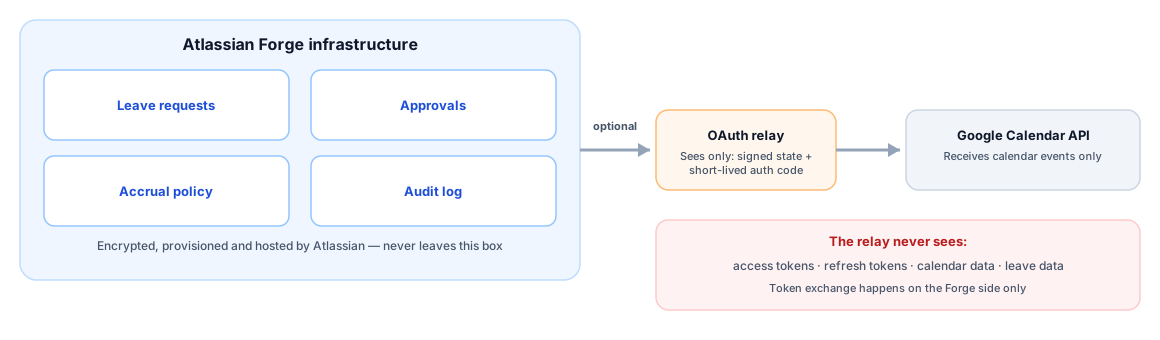
OutSync is built entirely on Atlassian Forge. Atlassian’s own platform documentation describes what that means concretely: Forge “allow[s] developers to host apps on infrastructure that is provisioned, managed, monitored, and scaled automatically by Atlassian,” and its hosted storage “lets you store data partitioned by Atlassian app and site.” In practice, for OutSync, that means every leave request, every approval decision, every accrual-policy setting, every approver configuration, and every audit-log entry lives in your site’s own Forge storage — provisioned and encrypted by Atlassian, not by OutSync, and not copied anywhere else.
The one honest exception: Google Calendar sync
If an admin turns on the optional Google Calendar connection, two things leave Atlassian’s infrastructure, and only two:
1. The calendar events OutSync creates. When leave is approved, cancelled, or revoked, OutSync calls Google’s Calendar API to create, update, or delete the corresponding event on the team’s shared calendar. This is unavoidable — it’s the entire point of the feature — and it’s the same category of call any calendar-integrating app has to make.
2. A short-lived authorization code, through a small relay. Google’s OAuth flow requires one exact, pre-registered redirect URL — it does not support redirecting back to a Forge webtrigger URL that’s different on every installation. So OutSync runs one small, stateless Cloudflare Worker whose entire job is: verify an HMAC-signed, expiring routing token, and forward Google’s short-lived authorization code to the correct installation’s Forge webtrigger. It never exchanges that code for a token itself, never stores anything, and never sees a calendar event, a leave request, or any data belonging to your organization. Token exchange happens entirely on the Forge side, and the resulting access and refresh tokens are stored in the same Forge-hosted storage as everything else — never in the relay.
Both of these are the honest scope of what leaves Atlassian’s infrastructure. Neither happens unless an admin explicitly connects Google Calendar, and the connection can be turned off at any time with no effect on the core leave/approval workflow.
Why this costs the “Runs on Atlassian” badge — and why that’s the correct outcome
Atlassian’s own eligibility page for the “Runs on Atlassian” badge is direct about the boundary: an app “must not egress data, with the exception of egress for analytics purposes,” and it explicitly acknowledges that “not all apps can be eligible… for example, integrations that communicate with external services by nature.” OutSync’s Google Calendar sync is precisely that kind of integration — a real, non-analytics call to a third-party API, made because the feature genuinely requires it, not because of a data-handling shortcut somewhere else in the app.
The alternative — quietly not mentioning this to keep the badge conversation simpler, or scoping the Calendar feature so narrowly it barely does anything — isn’t actually more trustworthy. It’s just a less-examined version of the same trade-off. Anyone requiring a “Runs on Atlassian”-eligible app across the board should treat OutSync’s Calendar sync as out of scope for that requirement, exactly as this page states, and evaluate the rest of the app (which does qualify structurally) on its own terms.
Scopes, retention, and what “optional” actually guarantees
The Calendar connection requests one OAuth scope:
https://www.googleapis.com/auth/calendar — Google classifies this “Sensitive,” which is
standard for any integration that can create or modify calendar events, not a signal that
OutSync is requesting more than the feature needs. It’s a single, org-level connection — one
admin connects one account once, not every employee individually — and OutSync’s own
connection-status check re-verifies it live on every admin-page load rather than trusting a
cached “was this ever connected” flag, so a revoked or expired connection surfaces as a clear
warning instead of silently going stale.
If the connection is never made, or is later disconnected, nothing about it is a half-measure: the approval workflow, balance tracking, board/space visibility, and audit trail all work identically with or without it, because Calendar sync was designed as an addition to that workflow, not a dependency of it.
Related reading
Frequently asked questions
Does OutSync qualify for Atlassian's "Runs on Atlassian" badge?
No, and this post says so directly rather than leaving it for a security reviewer to discover later. Atlassian's own eligibility page states an app "must not egress data, with the exception of egress for analytics purposes," and explicitly notes that "not all apps can be eligible... for example, integrations that communicate with external services by nature." OutSync's optional Google Calendar sync is exactly that kind of integration.
What does the OAuth relay actually see?
A short-lived Google authorization code and an HMAC-signed routing token, for the few seconds it takes to redirect one request to the correct Forge webtrigger URL. It never receives, logs, or stores an access token, a refresh token, calendar data, or leave data — nothing about a request or an employee passes through it, ever.
What happens to my data if I never connect Google Calendar?
Every leave request, approval decision, accrual balance, approver configuration, and audit-log entry stays inside your site's own Forge-hosted storage — nothing about your organization's leave data reaches any system outside Atlassian's infrastructure at all.