Time Off Request Form: What to Include, and How to Automate It
On this page
The form’s actual job
A time-off request form isn’t a data-entry exercise — its real job is to hand an approver everything they need to make a decision in one look, without a separate lookup step. Most forms fail this quietly: they collect a date range and a reason, and leave the approver to go check the requester’s actual balance somewhere else before deciding anything.
What actually belongs on the form
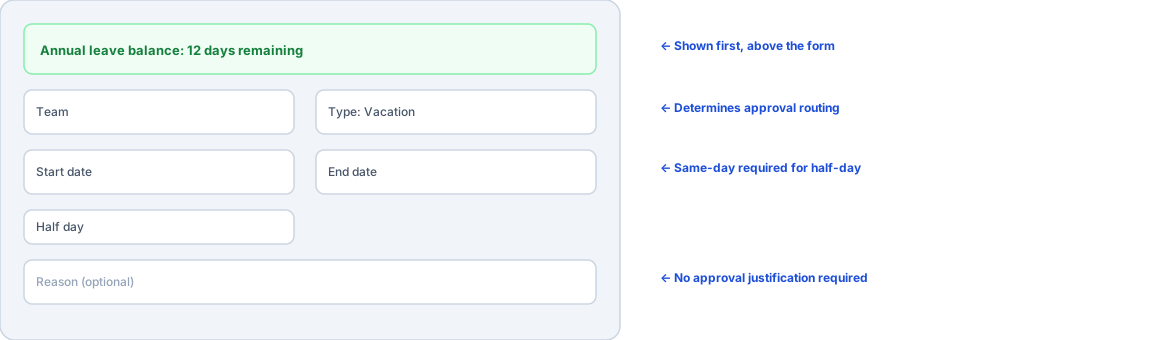
The requester’s current balance, shown first. Not a separate report, not a number someone has to calculate — visible directly above the form, before the date fields, so both the person requesting and the person approving are working from the same, current number.
Team selection, if the person is on more than one — this determines who the request even routes to for approval, so it needs to be explicit rather than assumed.
Leave type. A simple category (vacation, sick, other) is enough for most teams; whether it draws from one shared balance or separate pools is a policy decision worth making explicitly rather than defaulting into by accident — see the case for tracking sick and vacation leave separately for when that distinction actually matters.
Start date, end date, and a half-day option. Half-day requests need their own careful handling — a checkbox that’s only meaningful (and validated) when start and end date are the same day, not a toggle that could ambiguously apply across a multi-day range.
An optional reason. Genuinely optional — requiring a justification for routine leave adds friction without adding information an approver actually needs to decide, and creates an unnecessary disclosure expectation for anything sensitive.
What doesn’t belong by default: a manager sign-off chain (multiple sequential approvers) for routine leave adds delay without adding a real decision point in most organizations — a single team-scoped approver, with a sensible fallback if none is configured, covers the actual decision that needs making without turning a vacation request into a multi-step workflow.
Automating collection isn’t automating the process
A shared Google Form or a structured email template automates the data entry half of this — useful, but it’s the smaller half. What it doesn’t automate: checking the requester’s real balance at the moment of submission, routing the request to the right approver automatically, updating a “who’s out” view the moment it’s approved, or keeping a calendar in sync without anyone re-entering the same dates a second time. A collection-only form still leaves someone manually doing all of that after the form is submitted — which is most of the actual work a request form exists to remove.
How OutSync’s request form applies this
The general-access screen shows the employee’s current balance directly above the form — “Your current balance” is visible before a single field gets filled in, not a separate tab. Team selection determines routing (team-specific approver, org default, or automatic fallback to the Jira project lead or Confluence space admin). Half-day is a real, validated option restricted to same-day requests. The reason field is genuinely optional. And once approved, the same request updates the balance, the “who’s out” panel, and — if connected — the shared Google Calendar automatically, with nothing to manually reconcile afterward.
Related reading
Frequently asked questions
What fields does a time-off request form actually need?
The minimum that actually supports a decision: who's requesting, the leave type, the date range, whether it's a half-day, an optional reason, and — critically — the requester's current balance shown right above the form, not buried in a separate report the approver has to go look up.
Should the request form show the balance before or after submission?
Before, and visibly, on the same screen as the form itself. An approver deciding whether to approve a request benefits from seeing the same balance the requester saw when they submitted it — if the balance visible at approval time doesn't match the intent of the request, that mismatch is worth surfacing before a decision, not after.
Can a paper or email-based request process be automated without a dedicated app?
Partially — a shared form (Google Forms, a spreadsheet) automates data collection, but doesn't automate the balance check, the approval routing, or the "who's out" visibility that makes the request useful to anyone besides the person who filed it. Automating collection alone still leaves the harder half of the process manual.