How to Log Leave for Contractors Without an Atlassian Account
On this page
The gap, in a competitor’s own words
This isn’t a hypothetical problem. A real, current 2-star review of Leave Tracker — a Jira Cloud leave-tracking app with 130 installs — names it directly: it “doesn’t allow admins to input vacations/sick days for their team members.” That’s not a UX complaint about a clunky form. It’s a hard wall: if the person whose leave needs recording doesn’t have an account to log into that app themselves, their absence has no path into the system at all.
Why this keeps happening
Every Jira and Confluence leave tracker, by construction, runs as an app installed for licensed users of that product. The unstated assumption baked into that architecture is that everyone whose leave matters also holds — and actively uses — a paid seat. Two groups break that assumption regularly:
- Contractors and seasonal workers, often deliberately kept off the roster of full, named accounts specifically to avoid paying for a seat they’d barely use.
- Anyone the organization tracks for planning purposes without giving Jira/Confluence access at all — a shared resource, a part-time specialist, someone whose actual day-to-day tool is somewhere else entirely.
The cost side got sharper this year
This isn’t just an inconvenience anymore — it has a real, current price attached. Atlassian’s own support documentation confirms that, as of a phased rollout starting July 14, 2025, maximum quantity billing now applies to Jira, Confluence, Jira Service Management, and several other Cloud products: “Your bill is based on the maximum amount of users you have throughout your billing period” — meaning a contractor added for two weeks and removed can still set the peak count for the entire billing period, not just the days they were actually present. Minimizing unnecessary named accounts isn’t a nice-to-have anymore; it has a direct, documented cost consequence.
That makes the “give them an account just so they can log their own leave” workaround a worse idea than it already was — it solves a leave-tracking gap by creating a billing problem.
How OutSync closes it
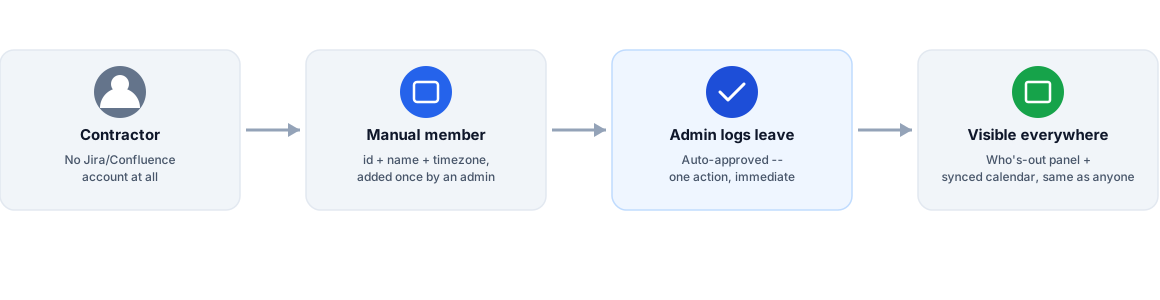
From a team’s admin settings, under Employees, an admin adds a manual member — just an id, a display name, and an IANA timezone (needed so date-range leave logs land on the correct calendar day for that person). No Jira or Confluence account is created, requested, or implied. That manual member then shows up everywhere a real team member would: in the “who’s out” panel on the board or space, and on the team’s synced Google Calendar if that’s connected.
To log their leave:
- Open the team’s admin settings and select the team.
- Under Employees, add the manual member once (id, name, timezone) — this only needs doing the first time.
- From the “log leave for an employee without an account” section, pick the dates and leave type, and log it. It’s recorded as approved immediately, since it’s an admin action on someone who can’t self-serve a request in the first place.
This is available on every plan for one person at a time. Logging leave for several manual members in a single action — useful for an admin processing an onboarding or offboarding wave rather than a one-off correction — is an Advanced-tier capability, alongside OutSync’s other admin-depth features (multi-region public holiday exclusion, configurable balance carryover, and the full audit trail covering every one of these admin actions).
What this doesn’t try to solve
Manual members aren’t a substitute for real Atlassian accounts where those make sense, and they don’t get their own login, their own approval queue, or any way to self-report a request — by design, since the entire point is covering people who can’t or shouldn’t have one. If a contractor’s engagement grows into something that actually needs Jira/Confluence access, that’s a licensing decision for the organization to make on its own terms — OutSync’s manual-member record simply stops being needed at that point, with nothing to migrate or clean up.
Related reading
Frequently asked questions
Why would someone not have a Jira or Confluence account at all?
The most common case is a contractor or seasonal worker whose organization deliberately doesn't purchase them a seat — either because their role doesn't need Jira/Confluence access at all, or because every additional named account now counts toward Atlassian's own maximum-quantity billing for the whole billing period, not just the days they're actually active.
Does this require creating a shadow account for the contractor?
No — that would just recreate the licensing cost problem this is meant to avoid. OutSync's manual members are a lightweight record scoped to a team (an id, a name, a timezone) with no Jira or Confluence account behind them at all, used only so an admin can log leave on their behalf and have it show up correctly in "who's out" visibility and the team calendar.
Can an admin log leave for several manual members at once?
Yes — logging for one person at a time is available on every plan; logging for several people in one action is an Advanced-tier capability, aimed at admins handling onboarding or offboarding waves rather than one-off corrections.