Confluence Team Availability: Keeping Documentation Teams in Sync
On this page
A different failure, the same root cause
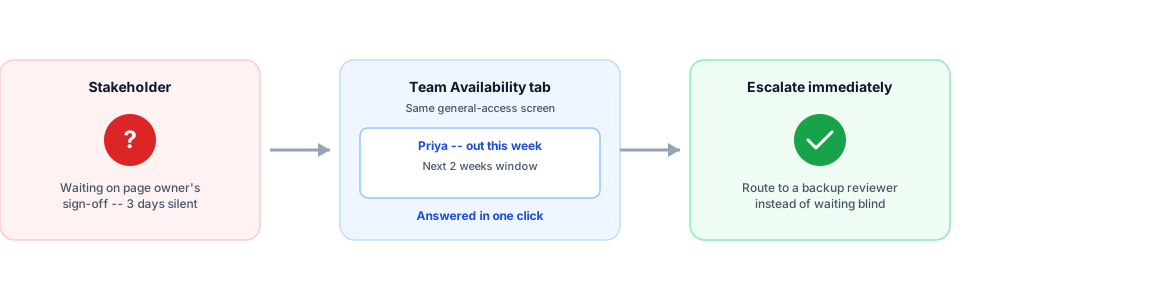
A mis-assigned sprint ticket fails loudly — someone’s out, the story doesn’t get done, it shows up in the next standup. A stalled documentation review fails quietly. A runbook needs sign-off before a release. The page’s designated reviewer hasn’t responded in three days. Nobody knows if they’re slow, busy, or on vacation until someone finally messages them directly and waits for an out-of-office autoresponder to confirm it. The release either waits, or ships without the review it was supposed to get.
That’s not a different problem from the ghost-resource problem — it’s the identical root cause in a slower-moving, less visible form. Availability data lives somewhere nobody checked before the decision (in this case, “should we wait” or “should we escalate”) needed to be made.
The research behind why this matters more than it looks
This isn’t a new observation. Stack Overflow’s own engineering blog, in a 2019 piece by Zachary Flower on organizational knowledge silos, put a sharp version of the underlying test directly: “If your entire organization’s productivity suffers because a single employee gets a cold, that’s a pretty good sign that it’s time to start distributing some knowledge.” The piece frames this as a “lottery factor” (elsewhere called a “bus factor”) — a measure of how few people’s unavailability it takes before something critical stalls.
Documentation and knowledge-management work is exactly where this risk concentrates. A real, current survey of knowledge-silo warning signs names precisely this pattern: “questions that always get redirected to a single expert” and “deployments that cannot happen when a particular person is unavailable” as concrete symptoms of the same underlying fragility. A Confluence space with one primary owner for a whole product area, or one designated reviewer for compliance-sensitive documentation, is a textbook instance of the risk both sources describe — and the risk isn’t solved by the documentation existing. It’s solved by knowing, at the moment it matters, whether that person is actually around.
Where this shows up in Confluence specifically, differently from Jira
A Jira board has a fixed cadence — a sprint starts, tasks get assigned, the sprint ends. Confluence work mostly doesn’t. A page review, a runbook update, an onboarding doc — these get picked up and blocked on an irregular, person-driven schedule with no sprint boundary forcing a check-in. That makes the “silent stall” failure mode worse in Confluence specifically: there’s no standup, no sprint-end review, no fixed moment that would naturally surface “this has been sitting for four days because the reviewer is out.” Someone has to notice and ask.
How OutSync’s Team Availability tab addresses this
OutSync’s Confluence app adds a Team Availability tab directly on its general-access screen — the same screen every employee already uses to submit their own requests, not a separate app or a calendar someone has to remember exists. It shows who’s out today, over the next 2 weeks, or the next month, scoped to whichever team (Confluence space) is selected.
The practical use, concretely: before escalating a stalled review, or before assigning a new documentation task to someone, a quick check of Team Availability answers “are they even around this week” without a Slack message and a wait for a reply. If Google Calendar sync is connected, the same approved leave shows up automatically on a shared team calendar too — a convenience layered on top of the tab, not a requirement to get the core visibility.
What this doesn’t solve
Team Availability tells you whether someone’s out. It doesn’t identify who the right person to ask is in the first place — that’s page ownership, space permissions, and how a documentation team structures its own knowledge, which remains entirely Confluence’s own territory. The lottery-factor risk itself — too much critical knowledge concentrated in too few people — isn’t something an availability panel fixes; distributing that knowledge is a process and culture change, not a feature. What OutSync’s tab removes is the specific, avoidable delay of not knowing someone’s out until you’ve already waited days to find out — one narrow, real slice of a broader problem, addressed honestly as that slice and nothing more.
Related reading
Frequently asked questions
What is the "lottery factor" or "bus factor"?
A measure of how many people would need to be unavailable before critical knowledge or a critical process stalls. Stack Overflow's own engineering blog put a sharp version of the test directly: "If your entire organization's productivity suffers because a single employee gets a cold, that's a pretty good sign that it's time to start distributing some knowledge."
Does OutSync manage page ownership in Confluence?
No — that's Confluence's own space permissions and page-tree structure, and OutSync doesn't try to replace or duplicate it. What OutSync adds is availability: once you know who owns or needs to review a page, the Team Availability tab tells you whether they're actually around this week, without messaging them to find out.
How is this different from the Jira board panel?
Same underlying data and the same design principle — visible in the tool where the relevant decision gets made, not a separate calendar to check — applied to Confluence's own general-access screen instead of a Jira board, since Confluence spaces don't have a "board" to attach a panel to.