Preventing Sensitive Data Leaks in Confluence and Jira
On this page
Four incidents, one pattern
None of these are hypothetical. Each is a documented, dated incident, and each shows a different point where sensitive data moved somewhere it shouldn’t have:
- CVE-2022-26138 — the “Questions for Confluence” app shipped with a hardcoded password
tied to a hidden
disabledsystemuseraccount. The password leaked publicly on Twitter, and that account had access to every non-restricted space in an affected Confluence instance. - CVE-2023-22515 — a broken access control flaw in Confluence Data Center and Server let external attackers create unauthorized administrator accounts through the setup endpoints, then exfiltrate content and credentials and install malicious plugins. Atlassian rated it CVSS 10, the maximum severity score.
- Disney (2024) — attackers used previously exposed credentials to reach Disney’s Confluence server and stole about 2.5 GB of internal data — including internal API endpoints and credentials for S3 buckets that were themselves sitting in Confluence content.
- Atlassian itself (2023) — an Atlassian employee accidentally posted valid credentials to a public repository. Attackers used them to access Envoy, a third-party app Atlassian used internally, and downloaded records for thousands of employees.
The common thread
Four different root causes — a vendor’s hardcoded credential, an authorization bug, a previously leaked password reused to get in, and an employee’s own leaked repo credential — converged on the same outcome: content that should have been restricted or protected ended up reachable. No single control addresses all four. That’s the actual argument for a layered checklist rather than picking one fix.
1. Restrict access by default, not by exception
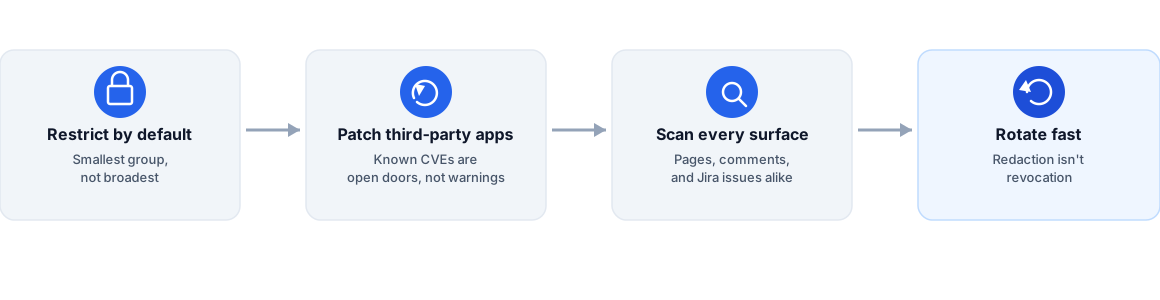
Both the CVE-2022-26138 and CVE-2023-22515 incidents turned a single compromised or auto-created account into broad content access, because that account inherited default, non-restricted permissions. Space- and project-level access should default to the smallest group that needs it, with broader access as the deliberate exception — not the default a new space or project starts with.
2. Patch and audit third-party apps promptly
The hardcoded-password incident originated inside an installed app, not inside Confluence itself. What to check before installing an Atlassian Marketplace app covers the evaluation side; the other half is staying current on patches for whatever’s already installed; an unpatched known vulnerability in an app you already trust is a live door left open.
3. Scan continuously, across every surface — not just pages
The Disney breach shows what happens when credentials accumulate inside Confluence content itself: the stolen data included live API endpoints and S3 credentials that had been pasted into pages. Scanning has to run continuously and cover comments and Jira issues, not only formal documentation. Atlassian Guard Premium does scan comments and Jira free-text fields, but it alerts rather than removes, and it is a separate subscription (what Guard scans, from Atlassian’s docs). Secret Sentinel redacts what it finds in place, across Confluence pages and comments and Jira issues and comments.
4. Rotate fast — redaction and deletion are not revocation
None of these incidents were prevented by someone deleting a page after the fact. Deleting a leaked secret does not revoke it — the credential is still valid until it’s rotated at the system that issued it. Treat every confirmed finding as a rotation task with an owner and a deadline, not a cleanup task that ends when the text disappears from the page.
5. Don’t treat training as the control
The Atlassian breach happened to an Atlassian employee — someone who, if anyone did, understood the risk of posting credentials publicly. Training alone doesn’t prevent this kind of mistake; it happens under time pressure, mid-task, to people who already know the rule. Build the checklist above as enforced controls, not as items on an onboarding slide nobody rereads.
Frequently asked questions
What actually caused Atlassian's own 2023 employee data breach?
An Atlassian employee accidentally posted valid credentials to a public repository. Attackers used those credentials to access Envoy, a third-party app Atlassian used for coordinating in-office resources, and downloaded employee records including names, emails, and phone numbers for thousands of staff.
What did attackers get from the Disney Confluence breach?
Roughly 2.5 GB of internal data, taken after attackers used previously exposed credentials to access Disney's Confluence server. The stolen content itself included internal API endpoints and credentials for systems like S3 buckets — meaning the Confluence pages were storing exactly the kind of secrets a leak like this then exposes further.
Is one security control enough to prevent this kind of leak?
No single control in this checklist would have stopped all four incidents on its own. Access-control hygiene, prompt patching, continuous content scanning, and fast credential rotation each close a different gap — which is why they need to run together, not as alternatives to each other.