Confluence DLP: What Atlassian Guard Scans and Skips
On this page
Someone pastes a production database password into a Confluence page to help a new joiner, and the security team wants to know two things: would anything have caught it, and what would that cost. In Confluence, the native answer is Atlassian Guard Premium. This page sets out what Guard scans according to Atlassian’s own documentation, what it does not, and where a Marketplace app still adds something.
Short answer: Confluence has no DLP of its own; Atlassian Guard Premium adds sensitive data detection. Per Atlassian’s documentation it scans Confluence page and blog bodies and titles “including live docs and comments”, Jira summaries, descriptions and “any other field that contains free text”, and new attachments. It skips whiteboards, databases, labels, space descriptions and text from third-party apps. It alerts, it does not redact, and it costs $8.55 per user a month for every user in the organization.
Correction, November 2026. An earlier version of this article, based on a third-party analysis, said Guard’s scan left out comments and most of Jira. Atlassian’s current documentation says it covers both. We have rewritten the article from Atlassian’s pages and removed the claims we could not trace to them.
What “DLP” means here
NIST defines data loss prevention as “a system’s ability to identify, monitor, and protect data in use, data in motion, and data at rest”. For Confluence and Jira that usually means three jobs: detect sensitive data when someone adds it, discover what is already stored, and act: alert, restrict, or remove it. Keep the three apart when you compare tools; most do one or two of them well.
What Atlassian Guard Premium scans
Atlassian’s page What sensitive data is detected? is the source for this section, read in November 2026. Content scanning detections “monitor for potentially sensitive data being added to Confluence pages and Jira issues”, in three groups: credentials, financial data and identity data. You can also create custom detections for terms that are sensitive to your organization, such as a project codename.
Scanned:
- “Confluence page or blog post body and title, including live docs and comments.”
- “Jira work item summary, description, and any other field that contains free text.”
- “The content of files attached to pages, blog posts, or work items (only for new file uploads)”.
- Text in images, through OCR, only if the image detection is enabled.
Not scanned:
- “Confluence whiteboards and databases.”
- “The names of files attached to pages, blog posts, or work items.”
- “Pre-populated Jira fields” such as drop-down values.
- “Other free-text areas such as labels, space descriptions, templates, sprint names, project descriptions, and field configurations.”
- “Text entered into our fields from third-party apps.”
When it scans: “When a Jira work item is created or updated, or a Confluence page is published or updated”. A Confluence update scans the whole page body; a Jira update scans only the fields that changed, so an old secret in a description is found only when that description is edited. For content that is already there, “you can use the content scan feature”.
Known limits Atlassian lists: some Jira work items cannot be scanned, for example when “a rich text field contains more than 64 KB of data”, the work item’s storage is over 1 MB, or it has “too many labels, comments, or worklogs”; attachments over 5 MB, compressed or archived are skipped.
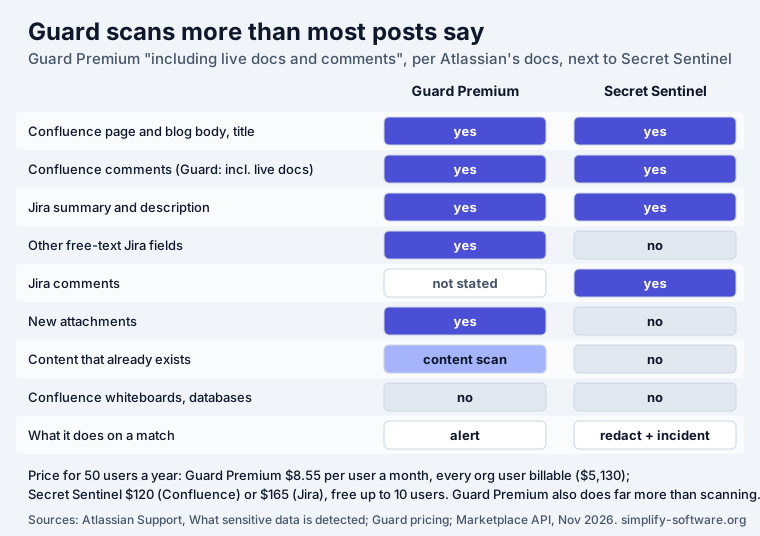
One row deserves care: Jira comments. Atlassian’s list names summaries, descriptions and other free-text fields, and its limits mention work items with “too many … comments”, but the list does not say “comments” for Jira the way it does for Confluence. If Jira comments matter to you, test it on your site with a dummy value before you rely on it.
What Guard does when it finds something
Guard alerts; it does not change content. When it finds a match it will “generate an alert”, and “The alert contains information about the page, and the person who published the Confluence page or updated the Jira work item, and suggested investigation and remediation steps.” Atlassian’s own example for an API key ends with the team asking the author “to remove the data, purge the page history, and revoke the API key”. Removing it, purging history and rotating the credential are human steps.
Two details from the same page affect investigations. The actor is the person who published the page, which “may not be the person who added the sensitive data” when several people edited a draft. And in Jira, “we’re not always able to show the actor’s name in the alert”.
What it costs
Guard is not part of a Confluence or Jira plan. Atlassian describes Guard Premium as “an add-on for Atlassian Guard Standard”, adding “data classification, sensitive data detection, threat detection, and extended audit logs”, and says “Atlassian Guard is billed differently compared to your existing app subscriptions.” Its pricing page lists Standard at $4.35 and Premium at $8.55 per user a month, and “Users who have signed up for free accounts count toward your Atlassian Guard bill as billable users.”
For 50 users, Premium comes to about $5,130 a year. That buys much more than content scanning (single sign-on, provisioning, threat detection, audit logs), so compare it with what you would otherwise buy for those jobs, not with a single scanning app.
When Guard Premium is enough, and when an app still helps
Guard Premium is the stronger choice when you need the whole security suite anyway, you want classification labels and governance policies, attachments and Jira custom fields matter, or you need to discover what is already stored across the site.
A Marketplace app still helps when:
- You need the value gone, not an alert. A credential in an alert is still on the page until
someone acts. Secret Sentinel replaces it in place when the page or
work item is saved, for example
[REDACTED by Secret Sentinel: github_token, ghp_****1a2b], and can open a Jira incident that names the type and place, never the value. - You do not have Guard Premium. Secret Sentinel’s Standard edition is free for up to 10 users; at 50 users it costs $120 a year in Confluence and $165 in Jira (Marketplace prices, November 2026).
- You want credential-specific rules. Secret Sentinel uses secretlint’s rules for about 50
credential formats (cloud keys, private keys, GitHub and GitLab tokens, payment and AI-service
keys, connection strings) plus
password=andtoken=assignments and URLs with credentials.
What Secret Sentinel does not do: it scans Confluence pages, blog posts and their comments and Jira summaries, descriptions and comments when they are created or edited. It does not scan attachments, other Jira fields, or content that already exists, and it does not remove values from page history, so Atlassian’s advice to rotate the credential still applies. It detects credentials and, if you turn them on, card numbers, IBANs and US Social Security numbers; it is not a general PII or classification tool.
Sensitive data discovery: finding what is already there
Detection on save does nothing for the password pasted in 2023. For that you need discovery: Guard Premium’s content scan, or a Marketplace app that scans existing pages. Several compete for that job, including PII Protection and DLP for Confluence, Compliance for Confluence, Gamma DLP for Confluence and Data - PII Scanner (DLP) for Confluence. Our buyer’s checklist for PII and secret scanners compares what their listings promise and lists the questions to ask before you buy. GitGuardian’s research on secret sprawl is a good reason to run a discovery scan at least once: about 28% of leak incidents start outside code repositories, in tools such as Jira and Confluence.
Sources
- Atlassian Support, What sensitive data is detected? and Understand Atlassian Guard, read in November 2026.
- Atlassian, Guard pricing, November 2026.
- Atlassian Marketplace pricing API for Secret Sentinel for Confluence and for Jira, November 2026.
- NIST CSRC glossary, data loss prevention.
Frequently asked questions
Does Confluence have DLP built in?
Not in the Confluence plans themselves. Sensitive data detection is part of Atlassian Guard Premium, which Atlassian describes as "an add-on for Atlassian Guard Standard" with "data classification, sensitive data detection, threat detection, and extended audit logs". Guard is a separate subscription: "Atlassian Guard is billed differently compared to your existing app subscriptions."
What does Atlassian Guard scan in Confluence and Jira?
According to Atlassian's documentation: "Confluence page or blog post body and title, including live docs and comments", "Jira work item summary, description, and any other field that contains free text", and "The content of files attached to pages, blog posts, or work items (only for new file uploads)". It does not scan Confluence whiteboards and databases, file names, labels, space descriptions, templates, sprint names or text entered by third-party apps.
Does Atlassian Guard scan Confluence comments?
Yes. Atlassian lists "Confluence page or blog post body and title, including live docs and comments" among the text it scans. Older articles, including an earlier version of this one, said comments were outside Guard's scan; Atlassian's current documentation says otherwise.
Does Atlassian Guard remove or redact sensitive data?
No, it alerts. When a page is published or a work item is updated, Guard scans the change and "generate[s] an alert" with suggested investigation and remediation steps; a person then removes the data, purges the page history and rotates the credential. Apps such as Secret Sentinel redact the value in place when it is saved.
How much does Atlassian Guard Premium cost?
Atlassian's pricing page lists Guard Standard at $4.35 and Guard Premium at $8.55 per user a month, and says "Users who have signed up for free accounts count toward your Atlassian Guard bill as billable users." For 50 users that is about $5,130 a year for Premium. Guard Premium also covers single sign-on, provisioning, threat detection and audit logs, so it is not only a scanner.
What is a Confluence sensitive data discovery tool?
A tool that finds sensitive data already stored in Confluence, not only new data as it is typed. Guard Premium has a content scan for existing content; Atlassian says "If you wish to perform a more complete scan of your existing content, you can use the content scan feature." Marketplace apps such as PII Protection and DLP for Confluence, Compliance for Confluence, Gamma DLP and Data - PII Scanner offer their own scans; our buyer's checklist compares them.