How to Prevent Credential Leaks in Confluence and Jira
On this page
The 2 a.m. Jira comment
It’s almost always the same shape. Something breaks in production, at a bad hour, and the fastest way to get a teammate unblocked is to paste the actual thing they need — a connection string, an API key, a chunk of stack trace with a token still sitting in it — straight into the Jira comment or Confluence page they’re both already staring at. Nobody stops to think about where that string goes next, or who else can see that project. They’re trying to close an incident, not audit a wiki.
That’s not a hypothetical. It’s the ordinary, recognizable shape of how credentials end up in the tools your team talks in every day:
- A stack trace pasted into a bug report, connection string and all
- A runbook page with a real API key left in as a “just replace this” example
- A support ticket with a customer’s database credentials copy-pasted for debugging
- An old onboarding doc with a shared service account password nobody ever rotated
None of this shows up in a source-control secret scan, because none of it is in source control. It’s written by people who weren’t thinking about security in that moment — they were thinking about the ticket in front of them.
The data backs this up
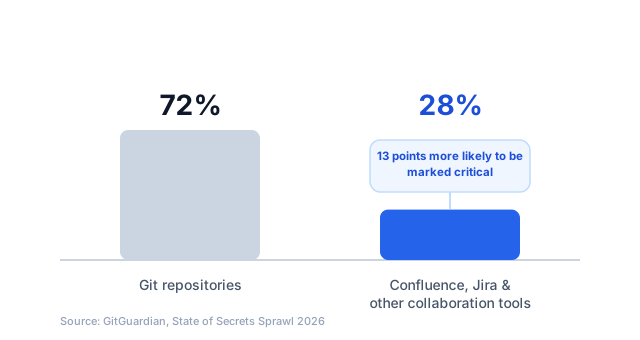
This isn’t just an intuition about how engineers behave under pressure. GitGuardian’s State of Secrets Sprawl 2026 report — built from scanning public GitHub plus a large sample of internal environments — found that about 28% of leak incidents originate entirely outside of repositories, in tools like Slack, Jira, and Confluence. Those leaks aren’t a lesser concern, either: they’re 13 percentage points more likely to be classified as critical than secrets found only in code. The likely reason is exactly the scenario above — a credential pasted into a wiki page or a ticket comment during a live incident doesn’t get the scrutiny a pull request gets, and it sits there, unrotated and unnoticed, for far longer than one caught by a pre-commit hook.
Why this is worse than it sounds
A leaked key in a private git branch has a small, known audience — usually whoever opened the PR and whoever reviewed it. A leaked key in Confluence or Jira can be visible to every project member, every space watcher, and — depending on your permission scheme — potentially your whole Atlassian site. It also tends to stay there indefinitely: nobody force-pushes over a bad Jira comment the way they’d rewrite a bad commit. The credential just sits there, indexed and searchable, until either your team finds it or someone else does.
What to actually do about it
1. Give people a faster, safer alternative than pasting the real thing. Nobody pastes a credential into a ticket because they don’t care about security — they do it because it’s the fastest way to unblock a teammate at 2 a.m. A written policy alone doesn’t fix that; a shared vault link or a redacted log format that’s just as fast to reach for does.
2. Treat anything ever exposed as compromised, full stop. Once a credential has been posted anywhere with more than one viewer, assume it’s been seen — there’s no reliable way to confirm otherwise after the fact. Rotate it, don’t just delete the comment.
3. Keep scanning your git repos. Tools like gitleaks or GitHub’s own secret scanning are still essential for source control. They just don’t see Confluence or Jira at all, so treat them as one layer of coverage, not the whole strategy.
4. Scan Confluence and Jira content directly, the same way you already scan your code. For most teams, this is the layer that’s simply missing — not deprioritized, just never built.
What to look for in an Atlassian-native scanner
If you’re evaluating tools for that last point, a few things matter more than they might seem to at first:
- Does it run inside Atlassian’s own infrastructure, or does your content get sent to a third-party server for analysis? For anything touching customer data or credentials, that’s not a minor detail.
- Does it classify by real risk, or just keyword-match? A tool that flags every string that looks vaguely like a token creates so much noise that people start ignoring it. Severity should reflect whether something is actually exploitable.
- Can a high-risk finding turn into a tracked, assigned incident — or does it just sit in a dashboard nobody checks?
- Does it support your organization’s own credential formats? Generic patterns catch AWS keys and GitHub tokens; they don’t catch your internal service’s token format unless the tool lets you add custom rules.
For the wider picture (where else credentials sprawl, the 2026 numbers, and a test of what pattern scanners catch in pasted text), see secret sprawl: how to detect and prevent it.
How Secret Sentinel fits
Secret Sentinel scans Confluence pages, comments, and Jira issues and comments for 50+ types of leaked credentials — AWS and GCP keys, GitHub and Stripe tokens, database connection strings, private key blocks, and more — and redacts them in place, the moment they’re pasted. Findings are classified by real exploitability, not keyword matching, so you’re not drowning in false positives from that 2 a.m. stack trace. A high-risk leak can automatically create a tracked Jira security incident, with an assignee already set, instead of waiting for someone to notice. It’s built entirely on Atlassian Forge, so nothing ever leaves your instance — there’s no external service in the loop. The Advanced edition adds a compliance dashboard and custom regex patterns for your organization’s own credential formats.
Install Secret Sentinel for Confluence · Install Secret Sentinel for Jira
Frequently asked questions
Don't code secret scanners like gitleaks already cover this?
No. Tools like gitleaks and GitHub's secret scanning only look at git repositories. A credential pasted into a Jira comment or a Confluence page was never committed to source control, so those tools never see it — it needs a scanner built for Confluence and Jira specifically.
How much of the actual risk is outside of code?
According to GitGuardian's State of Secrets Sprawl 2026 report, about 28% of leak incidents originate entirely outside repositories, in tools like Slack, Jira, and Confluence — and those leaks are 13 percentage points more likely to be classified as critical than leaks found only in code.
What should I do if I find a secret that's already been posted somewhere?
Rotate it immediately, regardless of how long it was visible or who you think saw it. Treat anything ever posted in a shared tool as compromised — there's no reliable way to know who read it before you noticed.
Does scanning Confluence and Jira content mean sending that content to a third party?
It depends on the tool. Secret Sentinel specifically runs entirely inside Atlassian's own Forge infrastructure — your content is never sent to an external service.