Jira Secret Scanner: An Admin Evaluation Checklist
On this page
Start with a deliberately boring ticket
Create a sandbox issue named Scanner acceptance test, paste one documented synthetic token into
its description, edit it, repeat the value in a comment, and watch what happens. This small test is
more informative than a feature matrix: it exposes what triggers a scan, exactly what text changes,
whether formatting survives, and whether a duplicate becomes a second incident.
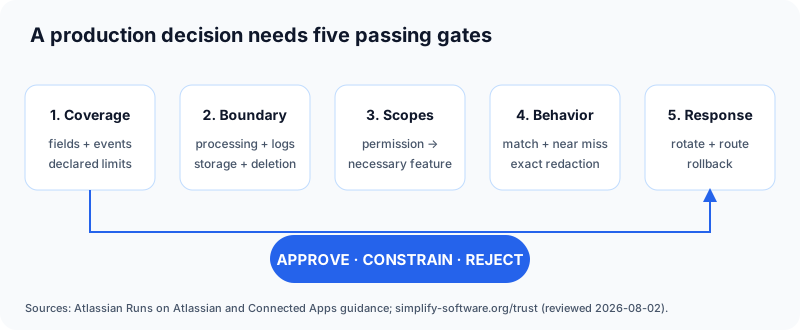
Gate 1: write down the protected surfaces
“Scans Jira” is not a testable claim. Separate summaries, descriptions, comments, attachments, automation payloads, and linked documents. Test create and update events independently. Secret Sentinel covers supported issue text and comments; it does not claim attachment or external-link scanning. A narrower declared boundary is safer than discovering an assumed boundary during an incident.
Gate 2: trace the content, including logs
A scanner must receive the suspected secret. Ask where computation runs, what domains receive content, whether findings or snippets are logged, what persists, and what uninstall deletes. Atlassian’s Runs on Atlassian criteria require Atlassian-hosted compute and storage plus controlled external egress, while explicitly retaining a shared-responsibility model. Confirm the listing badge, then read the vendor’s concrete architecture rather than treating the badge as a penetration test.
For Secret Sentinel, the Trust Center lists each scope, stored field, retention rule, and limitation. Its production manifests declare no remote or external egress.
Gate 3: map every scope to a behavior
Read scope enables detection. Write scope enables in-place redaction and incident creation. User read scope supports assignee resolution. Storage retains settings and aggregate reporting. If the vendor cannot connect a scope to a user-visible behavior, stop the review. Atlassian’s official app management guidance also recommends reviewing consented permissions and managing access through Connected Apps and, where available, data security policy.
Gate 4: test precision as a workflow property
Run four cases: a synthetic supported secret, a harmless look-alike, the same secret twice, and a secret embedded in formatted content. Record matched span, surrounding text, severity, duplicate behavior, and the administrator control used for an accepted false positive. Do not score only “found/not found”; destructive over-redaction is also a failure.
Secret Sentinel exposes synthetic examples in its documentation and explains its rule composition in the open detection methodology.
Gate 5: prove the response path and the exit path
Detection is not revocation. The acceptance test needs an owner for rotation, a severity rule, an incident destination, and evidence of closure. Finally, export the configuration you need, uninstall the sandbox app, and document Atlassian’s hosted-storage lifecycle. Forge’s official storage reference states that hosted storage is retained for 28 days after uninstall and recovery requires customer consent. For Secret Sentinel, that means settings, ignore-list hashes, and aggregate integer counters—not found secrets or content copies.
If the trial passes, send the evidence rather than a vague recommendation. The admin approval kit turns these findings into a ready review request.
Frequently asked questions
Should an administrator test a secret scanner with a real API key?
No. Use vendor-documented synthetic values in a sandbox. A live credential creates the incident the test is meant to prevent.
Does redacting a secret make the credential safe again?
No. Redaction reduces further exposure, but the credential owner must revoke or rotate it.